What is Copilot Studio? Agents, harnesses, channels and cost
What is Copilot Studio? Microsoft's low-code tool for building AI agents and workflows: what you build, where agents run, how it differs from Copilot, and who pays.
Copilot StudioQuick reference12 min read
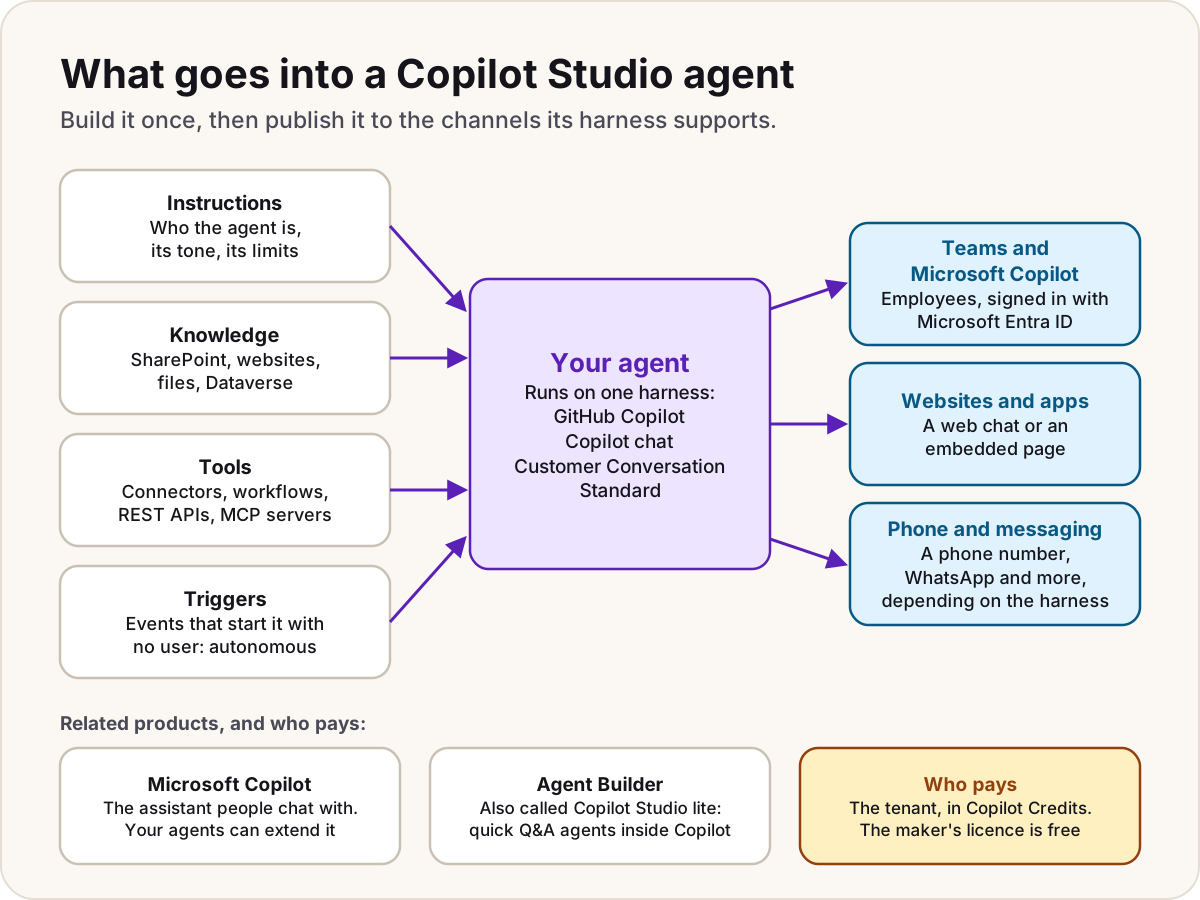
Copilot Studio is Microsoft's low-code tool for building AI agents and workflows. An agent follows instructions you write, answers from knowledge you connect (SharePoint, websites, files, Dataverse) and uses tools to act (connectors, workflows, REST APIs, MCP servers). You publish it to Teams, Microsoft Copilot, a website or other channels. People who chat with a published agent need no licence of their own: the organisation pays for activity in Copilot Credits.
Note
Checked against Microsoft Learn on 22 October 2026, and against Microsoft's Copilot Studio pricing page.
What you build
Copilot Studio has three kinds of building block, and they can call each other: a workflow can call an agent for one step, and an agent can run a workflow as a tool.
- Agents hold a conversation or carry out a task. You describe the agent in plain language or configure it by hand, test it, then publish it.
- Workflows are automations built in a drag-and-drop designer, where a step can reason with AI as well as follow fixed logic. They're the newer flow format.
- Agent flows are the established flow format, close to Power Automate cloud flows but native to Copilot Studio. They're deterministic: the same input takes the same path. An agent can call one as a tool, and every action they run spends Copilot Credits.
Building apps in Copilot Studio is also in preview.
What an agent is made of
| Part | What it does |
|---|---|
| Instructions | Who the agent is, its tone, what it may and may not do |
| Knowledge | Where answers come from: SharePoint, public websites, uploaded files, Dataverse tables, Copilot (Graph) connectors and, on the standard harness only, Azure AI Search |
| Tools | How it acts: Power Platform connectors, custom connectors, workflows or agent flows, REST APIs, MCP servers, prompts (standard harness), computer use (standard harness) |
| Topics | Scripted conversation paths with questions and conditions (standard harness; the GitHub Copilot harness replaces them with hooks) |
| Connected agents | Other agents it hands work to: Copilot Studio agents in the same environment, Microsoft Foundry agents, agents that speak the A2A protocol, and Microsoft 365 Agents SDK agents |
| Triggers | Events that start the agent without anyone typing |
Our guides go deeper on choosing knowledge sources and connecting an MCP server.
Conversational and autonomous agents
A conversational agent waits for someone to ask. An autonomous agent starts itself: an event trigger, such as a new SharePoint item, a new email or a schedule, sends it a payload and it follows its instructions. Microsoft's examples include triaging incoming requests and processing updates in the background.
Two points to know before you build one:
- On the standard harness, event triggers authenticate only with the maker's credentials. Anyone who can use the published agent may reach data through that connection, so Copilot Studio warns you before publishing. Admins can block event triggers with data policies.
- On the GitHub Copilot harness, triggers are in preview. After publishing you choose Activate this agent for me (it runs with your connections) or Share with others (each person sets up their own connections).
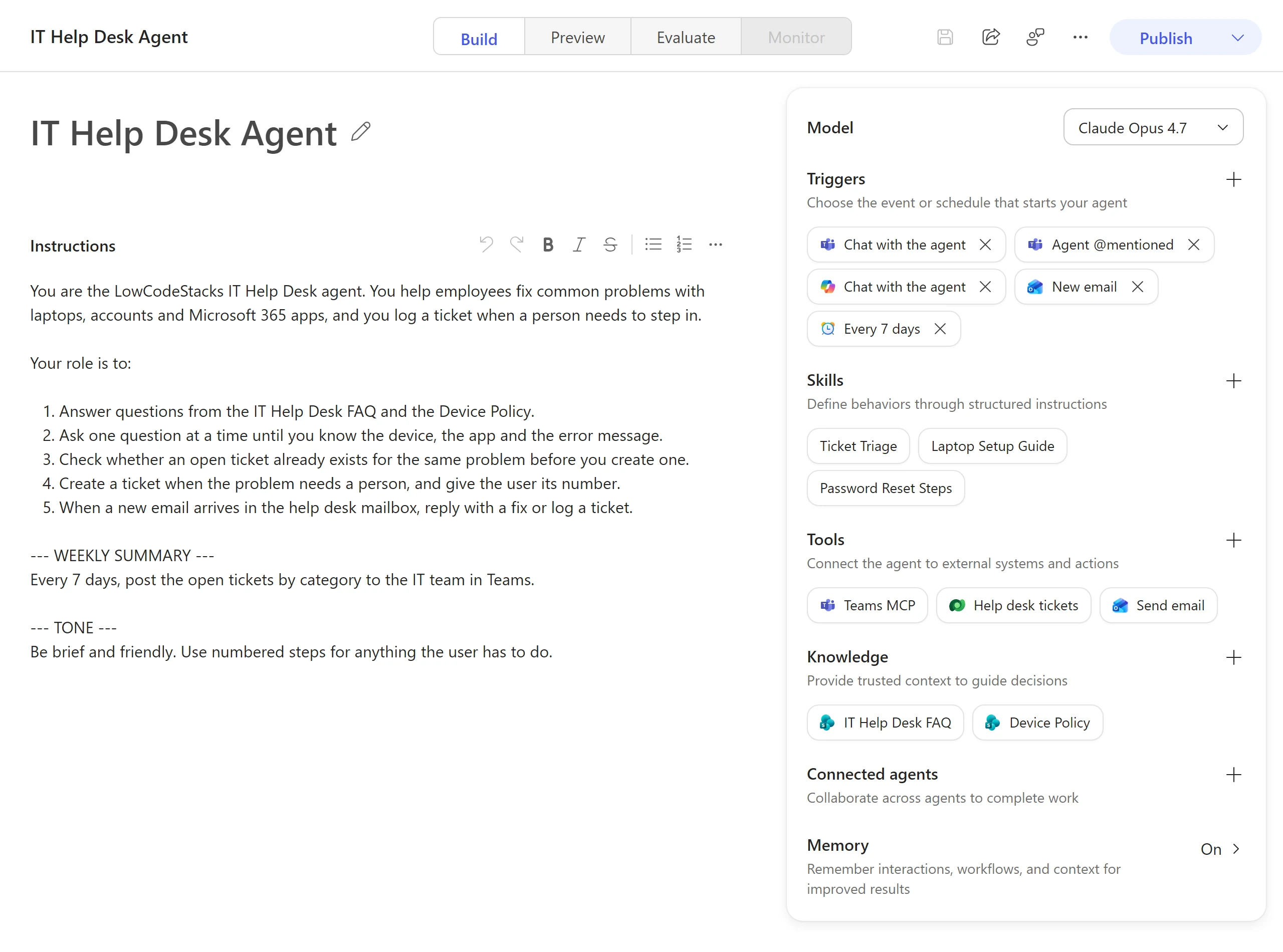
On the GitHub Copilot harness, triggers sit in the configuration panel on the agent's Build tab. What the panel shows, as of October 2026:
- Model: the AI model behind the agent's reasoning.
- Triggers: "Choose the event or schedule that starts your agent". Each trigger is a chip, such as a Teams chat, a new email or a schedule, and the + beside the heading adds another.
- Skills, Tools and Knowledge: structured behaviours, the systems the agent can act on, and the sources it answers from.
- Memory: whether the agent remembers details from earlier interactions.
What people use it for
Microsoft's own examples cover the range: an internal help desk that answers common questions and routes simple requests; an onboarding agent that answers from SharePoint inside Copilot Chat; a customer-service agent on a website or phone line that hands over to a person when it's stuck; and an accounts payable process that reads invoices, matches them to purchase orders and routes exceptions for approval.
The four harnesses
Everything you build runs on a harness: the runtime between your configuration and the model, which decides when to call the model, which tools to use and what to do with the results. You pick it when you create the agent. An agent built on the GitHub Copilot harness can't be moved to the standard harness, or the other way round.
| Harness | Best for | Publishes to | Billing |
|---|---|---|---|
| GitHub Copilot | Long, multi-step work that needs reasoning: it plans, picks tools, retries, and creates or edits Word, Excel, PowerPoint and PDF files. Has skills and memory | Internal users or external customers | Copilot Credits, usage-based, including while you build and test |
| Copilot chat | Adding your organisation's knowledge to Microsoft Copilot Chat | Internal users | Consumption, or included with a Microsoft Copilot licence |
| Customer Conversation | Customer service over chat or voice, with a primary agent, specialist sub-agents and escalation to a person | Website chat or a phone number | Copilot Credits, usage-based |
| Standard | Rule-based agents and structured conversations built from topics, plus agent flows | Internal users or external customers | Copilot Studio's capacity model |
Despite the name, the GitHub Copilot harness isn't the GitHub Copilot service. Microsoft says it shares technology with GitHub Copilot, but customer data isn't sent to that service, and Copilot Studio's own compliance and data residency commitments still apply.
Warning
A more capable harness isn't automatically better. Microsoft's guidance warns that the GitHub Copilot harness can overwork a simple job, adding latency and Copilot Credits without a better answer. A working standard harness agent doesn't need to move.
Where agents run
You publish from Copilot Studio, then add channels. Which ones you get depends on the harness, and admins can switch channels off for the whole tenant.
| Channel | Standard harness | GitHub Copilot harness |
|---|---|---|
| Microsoft Teams and Microsoft Copilot | Yes | Yes |
| Demo website | Yes | Yes |
| Your own website (embedded) | Yes | Yes, as a web app in an iframe |
| SharePoint | Yes | Not yet |
| Mobile or native app | Yes | Not yet |
| WhatsApp, Facebook | Yes | Not yet |
| Slack, Telegram, Twilio, email and other Azure Bot Service channels | Yes | Not yet |
| As an MCP server or an A2A agent for other clients | Not listed | Preview, in early release environments only |
The Customer Conversation harness publishes to website chat or a phone number.
By default an agent uses Authenticate with Microsoft, so people in Teams, Power Apps and Microsoft Copilot sign in with Microsoft Entra ID with no setup. No authentication lets anyone with the link chat with it, and the agent then can't use tools with the user's own credentials. Our guide to grounding an agent safely covers why sign-in matters.
Copilot Studio vs Microsoft Copilot and Agent Builder
Three products share the word Copilot, and two of them build agents.
| Microsoft Copilot | Agent Builder (Copilot Studio lite) | Copilot Studio | |
|---|---|---|---|
| What it is | The AI assistant people chat with, and Copilot inside Word, Excel, Outlook and Teams. Called Microsoft 365 Copilot until 2026 | A quick way to build agents inside the Microsoft 365 Copilot app and Teams | A separate web app at copilotstudio.microsoft.com |
| Who uses it | Everyone | Information workers | Makers and developers |
| Builds | Nothing; it uses agents | Question-and-answer agents for yourself or a small team, from SharePoint, Copilot connectors and the web | Agents and workflows for a department, the whole organisation or customers |
| Actions on other systems | Through agents | No: copy the agent to Copilot Studio to add connectors or workflows | Yes: connectors, workflows, REST APIs, MCP, autonomous triggers |
| Managed in | Microsoft 365 admin center | Microsoft 365 admin center | Power Platform admin center, with environments, data policies and solutions |
Microsoft's naming is untidy here. The Agent Builder page on Microsoft Learn sits at a copilot-studio-lite address, release notes call it "Copilot Studio lite", and the pricing page uses both names. They're the same thing.
Use Agent Builder when one person or a small team needs answers from content they can already see. Move to Copilot Studio when the agent needs a wider audience, actions on other systems, an external channel, or proper testing and deployment across environments. Copy to Copilot Studio keeps the agent's instructions and configuration, so nothing is lost.
There's also a smaller Copilot Studio for Teams plan inside some Microsoft 365 subscriptions. It builds classic agents that publish only to Teams and store data in Dataverse for Teams, with no generative orchestration and no Power Platform connectors.
Weighing Copilot Studio against Microsoft Foundry or Power Automate instead? See which Microsoft agent tool to use.
How it's paid for
- Is it free? Partly. The maker's Copilot Studio user licence is free once the tenant has a credit pack, and a trial lets anyone build and test, but not publish.
- The organisation pays for use, in Copilot Credits. On Microsoft's pricing page in October 2026, a pack of 25,000 credits a month costs $200; pay-as-you-go through an Azure subscription and a pre-purchase plan (up to 20% off) are the alternatives.
- A Microsoft Copilot licence lets that person build and use internal agents on the Copilot chat and standard harnesses at no extra cost. External channels, people without a Copilot licence, and the GitHub Copilot harness need standalone Copilot Studio credits.
What each answer, tool call and flow action costs, and what happens when credits run out, is in Copilot Studio licensing and Copilot Credits. How the same credits pay for other Microsoft AI features is in Copilot Credits explained, and the seat licences are in Microsoft Copilot licensing explained.
Ready to try it? Your first Copilot Studio agent walks through instructions, knowledge, testing and a small first release.
Sources
- Copilot Studio overview — Microsoft Learn
- Harnesses in Copilot Studio — Microsoft Learn
- Compare Copilot Studio agent harnesses — Microsoft Learn
- Agents overview — Microsoft Learn
- Agents powered by the GitHub Copilot harness overview — Microsoft Learn
- Agent flows overview — Microsoft Learn
- Add tools to custom agents — Microsoft Learn
- Event trigger overview — Microsoft Learn
- Add triggers to an agent (GitHub Copilot) (preview) — Microsoft Learn
- Key concepts: publish and deploy your agent — Microsoft Learn
- Available channels for agents (GitHub Copilot) — Microsoft Learn
- Choose between Agent Builder and Copilot Studio — Microsoft Learn
- Agent Builder overview — Microsoft Learn
- Microsoft Copilot requirements (the rename) — Microsoft Learn
- Get access to Copilot Studio (trial and Teams plan) — Microsoft Learn
- Licensing for agents powered by the standard harness — Microsoft Learn
- Copilot Studio plans and pricing — Microsoft
Was this helpful?
Comments
No comments yet. Share what worked for you.
Sign in to comment. Comments show under a display name you choose, never your email.