What is Microsoft Fabric? OneLake, capacity, Power BI and the trial
Microsoft Fabric in plain terms: one SaaS analytics platform on one lake, OneLake, paid for by a shared capacity. Where Power BI fits, and whether Fabric is free.
Data & storageQuick reference10 min read
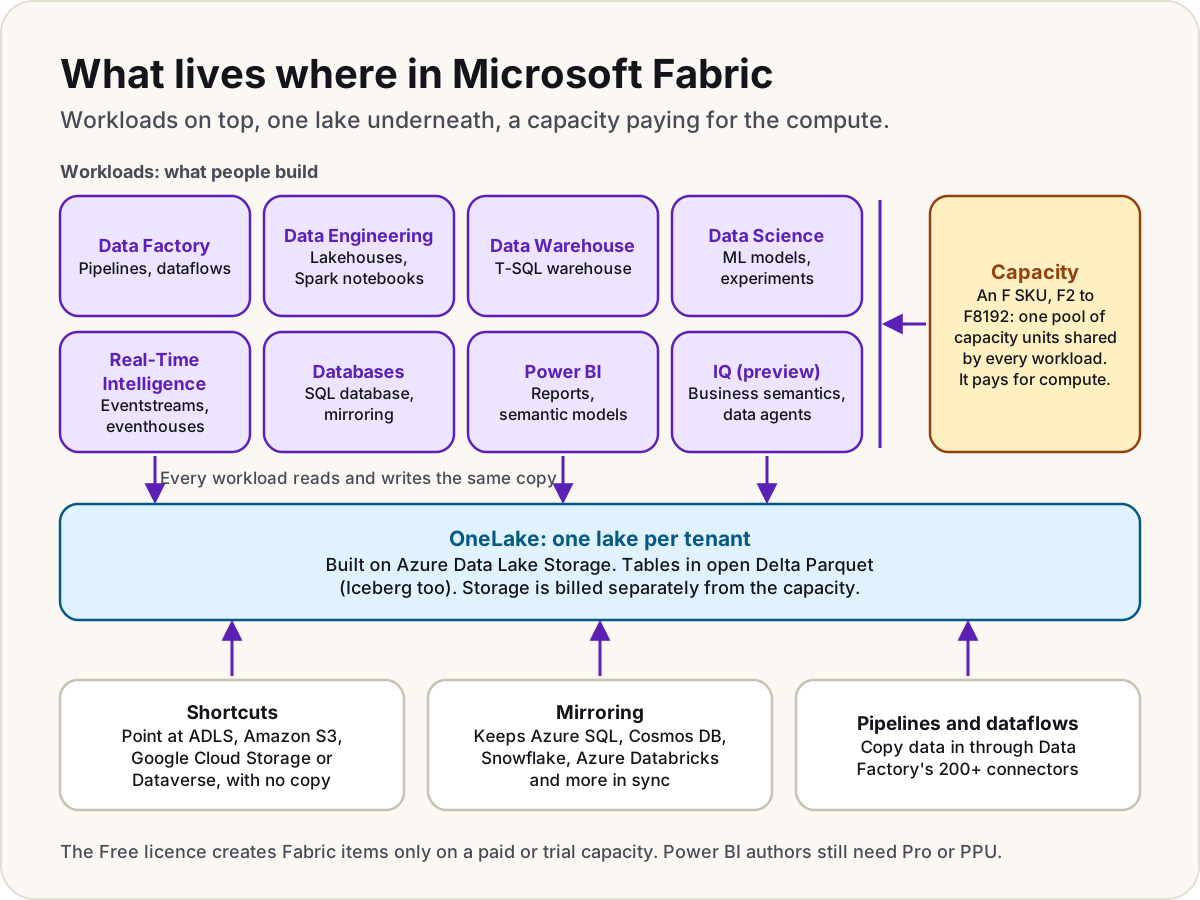
Microsoft Fabric is Microsoft's software-as-a-service (SaaS) analytics platform. It puts data integration, Spark data engineering, a SQL data warehouse, data science, real-time analytics, operational databases and Power BI in one place, and they all store data in a single lake for your organisation called OneLake. You don't run servers: you buy a capacity, a pool of compute measured in capacity units, and every workload draws on it. Power BI is part of Fabric, so if your organisation uses Power BI it already has Fabric; what it may not have is a capacity to run the rest.
What Fabric is
Fabric brings tools that used to be separate Azure services into one SaaS product, with one portal, one security model and one place to store data. Microsoft manages the infrastructure. You don't create storage accounts, resource groups or clusters to use it, and Microsoft says you don't need an Azure account to use Fabric at all. A paid capacity is the one thing you buy through Azure.
OneLake: one lake per tenant
OneLake is the storage underneath everything. Every Fabric tenant gets exactly one, automatically: you can't delete it or create a second. It's built on Azure Data Lake Storage, and it keeps tables in the open Delta Parquet format (Iceberg tables can be read too), so a table written by the SQL warehouse can be read by a Spark notebook or a Power BI report without copying it.
Data is organised as tenant, then workspaces (like folders, each with its own admins), then items such as lakehouses and warehouses. Data gets in three ways:
- Shortcuts point at data where it already sits (Azure Data Lake Storage, Amazon S3, Google Cloud Storage, Dataverse and others) without copying it.
- Mirroring keeps a near real-time copy, or for some sources just the catalog, of a database in OneLake: Azure SQL Database, Cosmos DB, Snowflake, Azure Databricks and more.
- Pipelines and dataflows in Data Factory copy data in through more than 200 connectors.
OneLake security roles can limit what someone sees down to folders, tables, rows and columns, and that rule then applies whether they query with SQL, Spark or a Power BI report.
The workloads
| Workload | What it's for | Items you create |
|---|---|---|
| Data Factory | Bringing data in and reshaping it, with Power Query | Pipelines, dataflows |
| Data Engineering | Large-scale processing with Apache Spark | Lakehouses, notebooks, Spark job definitions |
| Data Warehouse | SQL analytics with T-SQL, storing data as Delta tables | Warehouses |
| Data Science | Building and running machine learning models | Experiments, models |
| Real-Time Intelligence | Data as it arrives: sensors, logs, clickstreams | Eventstreams, eventhouses, KQL databases |
| Databases | Operational databases inside Fabric | SQL database, Cosmos DB, mirrored databases |
| Power BI | Reports and dashboards | Reports, semantic models, dashboards |
| IQ (preview) | Shared business definitions across data and AI | Ontologies, data agents |
Capacity pays for the compute
A capacity is the pool of compute behind your workspaces. You buy an F SKU in Azure, from F2 to F8192, where the number is its capacity units (CUs). Every workspace you assign to it shares those CUs across every workload: a Spark job, a warehouse query and a report refresh all draw on the same pool. For scale, Microsoft maps one CU to two Spark vCores, so an F64 gives Spark 128 vCores.
Three things follow from that:
- One bill for compute. Azure bills a capacity per second (one-minute minimum), or you reserve CUs for one or three years. OneLake storage is billed separately. Our Fabric capacity pricing guide has the prices for each SKU, the overage that's on by default, and when pausing pays.
- Short bursts are smoothed. Fabric spreads the cost of an operation over time, so a capacity can run above 100% for a while. Push it too far and it throttles: reports slow down, then requests are rejected. Our Fabric capacity throttling guide explains the stages.
- Size matters for licensing. On F64 or larger, people who only view Power BI reports need no paid licence. Below F64, they do.
An admin also has to allow it: Fabric items need the Users can create Fabric items tenant setting, under OneLake catalog > Govern > Configurations > Tenant settings, as well as a capacity that supports Fabric.
How Power BI fits in
People ask how Microsoft Fabric compares with Power BI, but it isn't a choice between them: Microsoft's own documentation says Power BI is part of Fabric, and the Power BI portal is now the Fabric portal. What differs is the licensing, which splits Fabric items into two groups:
- Power BI items: reports, semantic models, dashboards, paginated reports, dataflows and the like. These follow the familiar per-user rules: anyone who creates or shares them outside their own My workspace needs Pro or Premium Per User (PPU).
- Everything else: lakehouses, warehouses, notebooks, pipelines, eventhouses. A free licence can create and share these, but only in a workspace on an F capacity or a trial capacity.
| You have | You can |
|---|---|
| Pro or PPU licences only | Power BI only. PPU doesn't give you a capacity, so no lakehouses, warehouses or notebooks |
| An F capacity below F64 | All of Fabric; report viewers still need Pro or PPU |
| An F64 or larger capacity | All of Fabric; report viewers need only a free licence and the Viewer role |
Our Power BI licensing guide works through who needs which licence in detail.
Is Microsoft Fabric free?
Partly. The Fabric (Free) licence costs nothing and is assigned automatically the first time someone signs in to Fabric, if Fabric is enabled for the tenant. But a licence isn't compute: with it alone you can build Power BI content only in your own My workspace, and Fabric items only in a workspace on a paid F capacity or a trial capacity.
The Fabric trial is the free way to get a capacity:
- It lasts 60 days and is an F4 or an F64. An admin may be able to change an F4 to 64 CUs under OneLake catalog > Govern > Capacities, on the Trial tab; changing the size doesn't reset the days left.
- It includes up to 1 TB of OneLake storage, and a Power BI individual trial if you don't already have PPU.
- Not included: Copilot, data agents, AI functions, AI services, trusted workspace access and Private Link. It doesn't autoscale, and it allows up to three SQL databases.
- Start it from your account manager (the photo in the top-right corner of Fabric) with Start trial, or by trying to create a Fabric item. If you don't see the option, trials may be switched off in your tenant.
When the trial ends, its workspaces go back to the Pro type. Power BI items carry on, but lakehouses, notebooks and other Fabric items stop working, and you have seven days to keep them by assigning the workspaces to a paid capacity. Microsoft says the trial is for evaluation only, not production, and a second trial isn't guaranteed.
Warning
Microsoft's pages disagree on the trial size. The licensing page lists the trial as 64 CUs and calls it an F64 equivalent, while the trial page says it's an F4 or an F64. They also disagree on Copilot: most pages say Copilot never runs on a trial, but the Copilot page for notebooks says trials work. Check the Trial tab to see what you got, and test Copilot on a paid F2 or larger.
After the trial, an F2 is the smallest paid capacity. The pricing guide shows what each size costs per month.
Who needs Fabric, and who doesn't
Do
- Use Fabric when you need a lakehouse or warehouse: data from many sources, cleaned once, used by many reports.
- Use it for Spark notebooks, machine learning or streaming data, if you'd rather not run those services yourself.
- Use it to analyse Dataverse data without building exports: Link to Fabric needs a Fabric capacity in the same region as the environment.
- Consider F64 or larger when hundreds of people only view reports, since they then need no paid licence.
Don't
- Don't buy a capacity for a small team that only builds Power BI reports from a few sources: Pro or PPU may be all you need.
- Don't store an app's live data in Fabric because it's there. Operational data belongs in Dataverse or an Azure database; our Azure data store guide walks the choice, and Fabric reads from them.
- Don't run production on a trial capacity: it ends after 60 days.
Comparing it with a code-first Spark platform? See Microsoft Fabric vs Databricks.
Sources
- What is Microsoft Fabric? — Microsoft Learn
- What is OneLake? — Microsoft Learn
- What is Mirroring in Fabric? — Microsoft Learn
- Understand Microsoft Fabric licenses and capacity — Microsoft Learn
- Try Microsoft Fabric for free — Microsoft Learn
- Enable Microsoft Fabric for your organization — Microsoft Learn
- Apache Spark billing and utilization in Microsoft Fabric — Microsoft Learn
- Save costs with Microsoft Fabric capacity reservations — Microsoft Learn
- Privacy, security, and responsible AI use of Copilot in Fabric — Microsoft Learn
- Overview of Copilot for Data Engineering and Data Science — Microsoft Learn
Was this helpful?
Comments
No comments yet. Share what worked for you.
Sign in to comment. Comments show under a display name you choose, never your email.