Copilot Credits explained: what spends them and how to cap the bill
Copilot Credits explained: what spends them, what a Copilot licence already covers, Microsoft's estimates per task, the easy-to-miss costs, and how to cap spending.
Governance & adminQuick reference7 min read
A credit costs $0.01 pay-as-you-go. That sounds harmless until a single analysis task uses 700 of them, an agent answers every caller on your phone line, and new Copilot services join your spending policy without anyone choosing them. This guide maps every place Microsoft's October 2026 credits guide says they're spent, with Microsoft's own estimates, so the bill isn't a surprise.
One pool for everything
Credits are Microsoft's common currency for AI work across Microsoft 365, Copilot Studio, Dynamics 365 and Power Platform. They're pooled at the tenant level: everything below draws from the same balance, so one busy service can drain credits that another team was counting on.
| Way to buy | Price | What to know |
|---|---|---|
| Pay-as-you-go | $0.01 a credit | Billed monthly to an Azure subscription; no commitment |
| Copilot Credit pre-purchase plan | 5% to 20% off | One year up front, 300,000 to 300 million credits; unused credits expire |
| Copilot Studio capacity pack | $200 a month for 25,000 credits | Managed in the Power Platform admin center; unused credits don't carry over |
Prepaid credits are always used first. When they run out, Microsoft's setup guide says usage automatically continues on pay-as-you-go against the subscription in the policy's billing method.
What a Microsoft Copilot licence already covers
Microsoft's guide lists what the per-user Microsoft Copilot licence (formerly Microsoft 365 Copilot) includes: Copilot Chat; Copilot in Word, Excel, PowerPoint, OneNote, Outlook and Teams; Researcher, Analyst and Facilitator; Work IQ grounding over your mail, calendar, files and people; and multiple models. None of that spends credits.
It also includes everyday Copilot in SharePoint: asking questions about content, creating Word, Excel or PowerPoint files, editing pages, lists and libraries, simple rules and approvals, renaming and sharing single files, and Autofill that fills metadata in over time. And employee-facing Copilot Studio agents in Microsoft channels run within fair-usage limits when they act as the licensed user.
What it doesn't include is work that is large-scale, automated or agentic: the services below.
What each service costs
These are Microsoft's own illustrative estimates from its credits guide (October 2026). Microsoft stresses they're rough planning figures; real use varies with the task.
| Service | Light | Medium | Heavy |
|---|---|---|---|
| Copilot Cowork (multi-step work across apps), per task | 100–300 credits | 300–700 | 700+ |
| Copilot Code (dashboards, trackers, apps from a prompt), per task | 25–60 | 75–150 | 200+ |
| Building agents with the GitHub Copilot harness in Copilot Studio | 1–20 (1–2 turns) | 21–60 (3–5 turns) | 61+ (6+ turns) |
| Running those agents, per run | 100–300 | 300–500 | 500+ |
| Apps on the Copilot Managed Runtime, per app per month | ~10–50 | ~300–500 | ~3,000–5,000 |
| Teams Phone Agent, per call | 5–15 (under a minute, one answer) | 15–40 (1–2 minutes, a transfer) | 40+ (2+ minutes, several tasks) |
Advanced Copilot in SharePoint also spends credits: working across a large or open-ended content set (for example "re-tag every document in this library" of 50,000 files), creating whole sites, editing at scale, scheduled AI automations, real-time Advanced Autofill, generating images into libraries and pages, and site analytics. Microsoft gives these as examples, not credit figures. Users can type /cost to see what a SharePoint task used.
Copilot Studio agents built on the standard harness follow their own rate card: a classic answer is 1 credit, a generative answer 2, an agent action 5, tenant graph grounding 10. Our Copilot Studio licensing guide has the full table.
- A user asks Cowork, an agent or SharePoint for work
- The spending policy checks the user, the service and the limits
- Prepaid credits are used first
- Then pay-as-you-go on the Azure subscription
- At the limit, access stops until the 1st
The costs that are easy to miss
Each of these is documented, but they're spread across different Microsoft pages:
- New services join automatically. Every spending policy has Auto-apply new services turned on by default, so newly supported Copilot services and agents can start spending under it as they launch.
- Building costs credits, not only running. With the GitHub Copilot harness, natural-language building, evaluation and preview all spend credits; only manual, non-AI configuration is free.
- Work IQ APIs aren't in the Copilot licence. Custom apps and agents that call them pay by usage: a variable charge for chat and context queries, and 0.1 credit per Tools API call. (Copilot's own chats and Researcher use Work IQ at no extra charge.)
- Hosted apps meter every API call at 0.1 credit. Power Apps Premium users are covered up to their Power Apps request limits; beyond that, it's credits.
- Proactive greetings are billed in Copilot Studio, even if nobody replies.
- AI Builder falls back to credits. From 1 November 2026, new and renewed Power Platform licences include no AI Builder credits, so AI Builder in apps and flows draws on this pool.
- Pay-as-you-go has no ceiling unless you set one. The setup offers "Don't limit monthly spending" as an option.
Cap the bill
Credits for these services are governed in the Microsoft 365 admin center, under Copilot > Cost Management (capacity packs are allocated separately, in the Power Platform admin center):
- Overview shows usage and remaining capacity, and the policies and users close to their limits.
- Consumption breaks spending down by policy, user, group, agent and service, so you can find the heavy users.
- Configuration holds the spending policies. For each policy, choose who it covers, which services and agents it allows, a monthly limit for the policy, an optional monthly limit per user, alerts, and the billing method.
When a user reaches a limit, they lose access to those services until credits reset on the 1st. Microsoft currently recommends at least 2,000 credits per user per month ($20 at pay-as-you-go) so licensed users have a usable experience.
Do
- Set a per-user monthly limit before enabling Cowork or Code, so one person can't spend the pool.
- Turn off Auto-apply new services on policies where new services should be reviewed first.
- Give finance and licensing staff the AI Reader role: they can see consumption without changing policies.
- Estimate first with Microsoft's Copilot Credit estimators (one for Cowork and the GitHub Copilot harness, one for agents).
Don't
- Don't leave the default policy at "Don't limit monthly spending" on a live pay-as-you-go subscription.
- Don't assume a Microsoft Copilot licence covers agents that call Work IQ APIs or run on the GitHub Copilot harness.
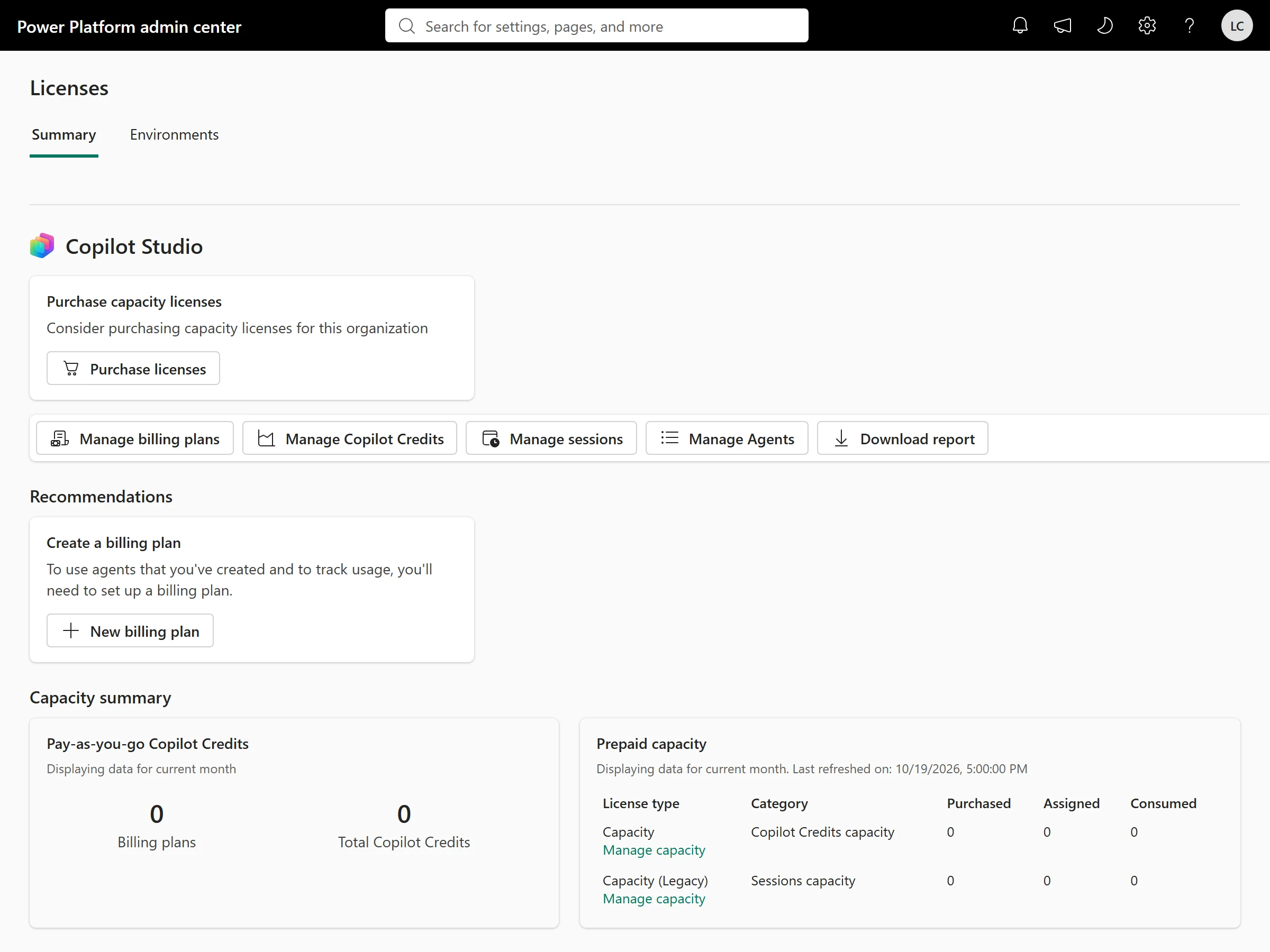
The Copilot Studio side of the same pool lives in the Power Platform admin center:
For licences rather than credits, start with our Microsoft Copilot licensing guide.
Sources
- Microsoft Copilot Credits Guide, October 2026 — Microsoft
- Understand usage-based billing and cost management for Copilot Credits — Microsoft Learn
- Set up usage-based billing for Copilot Credits — Microsoft Learn
- Managing AI experiences enabled by usage-based billing — Microsoft Learn
- What you see in the Microsoft 365 admin center vs. your Azure bill — Microsoft Learn
- Billing rates and management (Copilot Studio) — Microsoft Learn
Was this helpful?
Comments
No comments yet. Share what worked for you.
Sign in to comment. Comments show under a display name you choose, never your email.