What each Microsoft Copilot licence includes: Work IQ, agents, credits
What each Microsoft Copilot licence includes, component by component: Copilot Chat, the $30 seat, E7, Agent 365, and the features that still spend credits.
Governance & adminQuick reference9 min read
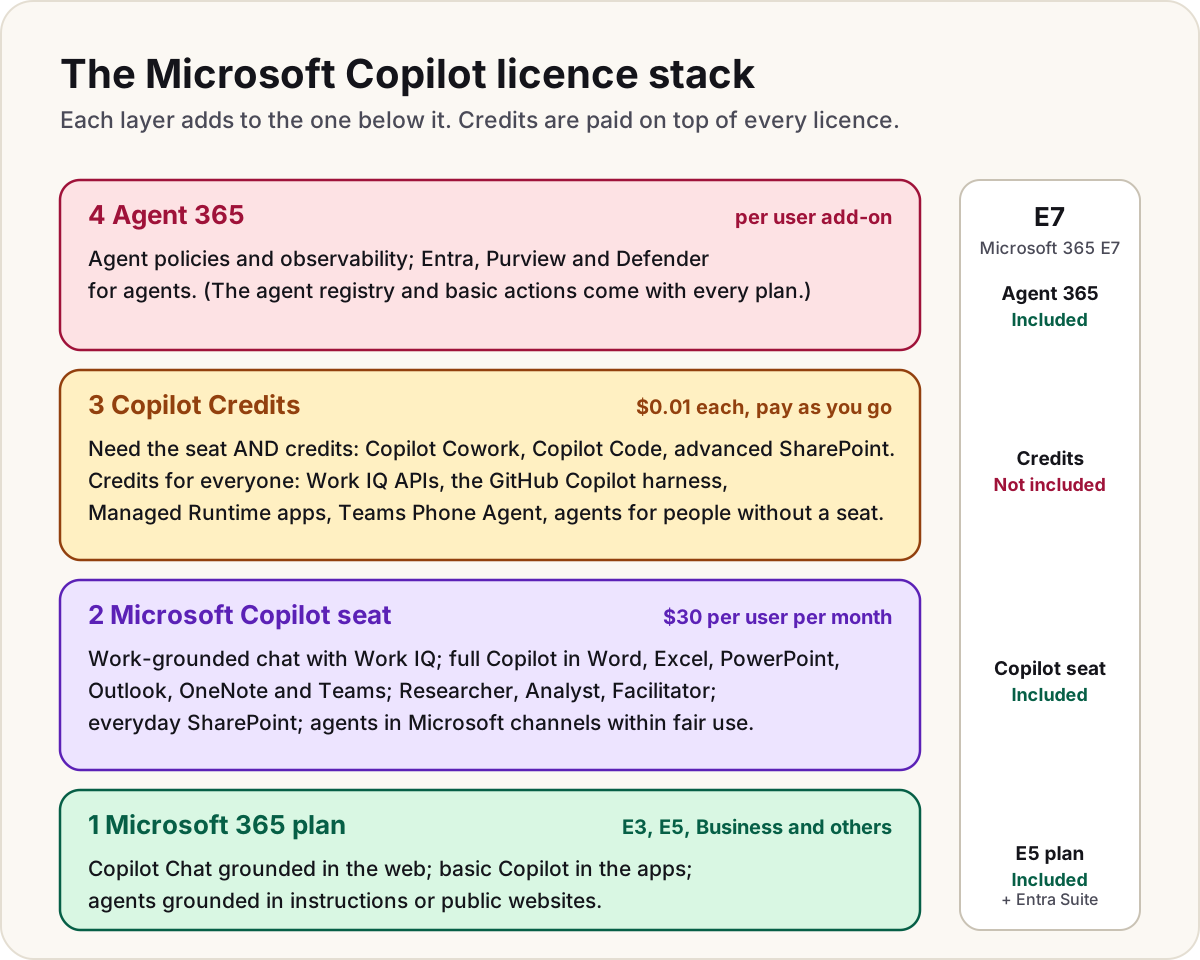
"Do we have Copilot?" has no single answer any more. A Microsoft Copilot licence is really a stack: what your Microsoft 365 plan already gives everyone, what the $30 seat adds, what is paid per use with Copilot Credits whoever you are, and what Agent 365 adds for governing agents. This page maps every component Microsoft names to the layer that pays for it, so you can see what you already own and what will cost more.
Note
Checked against Microsoft Learn on 21 October 2026, and against Microsoft's October 2026 Copilot Credits Guide.
Every component, side by side
| Component | Microsoft 365 plan only (Copilot Chat) | With the Microsoft Copilot seat | Microsoft 365 E7 |
|---|---|---|---|
| Copilot Chat grounded in the web | Included | Included | Included |
| Chat over your mail, files, meetings and people (Work IQ) | No; uploaded files only | Included, no extra charge | Included |
| Copilot in Word, Excel, PowerPoint, Outlook, OneNote, Teams | Basic, with standard access | Full, grounded in work data | Included |
| Researcher, Analyst, Facilitator | No | Included | Included |
| Agents grounded in instructions or public websites | Included | Included | Included |
| Agents grounded in SharePoint, connectors or other shared tenant data | Credits, once usage billing is on | Included | Included |
| Copilot Studio agents (standard or Copilot Chat harness) in Microsoft channels | Credits | Included, within fair use | Included, within fair use |
| Everyday Copilot in SharePoint (questions, pages, lists, simple rules, Autofill over time) | No | Included | Included |
| Advanced Copilot in SharePoint (at scale, whole sites, real-time Advanced Autofill, images, analytics) | No | Seat + credits | Seat + credits |
| Copilot Cowork | No | Seat + credits | Seat + credits |
| Copilot Code (Frontier program) | No | Seat + credits | Seat + credits |
| Work IQ APIs for your own agents and apps | Credits | Credits | Credits |
| Copilot Chat API | Not available | Included, for now | Included |
| Copilot Retrieval API | Pay-as-you-go preview: $0.10 a call, SharePoint and connectors only | Included, for now | Included |
| GitHub Copilot harness in Copilot Studio (building and running) | Credits | Credits | Credits |
| Apps on the Copilot Managed Runtime | Credits (included for Power Apps Premium users within request limits) | Same | Same |
| Teams Phone Agent | Credits + Teams Phone | Credits + Teams Phone | Credits + Teams Phone |
| SharePoint Advanced Management | No | Included with the seat | Included |
| Agent registry and basic agent actions in the admin center | Included | Included | Included |
| Agent 365 policies, observability, and Entra, Purview and Defender for agents | No | No; Agent 365 add-on | Included |
Layer 1: your Microsoft 365 plan
Every user with an Entra work account on an eligible Microsoft 365 plan gets Copilot Chat at no extra cost. Its limits:
- It's grounded in the web, not your organization. Microsoft is explicit: without a Copilot licence, Copilot Chat can't reach the user's mail, files or other data in Microsoft Graph. People can upload a file into a chat.
- Inside Word, Excel, PowerPoint, OneNote and Outlook, users get basic Copilot features with "standard access", which Microsoft says depends on service capacity and can vary through the day.
- Agents grounded in instructions or public websites cost nothing. Agents that read SharePoint, connectors or other shared tenant data are metered in Copilot Credits, and they're off until an admin turns on usage billing.
Layer 2: the Microsoft Copilot seat
The per-user licence ($30 per user per month, paid yearly, on top of a qualifying plan) is what most people mean by "Copilot". Microsoft's Credits Guide lists what it includes:
- Copilot Chat grounded in both the web and work data.
- Copilot in the apps: Word, Excel, PowerPoint, OneNote, Outlook and Teams.
- Researcher, Analyst and Facilitator, Microsoft's built-in agents.
- Work IQ grounding across email, calendar, files, people and organizational context, with access to multiple models.
Work IQ is the intelligence layer underneath: data, memory (what Copilot remembers about how you work) and the semantic index over your content. Inside Copilot it costs nothing extra; Microsoft states there are no incremental charges for Work IQ in chats, the apps, or Researcher, Facilitator and Analyst.
The seat also covers agents built in Copilot Studio with the standard or Copilot Chat harness when they run in Microsoft channels for licensed users, within fair-usage limits.
Layer 3: what spends credits on any licence
Copilot Credits cost $0.01 each pay-as-you-go, and they're pooled across the whole tenant. Two groups of features use them.
Need the seat and credits. The Credits Guide lists the Microsoft Copilot licence and usage-based billing as prerequisites for each of these, so a seat alone isn't enough:
| Feature | Microsoft's estimate per task |
|---|---|
| Copilot Cowork | 100–300 credits light, 300–700 medium, 700+ heavy |
| Copilot Code | 25–60 light, 75–150 medium, 200+ heavy |
| Advanced Copilot in SharePoint | Varies by task; users can type /cost to see it |
Credits whoever you are. These aren't in any licence:
- Work IQ APIs. Your own agents and apps calling Work IQ (by A2A, MCP or REST) pay a variable charge for chat and context, and 0.1 credit per Tools API call. Microsoft says plainly that the Work IQ APIs aren't included in the Copilot licence.
- The GitHub Copilot harness in Copilot Studio: building (natural-language authoring, evaluation, preview) and running.
- Apps on the Copilot Managed Runtime: 0.1 credit per API call, except that Power Apps Premium users are covered up to their request limits.
- Teams Phone Agent: 5 to 40+ credits per call, with Teams Phone and a resource account licence.
- Agents for people without a seat that read tenant data, and Copilot Studio agents outside the fair-use cover.
Our Copilot Credits guide has the full estimates and how to cap the bill.
Layer 4: Agent 365
Agent 365 is the control plane for agents, licensed per user: agents owned or managed by a licensed user are covered, and agents don't need their own licence. Every Microsoft 365 plan already includes the agent registry and basic actions (publish, block, assign, delete, lifecycle rules). Agent 365 adds:
- Policy templates, observability and monitoring, and tenant-wide control of which tools and MCP servers agents can use.
- Entra for agents: access packages, conditional access and lifecycle workflows.
- Purview for agents: audit and eDiscovery of agent interactions, data loss prevention, and sensitivity labels that agents honour.
- Defender for agents: detecting suspicious activity and misconfigurations.
It's an add-on to Microsoft 365 E5, A5 or Business Premium (or the Defender and Purview suites), and it's included in E7. Our guide to what Agent 365 is covers setting it up.
Microsoft 365 E7: what the bundle covers
Microsoft 365 E7, generally available since 1 May 2026, is Microsoft 365 E5 plus the Microsoft Copilot seat, Agent 365 and the Microsoft Entra Suite in one licence, at $99 per user per month paid yearly ($90.45 without Teams). Agent 365 on its own is $15 per user per month. Compared with E3 and E5, Microsoft's comparison page adds that E7 brings SharePoint Advanced Management through its included Copilot licence, and extends Purview and security controls to Copilot and agents.
Warning
E7 doesn't include Copilot Credits. Cowork, Code, advanced SharePoint, Work IQ APIs and the GitHub Copilot harness still bill per use on an E7 tenant.
Do
- List which of the "seat + credits" features you'll switch on, and set a spending policy before you do.
- Give the seat to frequent users and leave occasional users on Copilot Chat with metered agents.
- Check what E5 already gives you (Security Copilot for eligible customers, advanced Purview) before buying E7 for it.
Don't
- Don't assume "we have Copilot" covers Cowork or Code: both need credits as well as the seat.
- Don't build your own agents on Work IQ APIs expecting the seat to pay for them.
For prices and the decision between the seat and pay-as-you-go, see Microsoft Copilot licensing explained. For agents you build, see Copilot Studio licensing and credits.
Sources
- Microsoft Copilot Credits Guide, October 2026 — Microsoft
- Compare Microsoft Copilot in Microsoft 365 E3, E5, and E7 — Microsoft Learn
- Microsoft Copilot overview: Copilot (Basic) and in-app features — Microsoft Learn
- Frequently asked questions about Copilot Chat — Microsoft Learn
- Agents admin guide: identify your Copilot licensing scenario — Microsoft Learn
- Plan licensing and cost: agents, Work IQ API and Copilot APIs — Microsoft Learn
- Work IQ overview — Microsoft Learn
- Retrieval API pay-as-you-go consumption (preview) — Microsoft Learn
- Microsoft Agent 365 service description: feature availability — Microsoft Learn
- Microsoft 365 E7 and Agent 365 now generally available — Microsoft Partner Center
- Microsoft Agent 365 plans and pricing, including Microsoft 365 E7 — microsoft.com
Was this helpful?
Comments
No comments yet. Share what worked for you.
Sign in to comment. Comments show under a display name you choose, never your email.