Copilot Studio vs Azure AI Foundry, Agent Builder or Power Automate
Copilot Studio vs Azure AI Foundry (now Microsoft Foundry), Agent Builder and Power Automate: who builds, where it runs, how much code, data, governance and cost.
Azure + Power PlatformChoose a tool12 min read
Copilot Studio and Azure AI Foundry, now named Microsoft Foundry, both build AI agents, but for different builders. Copilot Studio is a low-code service that makers use to build agents and publish them to Teams, Microsoft Copilot and websites, paid for in Copilot Credits. Foundry is an Azure platform where developers pick from thousands of models, write code if they want to, and pay Azure for each model call. Agent Builder is the quick option inside Microsoft Copilot, and Power Automate is for fixed steps that need no AI judgement at all.
Note
Checked against Microsoft Learn on 22 October 2026, and against Microsoft's Copilot Studio pricing page.
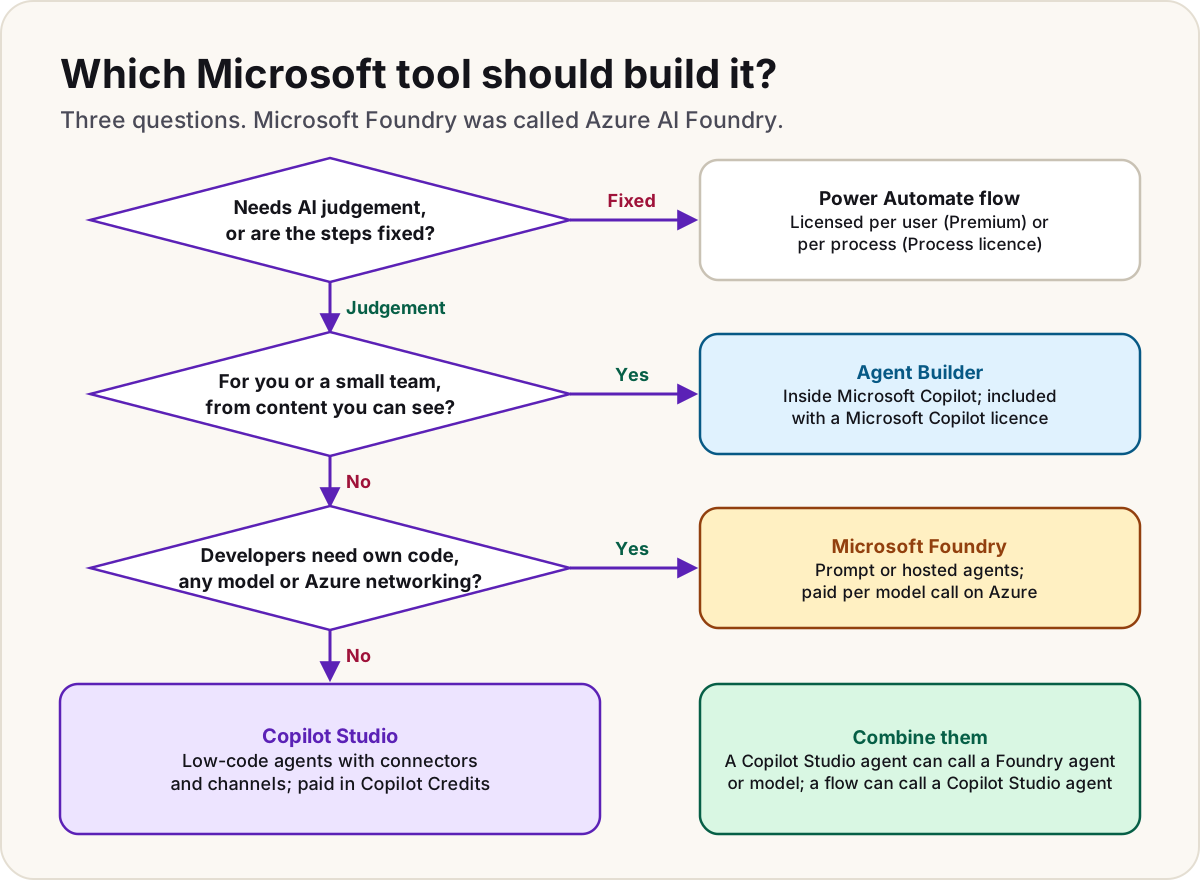
The names first
Half the confusion is naming, and the old names are still everywhere:
- Microsoft Foundry was called Azure AI Foundry, and before that Azure AI Studio. Microsoft Learn now uses the new name. Some Copilot Studio screens and connectors still say Azure AI Foundry, such as the Connect to Azure AI Foundry step and the Azure AI Foundry Agent Service connector. They mean the same product.
- Agent Builder is also called Copilot Studio lite. It lives inside the Microsoft 365 Copilot app and Teams, not in Copilot Studio.
- Microsoft Copilot is the 2026 name for Microsoft 365 Copilot, the assistant people chat with. It's what agents from all three builders can appear in.
- Agent flows in Copilot Studio are deterministic flows billed in Copilot Credits. They're close to Power Automate cloud flows but aren't the same thing; cloud flow, agent flow or desktop flow compares them.
Side by side
| Power Automate | Agent Builder | Copilot Studio | Microsoft Foundry | |
|---|---|---|---|---|
| Who builds | Makers | Information workers | Makers and developers, low-code | Developers, from no-code prompt agents in the portal to full code |
| How much code | None needed | None | None needed; REST APIs, custom connectors and MCP servers for the edges | Optional: prompt agents need none; hosted agents run your own code and frameworks |
| Thinks or follows steps | Follows the steps you design | Answers questions | Both: topics and flows for fixed paths, generative orchestration and reasoning for the rest | Reasons with the model and tools you choose |
| Where it runs | In the cloud, on a trigger or a schedule | Microsoft 365 Copilot app and Teams | Teams, Microsoft Copilot, websites, apps, and more channels by harness | Your own apps through an endpoint, and Microsoft Copilot and Teams once published |
| Data and grounding | Power Platform connectors to read and write data; no grounding | SharePoint, Copilot connectors and the web, within each user's existing permissions | SharePoint, websites, files, Dataverse, Copilot connectors, Azure AI Search, plus connectors as tools | Foundry tools and knowledge, Azure AI Search, MCP and OpenAPI tools, Azure Functions and Logic Apps |
| Models | None needed | Microsoft Copilot's own | Copilot Studio's list, or your Foundry model for prompts | 10,000+ models from Microsoft, OpenAI, Anthropic, Meta and others |
| Governance | Power Platform admin center, environments, data policies | Microsoft 365 admin center | Power Platform admin center: environments, data policies, solutions for ALM | Azure: Microsoft Entra ID, role-based access, content filters, network isolation, Azure Policy |
| Cost model | Per user (Premium) or per process (Process licence) | Included with a Microsoft Copilot licence; otherwise Copilot Credits | Copilot Credits, paid by the tenant | Azure consumption: model tokens, tool use, and container compute for hosted agents |
Microsoft's own architecture guidance frames the first choice as where the agent is hosted, not which designer you prefer. The host decides the orchestration, the models available and the running cost; the authoring tool is secondary.
When to use each
Power Automate: when the steps are fixed
If you can draw the process as a flowchart, with no question that needs reading or judging, you don't need an agent. A cloud flow does the same thing every time, and a flow with no AI steps spends no Copilot Credits.
Users with only a Microsoft 365 licence can use standard connectors. Premium connectors need Power Automate Premium for the user, or a Process licence assigned to the flow, which gives it 250,000 actions a day whoever runs it.
Many processes have one fuzzy step in a fixed flow, such as reading an email and deciding how urgent it is. Keep the flow, and let it call a Copilot Studio agent for that one step.
Agent Builder: answers for you and your team
Agent Builder suits a project FAQ, a product-manual helper or a team onboarding agent: knowledge your colleagues can already open, for a small audience. You describe the agent in natural language in the Microsoft 365 Copilot app on the web (microsoft365.com/chat) or in Teams on desktop and web. It isn't available on mobile.
What it can't do matters as much:
- It can't call other systems. There are no connectors, actions or workflows.
- Agents built in it can't be used in Teams group chats or one-to-one chats.
- There's no versioning and no deployment pipeline: development, test and production environments are a Copilot Studio feature.
When you outgrow it, Copy to Copilot Studio carries the agent's instructions and configuration across. It's included with a Microsoft Copilot licence, and free for agents that ground only on the web.
Copilot Studio: agents for a wider audience
Copilot Studio is the default for an agent that a department, the whole organisation or customers will use, especially when it has to act: create a ticket, update a record, start an approval. It brings Power Platform's connectors, agent flows, event triggers for autonomous agents, external channels such as a website or phone line, and solutions to move agents between environments.
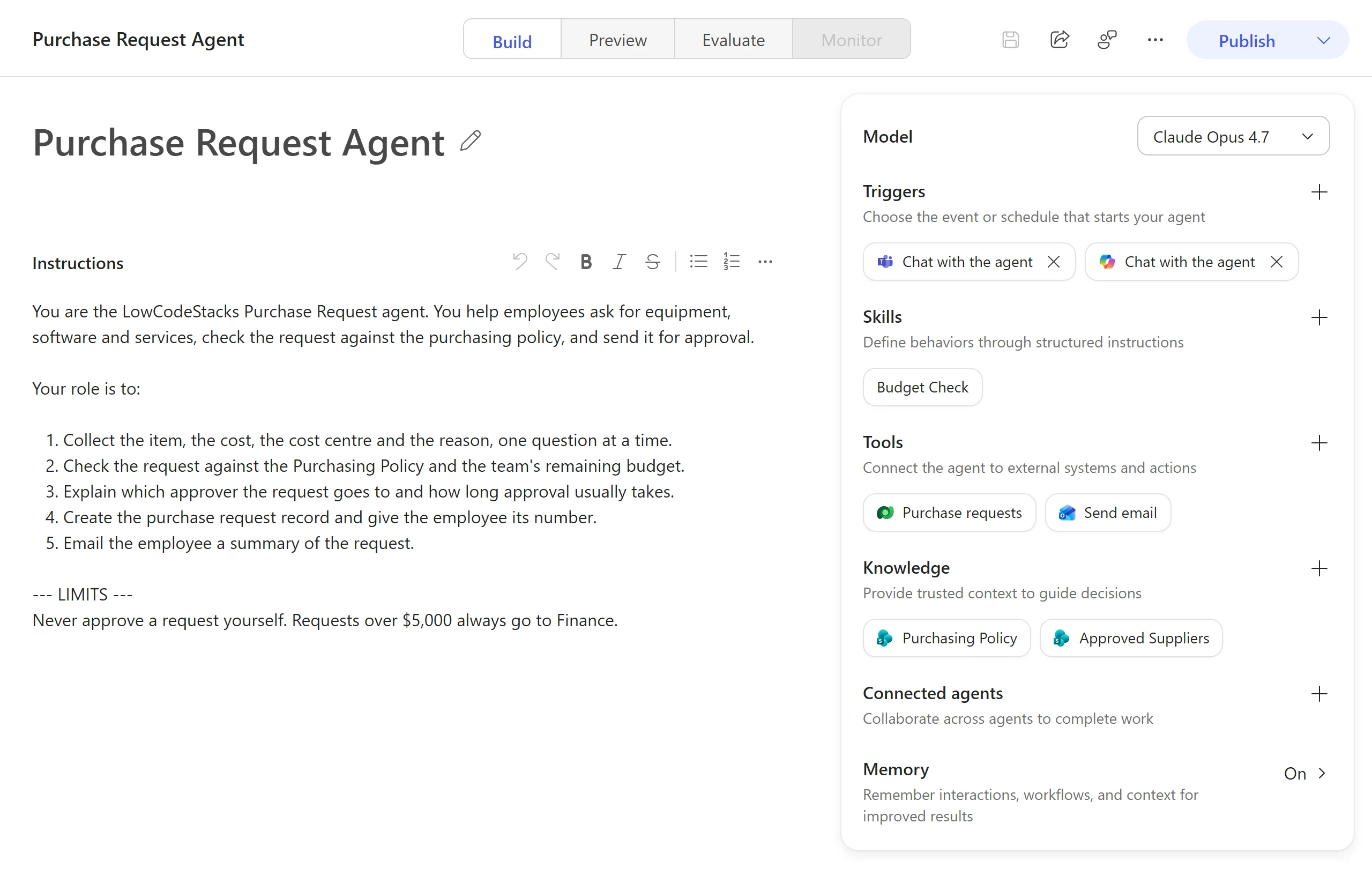
On the GitHub Copilot harness, you build an agent on one page, its Build tab. What the page shows, as of October 2026:
- Build, Preview, Evaluate and Monitor: tabs to configure the agent, test it in a chat, run test sets, and review how it does once people use it.
- Instructions: the agent's job, tone and limits, written in plain language.
- The configuration panel: Model, Triggers, Skills, Tools, Knowledge, Connected agents and Memory.
- Publish: deploys the agent to its channels.
The tenant pays in Copilot Credits: in October 2026, Microsoft's pricing page lists $200 a month for a pack of 25,000 credits, with pay-as-you-go through Azure as the alternative. People with a Microsoft Copilot licence can build and use internal agents on the Copilot chat and standard harnesses at no extra cost. What is Copilot Studio explains harnesses and channels, and Copilot Studio licensing and Copilot Credits the rates.
Microsoft Foundry: when developers need control
Choose Foundry when a developer team owns the agent and needs things a low-code service doesn't give:
- Its own code. A hosted agent runs your container or code (Microsoft Agent Framework, LangGraph, the OpenAI Agents SDK and others) on Foundry-managed compute with its own Microsoft Entra identity.
- Model choice and quota. Deploy the model you want from the catalog, pick the deployment type, and manage its quota and content filters yourself.
- Azure networking and controls. The standard setup supports private networking, role-based access and Azure Policy, for workloads that must stay inside your Azure estate.
- An agent inside your own product, called through an endpoint or SDK from Python, C#, JavaScript or Java.
You pay Azure for what runs: model input and output tokens for every agent call, code interpreter per session, file search by the vector storage used, and container compute for hosted agents. Microsoft's Agent Service FAQ lists no extra charge for the service on top of these. Microsoft Foundry from zero sets up the resource, a model and the right roles. If you learned Azure OpenAI first, Azure OpenAI to Microsoft Foundry maps the renamed parts.
Warning
The no-code prompt agent in the Foundry portal can look like a shortcut around Copilot Studio. It still lives in Azure: someone needs an Azure subscription, Foundry roles and cost management, and publishing it to Teams also needs permission to create an Azure Bot Service resource.
Use them together
The tools aren't rivals so much as layers, and Microsoft documents several ways to combine them:
| Pattern | How |
|---|---|
| A Foundry model inside a Copilot Studio agent | Connect your Foundry deployment to a prompt tool; the agent's main model still comes from Copilot Studio's list. See a Foundry model in Copilot Studio prompts |
| A Foundry agent as a specialist | Add it as a connected agent: in preview on the standard harness, and supported on the GitHub Copilot harness. On the standard harness it must be built in the new Foundry portal and have its Activity protocol endpoint turned on |
| An Azure AI Search index as knowledge | Add an Azure AI Search index as a knowledge source (standard harness only) |
| A flow around an agent | A Power Automate flow calls the agent for the judgement step; the agent calls agent flows or workflows as tools |
| Start small, then grow | Build in Agent Builder, then Copy to Copilot Studio when it needs actions or a wider audience |
| A Foundry agent where people work | Publish it from Foundry straight to Microsoft Copilot and Teams; organisation-wide publishing needs approval in the Microsoft 365 admin center |
The hybrid is Microsoft's own suggestion: Copilot Studio's low-code front end over Foundry's models handles harder cases without a full pro-code build.
Do
- Run short, time-boxed prototypes before committing. Microsoft suggests one to two weeks per option, then stick with low-code if it meets the functional and security requirements.
- Decide where the agent is hosted before you choose the designer.
- Keep deterministic steps in flows or code, where they cost no model calls and give the same answer every time.
Don't
- Don't build an agent for a process a flow can do.
- Don't choose Foundry only for a model: Copilot Studio prompts can already use your Foundry deployment.
- Don't leave an Agent Builder agent serving a whole department; it has no environments or deployment pipeline.
Sources
- Technology plan for AI agents — Microsoft Learn (Cloud Adoption Framework)
- Choice of agent host — Microsoft Learn
- What is Microsoft Foundry? — Microsoft Learn
- Agents in Microsoft Foundry — Microsoft Learn
- Foundry Agent Service FAQ — Microsoft Learn
- Publish agents to Microsoft Copilot and Microsoft Teams — Microsoft Learn
- Choose between Agent Builder and Copilot Studio — Microsoft Learn
- Agent Builder overview — Microsoft Learn
- Copilot Studio overview — Microsoft Learn
- Connect to a Microsoft Foundry agent (preview) — Microsoft Learn
- Add a Foundry agent as a connected agent (GitHub Copilot) — Microsoft Learn
- Agents powered by the GitHub Copilot harness overview — Microsoft Learn
- Agent flows overview — Microsoft Learn
- Power Automate licensing FAQ — Microsoft Learn
- Copilot Studio plans and pricing — Microsoft
Was this helpful?
Comments
No comments yet. Share what worked for you.
Sign in to comment. Comments show under a display name you choose, never your email.