What is Dataverse? Microsoft's data platform for Power Apps
What is Dataverse: the tables, security, logic, search and API behind Power Apps, what it costs, and how it compares with SQL Server and SharePoint lists.
DataverseQuick reference13 min read
Microsoft Dataverse is the data platform underneath Power Apps, Power Automate, Copilot Studio, Power Pages and the Dynamics 365 apps. It stores data in tables, and it brings its own security model, business rules, search, auditing and API, so every app that uses a table gets the same rules. This guide is about Microsoft Dataverse, not Harvard Dataverse, the research-data repository built on the unrelated open-source Dataverse Project; if you're publishing a research dataset, you need that one instead.
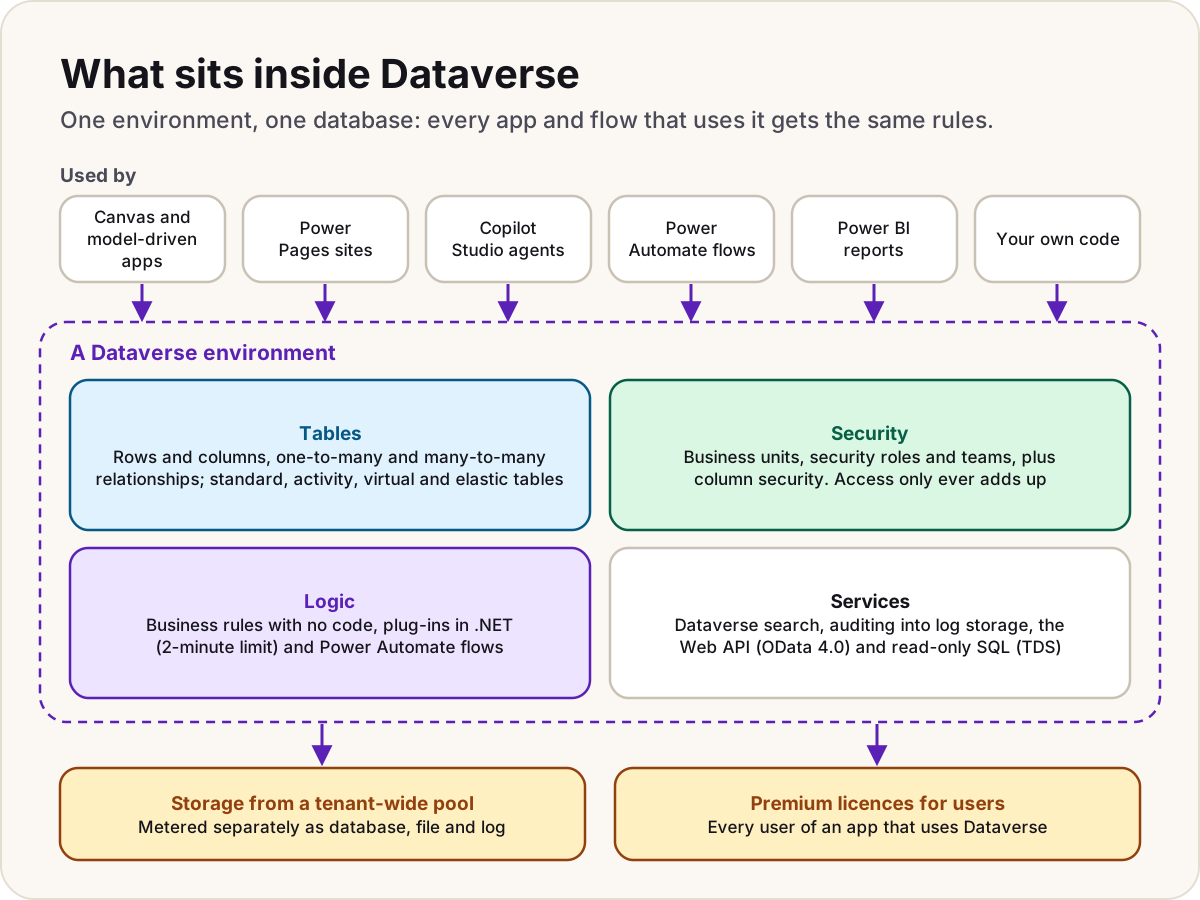
Where Dataverse lives
Each Power Platform environment can have at most one Dataverse database. Apps, flows and agents in that environment read and write its tables. Dynamics 365 Sales, Customer Service and the other customer engagement apps keep their data in Dataverse too, which is why a canvas app can work with Dynamics 365 data without an integration.
You manage tables at make.powerapps.com under Tables, ideally inside a solution so the work can move between environments. Microsoft runs the service: there's no server to patch and no database file to back up, and Microsoft takes system backups for you automatically.
Tables, columns and relationships
A table holds rows (once called records) and columns (once called fields). Microsoft renamed the terms in November 2020, but the old names live on in the API, so you'll still see entity and attribute in developer docs.
Every environment starts with standard tables such as Account, Contact and Task, which you can extend, and you add custom tables for your own data. There are four table types:
| Type | What it's for |
|---|---|
| Standard | Ordinary business data. Most tables you create |
| Activity | Things with a time on a calendar: emails, tasks, appointments, phone calls |
| Virtual | Rows that live in an outside source, such as Azure SQL Database, and are fetched when someone asks |
| Elastic | Very large datasets, beyond tens of millions of rows. Powered by Azure Cosmos DB |
Columns are typed: text (up to 4,000 characters, or about a million in multiline text), whole and decimal numbers, currency, choice and multi-select choice, Yes/No, date and time, lookup, file, image, autonumber and Power Fx formula columns.
Relationships come in two kinds. A one-to-many relationship is a lookup column on the child table (many courses in one classroom). A many-to-many relationship uses a hidden intersect table (many students on many courses). The designer also shows "many-to-one", which is just a one-to-many seen from the child's side. Each relationship can decide what happens to related rows when the parent is deleted, assigned or shared: cascade, remove the link, or Restrict, which blocks the delete while children exist.
Warning
A lookup returns the related row's primary name to anyone who can read the row holding the lookup, even if they can't open the related row itself. Never put sensitive data in a primary name column.
Two choices can't be undone: a table's ownership (user or team, or organisation) and its schema name. Our first Dataverse schema guide walks through both before you create anything.
Security: business units, roles and teams
Dataverse decides access row by row, for every app and for the API, so a maker can't bypass it by building a new app. Four parts work together:
- Business units are security boundaries. Every database has one root unit, and every user belongs to exactly one unit. Child units can mirror your organisation, but they don't have to.
- Security roles group privileges: Create, Read, Write, Delete, Append, Append To, Assign and Share, each at an access level such as the user's own rows, their business unit, or the whole organisation.
- Teams hold roles for groups of people. Owner teams can own rows; access teams get access to rows shared with them but hold no roles. A team can be tied to a Microsoft Entra group, so membership follows the group.
- Column security protects individual columns, such as a salary, through column security profiles. It never grants access to a row on its own.
Access is cumulative: a user gets the broadest access any of their roles or teams grants, and no role can take away what another gives. Sharing a single row covers exceptions, but Microsoft warns it's slower and harder to troubleshoot than roles.
Business units and teams don't travel in solutions; you recreate them in each environment. Security roles and column security profiles do. Our security roles, business units and teams pattern shows a layout that stays readable as you grow.
Business logic: rules, plug-ins and flows
Logic in Dataverse runs in the data layer, so it holds however the data arrives. Microsoft's advice is to try the no-code options first:
- Business rules set or clear values, set defaults and show validation errors, with no code. Scope a rule to Entity for it to apply to canvas apps as well as model-driven forms; some actions, such as show or hide, only work on model-driven forms. Changing a rule doesn't recheck rows already saved. Learn's FAQ says business rules run on clients, while its scope table says Entity scope runs on the server too, so test the behaviour you rely on.
- Formula, calculated and rollup columns work values out for you.
- Power Automate cloud flows react to rows being added, changed or deleted, and connect to other systems.
- Plug-ins are .NET classes registered on events such as create or update. They can run synchronously, inside the transaction, so they can cancel a save with an error, or asynchronously, after it. The whole operation, including every synchronous and asynchronous plug-in on it, must finish within 2 minutes, and Microsoft's guidance is to keep each plug-in to about 2 seconds.
Microsoft also suggests keeping a table to no more than 150 business rules, because performance drops beyond that.
Search, auditing and the API
Dataverse search is a relevance-ranked index across tables, used by the search bar in model-driven apps and by Copilot experiences. It's on by default, admins can turn it off, it respects security roles, and its index counts against your database storage. Each table's Quick Find view decides which columns are searched.
Auditing records who created, changed or deleted a row and what the old value was. You turn it on in three places: the environment, the table and the column. Audit logs use log capacity, not database capacity, and you set how long they're kept. Learn's admin page shows the default retention as Forever, while the developer reference gives a default of 30 days, so set the period deliberately rather than relying on the default.
The API: the Web API follows OData version 4.0, so any language that can send authenticated HTTP requests can use it, and .NET developers can use the SDK for .NET instead. A TDS endpoint lets tools such as SQL Server Management Studio and Power BI run read-only SQL against tables, under the same security roles. It allows SELECT only: no INSERT or UPDATE and no stored procedures.
Every user's API calls fall under service protection limits, applied per user and per web server: by default 6,000 requests and 20 minutes of combined execution time in any five-minute window, and 52 concurrent requests. Over the limit, the Web API returns 429 Too Many Requests with a Retry-After value.
Capacity: the shared storage pool
Dataverse storage is a pool for the whole tenant, measured as three separate types:
- Database: rows in tables, plus the search index.
- File: attachments, notes and file or image columns.
- Log: audit logs, plug-in trace logs and elastic tables.
Microsoft's page on moving Access data to Dataverse gives a single base licence's starting point as 10 GB of database, 20 GB of file and 2 GB of log, and each Power Apps Premium licence adds 250 MB of database and 2 GB of file capacity. Spare database capacity can cover a log or file shortfall, and spare log can cover file, but never the other way round. Production, sandbox and default environments count; trial and developer environments don't.
When a storage type runs short, admins can't create, copy, restore or recover environments until space is freed or bought. Our Dataverse storage capacity guide shows how to find what's filling it.
Dataverse vs SQL Server and SharePoint lists
| Dataverse | SQL Server or Azure SQL | SharePoint lists | |
|---|---|---|---|
| What you get | A managed service with tables, security, logic, search, audit and an API built in | A database engine; you design the security, logic and API yourself | Lists inside a SharePoint site, included with Microsoft 365 |
| Security | Business units, roles, teams and column security, applied to every app and the API | Logins, database roles and anything else you configure | Site, list and item permissions |
| Writing with SQL | No: SQL is read-only through the TDS endpoint | Full T-SQL, stored procedures and triggers | No |
| Size | No row limit is published; storage comes from the capacity pool, and elastic tables go past tens of millions of rows | Set by the server or service tier you buy | Up to 30 million items per list, but views over 5,000 items need indexed columns |
| Power Apps licence for users | Premium | Premium: the SQL Server connector is premium in Power Apps | Included with Microsoft 365 |
Choose Dataverse when the rules must hold whichever app or flow writes the data, different people must see different rows, or several apps share the data. Choose SQL Server when you already run it, need full SQL including writes, or other systems already depend on it; your apps then pay for premium connectors without getting Dataverse's built-in security and logic. Choose SharePoint lists for small, simple data where everyone sees the same items. Our Dataverse or SharePoint lists comparison has a five-question test.
Licensing in one paragraph
Dataverse isn't included in Microsoft 365 for your own apps. An app that uses Dataverse tables is premium, every model-driven app is premium, and every person who runs one needs premium Power Apps rights: Power Apps Premium, one of the per app options, or a Dynamics 365 licence that includes them. A few tables used by Dynamics 365, called restricted tables, also need a Dynamics 365 licence to create, update or delete rows. Prices, the per app options and the 2027 changes are in our Power Apps licensing guide.
Dataverse for Teams is retiring
Dataverse for Teams was a cut-down version inside Microsoft Teams, included with many Microsoft 365 plans, with 2 GB per environment and no direct API access. Microsoft has deprecated it on a fixed schedule:
| Date | What happens |
|---|---|
| 15 November 2026 | No new Dataverse for Teams environments can be created |
| 15 September 2027 | Environments not upgraded to Dataverse are suspended; they can still be upgraded |
| 30 October 2027 | Environments still not upgraded are decommissioned, with their apps, flows, agents and data |
Build anything new in a Dataverse environment and add it to Teams from there. For existing ones, our Dataverse for Teams retirement guide covers finding, upgrading or moving each environment.
Do
- Start every table in a solution with your own publisher prefix.
- Design security around roles and teams before you build screens.
- Turn on auditing for the tables and columns that matter, and set the retention period yourself.
Don't
- Don't store secrets or personal details in a primary name column.
- Don't put long-running work in a synchronous plug-in; make it asynchronous or move it to a flow.
- Don't start anything new in Dataverse for Teams.
Sources
- What is Microsoft Dataverse? — Microsoft Learn
- Why choose Microsoft Dataverse? — Microsoft Learn
- Power Platform environments overview — Microsoft Learn
- Create and edit tables using Power Apps — Microsoft Learn
- Types of tables — Microsoft Learn
- Create and edit columns in Dataverse using Power Apps — Microsoft Learn
- Dataverse table relationships — Microsoft Learn
- Ownership-based security in Dataverse — Microsoft Learn
- Apply business logic in Dataverse — Microsoft Learn
- Create a business rule for a table — Microsoft Learn
- Use plug-ins to extend business processes — Microsoft Learn
- Analyze plug-in performance — Microsoft Learn
- Configure Dataverse search for your environment — Microsoft Learn
- Manage Dataverse auditing — Microsoft Learn
- Configure auditing — Microsoft Learn
- Use the Microsoft Dataverse Web API — Microsoft Learn
- Use SQL to query data — Microsoft Learn
- How Dataverse SQL differs from Transact-SQL — Microsoft Learn
- Service protection API limits — Microsoft Learn
- Dataverse capacity-based storage details — Microsoft Learn
- Migrate Microsoft Access data to Dataverse — Microsoft Learn
- Power Platform licensing FAQs — Microsoft Learn
- Power Apps licensing FAQs — Microsoft Learn
- Restricted tables requiring Dynamics 365 licenses — Microsoft Learn
- SQL Server connector reference — Microsoft Learn
- SharePoint limits — Microsoft Learn
- Important changes coming in Power Platform: Dataverse for Teams — Microsoft Learn
- About the Dataverse for Teams environment — Microsoft Learn
- The Dataverse Project (the unrelated research-data software) — dataverse.org
Was this helpful?
Comments
No comments yet. Share what worked for you.
Sign in to comment. Comments show under a display name you choose, never your email.