What is Power Apps? App types, data, licences and real uses
What is Power Apps? Microsoft's low-code tool for business apps: the three app types, where the data lives, what Microsoft 365 covers, Teams, Copilot and real uses.
Power AppsQuick reference12 min read
Power Apps is Microsoft's low-code platform for building the business apps a spreadsheet or an email chain can't handle: a request form, an inspection checklist on a phone, a case-management app for a whole team. You build with screens and Excel-like formulas, start from your data, or describe the app to Copilot. People then run it in a browser, in the Power Apps mobile app or inside Microsoft Teams, against data you already have or data stored in Dataverse, the platform's own database.
Note
Checked against Microsoft Learn on 22 October 2026, and against Microsoft's Power Apps pricing page.
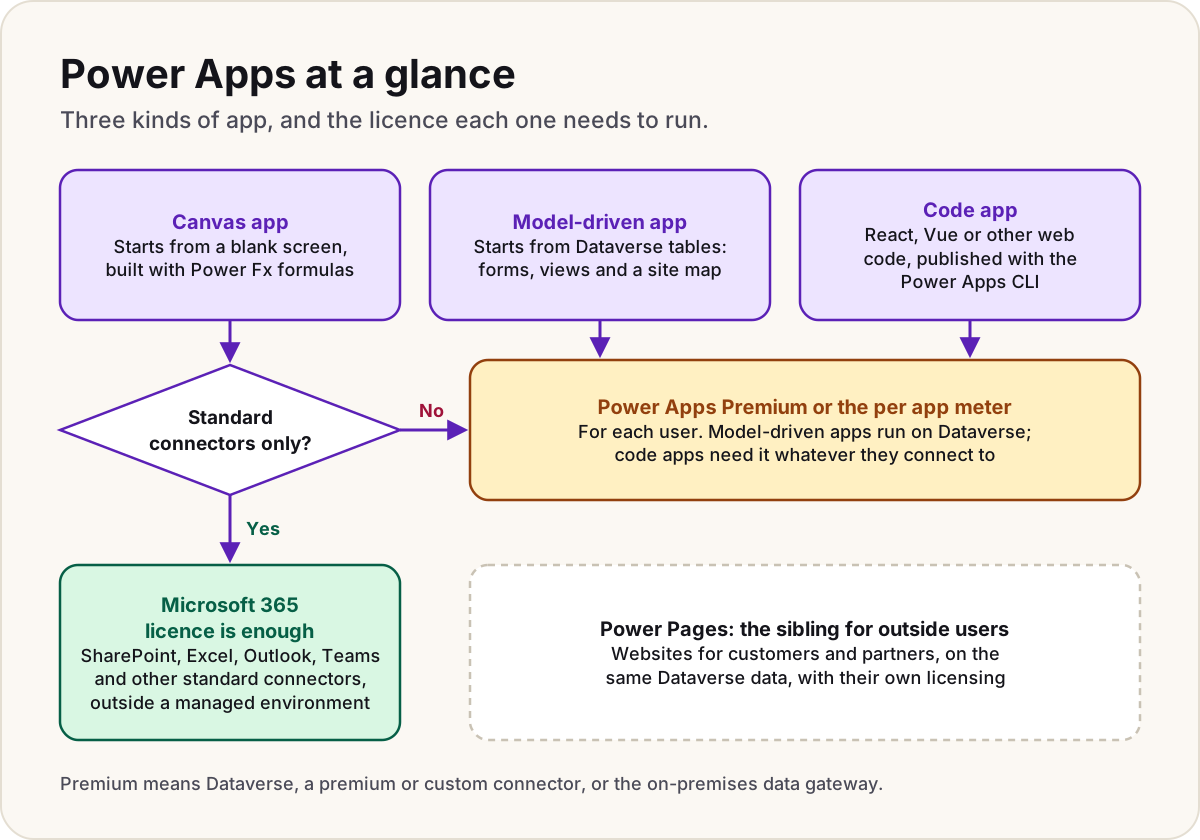
The three kinds of app
| Canvas app | Model-driven app | Code app | |
|---|---|---|---|
| Starts from | A blank screen | Your Dataverse tables | Your own web app code |
| How you build | Place controls on screens and set their behaviour with Power Fx formulas in Power Apps Studio | Add forms, views, dashboards and a site map in the app designer | React, Vue or another single-page app framework in an editor such as Visual Studio Code |
| Data | Dataverse or any connector | Dataverse only | Dataverse and Power Platform connectors, called from JavaScript |
| Layout | Every pixel is yours | Generated from the components, responsive by default | Every pixel is yours |
| Who builds it | Makers comfortable with Excel-style formulas | Makers modelling a process | Professional developers |
| Licence for users | Microsoft 365 if it uses standard connectors only; otherwise premium | Always premium | Always premium |
Canvas apps are the classic Power Apps. Microsoft compares building one to arranging a slide deck in PowerPoint: drop on galleries, forms and buttons, then write formulas such as Filter(Tasks, Status = "Open") in the formula bar. Power Fx is the same language family as Excel formulas, and an app recalculates the way a worksheet does.
Model-driven apps turn it around. You design the data first (tables, columns, relationships, business rules) and the app's screens follow from it. Model-driven apps share one consistent, responsive layout, which helps when people move between apps all day. Our canvas vs model-driven guide has five questions that settle the choice between them.
Code apps are for developers who want full control of the interface but still want Power Platform's sign-in, connectors and governance. You write a single-page web app, add connectors with the Power Apps client library, and publish it to an environment with the Power Apps CLI (pa app push). It's then governed like a canvas app: the same sharing limits, data policies and Conditional Access apply. Two things to know first:
- An admin turns them on per environment: Manage > Environments > the environment > Settings > Product > Features, then the Enable code apps toggle.
- They aren't supported in Power Apps for Windows, can't customise SharePoint list forms and don't work with Power Platform Git integration.
Note
Microsoft's main Power Apps overview still says you can create two types of app, canvas and model-driven. Code apps are documented separately, in the developer section of Learn.
Power Pages: the sibling for outside users
Power Apps is for people inside your organisation. When customers, partners or the public need a website, that's Power Pages, a separate product for external-facing sites built on the same Dataverse data. It has its own licensing for site visitors; Power Pages or SharePoint explains when you need it.
Where the data lives
A Power Apps app doesn't need its own database. It reaches data in two ways.
Connectors. A connector is a ready-made link to a service: SharePoint, Excel, Outlook, Office 365 Users, SQL Server, Salesforce and many more. Microsoft's pages don't agree on the count: the maker overview says canvas apps connect to more than 200 data sources, while the code apps page says more than 1,500 connectors. What matters more is the class:
- Standard connectors, such as SharePoint, Outlook, Excel and Teams, come with Microsoft 365.
- Premium connectors need a premium licence. SQL Server, Azure SQL, the other Azure connectors and the Dynamics 365 connectors are all premium, even though they feel like everyday plumbing.
- Custom connectors (your own APIs) and the on-premises data gateway also need a premium licence.
Dataverse. Dataverse stores data in tables of rows and columns, with role-based security, business rules and relationships built in. Dynamics 365 apps keep their data there too, so an app can work on it without any integration. If you're choosing between a SharePoint list and Dataverse for a new app, Dataverse or SharePoint lists compares them honestly, licence cost included.
Warning
Large lists catch out most first canvas apps. When a formula can't run at the data source, Power Apps works on only the first 500 rows by default and shows no error. Read why a gallery stops at 500 rows before you build on a big SharePoint list.
What Microsoft 365 includes and what needs Premium
Many Microsoft 365 licences include limited Power Apps rights: apps that use Microsoft 365 data and standard connectors. That covers a surprising amount, such as a canvas app on a SharePoint list that sends Outlook email.
You need premium rights for anything beyond that: Dataverse, premium or custom connectors, the gateway, every model-driven app and every code app. Two options, at Microsoft's US list prices in October 2026:
| Option | What it is | Price (USD) |
|---|---|---|
| Power Apps Premium | Per user: unlimited apps and Power Pages sites, premium, custom and on-premises connectors, and 250 MB of Dataverse database plus 2 GB of file capacity added to the tenant's pool | $20 per user per month, paid yearly; $22 for terms that start on or after 1 January 2027 |
| Per app pay-as-you-go meter | Billed through an Azure subscription for each person who opens a given app at least once in the month | $10 per active user per app per month |
So "Power Apps Premium" is simply the per-user licence that unlocks everything above. Building is free: you don't need a licence to make a canvas app. Running an app is what needs one.
Two traps:
- A Dataverse service plan in the Microsoft 365 admin center doesn't let users run custom apps. It exists for Microsoft 365's own features.
- In a managed environment, every active user needs premium rights, even for a standard app, and Microsoft starts blocking unlicensed users there in February 2027.
Power Apps licensing explained covers the details, guests and the enforcement date.
Power Apps in Teams
Microsoft documents five ways to use Power Apps in Teams: embed a canvas app or a model-driven app as a tab in a team, or as a personal app, or build a canvas app inside Teams on Dataverse for Teams.
To add an existing app, sign in to Power Apps, select Apps, then More actions (...) next to the app, and select Add to Teams. Your Teams admin must allow custom apps to be uploaded, and the app must be in the same tenant as your Teams account. People who open it still need the licence the app requires.
Warning
Dataverse for Teams is being retired. No new Dataverse for Teams environments can be created from 15 November 2026; environments not upgraded to Dataverse are suspended on 15 September 2027 and decommissioned on 30 October 2027. Apps built on full Dataverse keep working in Teams. What to do with each environment.
Copilot in Power Apps
Copilot shows up in two places: helping makers build, and helping users inside the app.
For makers:
- Describe the data, get an app. From the Power Apps home screen, select Start with data > Create new data, describe what you want to track, and Copilot creates Dataverse tables you build a canvas app on.
- Plans turn a description of a business process, plus images such as a process diagram or a screenshot of an old system, into a whole solution: Dataverse tables, canvas and model-driven apps, Power Pages sites, flows and Copilot Studio agents.
- Formulas. Copilot can create and edit Power Fx formulas for you in the formula bar.
- Generative pages (in model-driven apps) generate a working React page from a description and up to six Dataverse tables. In the browser it's available only for environments in the United States, Great Britain, Australia and Singapore; Microsoft recommends AI coding tools such as GitHub Copilot CLI, which work worldwide.
For app users (mostly model-driven apps): form fill assistance and smart paste suggest values for empty fields, which people accept or reject; row summaries; and a Copilot control you can add to a canvas app (preview). Form fill assistance needs a Power Apps Premium licence and is a production-ready preview in Power Apps.
Admins control this in the Power Platform admin center. Generally available Copilot features are on by default and only Microsoft Support can turn them off. Preview features can be turned off per environment (Settings > Features > Copilot) or for the tenant (Settings > Copilot in Power Apps (preview)). Availability varies by region.
Note
App building is moving. Microsoft now has a "vibe" Power Apps experience in preview, and app creation in Copilot Studio (preview), which can consume Copilot Credits. The two pages don't quite agree: the vibe page says app building will "soon roll out" to Copilot Studio, while Copilot Studio's own pages describe it as already rolling out gradually.
What people actually build
Microsoft's own templates give a fair picture: help desk management, employee onboarding, asset checkout, site inspection and budget tracking. Here's how typical jobs map onto the app types:
| The job | App type | Usual data |
|---|---|---|
| A site inspection with photos, on a phone | Canvas | SharePoint list, or Dataverse if it must work offline |
| Book out laptops and kit | Canvas | SharePoint list |
| A nicer form on a SharePoint list | Canvas, as a customised list form | The list itself |
| A help desk with cases, contacts and history | Model-driven | Dataverse |
| Onboarding that walks people through the same stages | Model-driven, with a business process flow | Dataverse |
| Act on a number in a Power BI report | Canvas, inside the report as a Power Apps visual | Whatever the report shows |
| A customer-facing portal | Not Power Apps: Power Pages | Dataverse |
Do
- Start with a canvas app on SharePoint when the data is simple, the audience is small and everyone already has Microsoft 365.
- Choose Dataverse early if the app will grow: relationships, security roles and business rules are hard to bolt on later.
- Check the app's licence designation (Standard or Premium) before you share it widely.
Don't
- Don't build a new app on Dataverse for Teams: it's retiring.
- Don't assume a Microsoft 365 licence covers an app because it opens for you; you might hold a premium licence your users don't.
- Don't use Power Apps for a public website. That's Power Pages.
Weighing Power Apps against Power Automate and Power BI? Power Apps vs Power Automate vs Power BI sorts jobs by tool.
Sources
- What is Power Apps? — Microsoft Learn
- Overview of creating apps in Power Apps — Microsoft Learn
- Power Apps code apps overview — Microsoft Learn
- Power Apps code apps architecture — Microsoft Learn
- Microsoft Power Fx overview — Microsoft Learn
- What is Microsoft Dataverse? — Microsoft Learn
- Overview of connectors for canvas apps — Microsoft Learn
- Power Platform licensing FAQs — Microsoft Learn
- Licensing overview for Microsoft Power Platform — Microsoft Learn
- Power Apps licensing FAQs — Microsoft Learn
- How to check license designation for an app — Microsoft Learn
- Pay-as-you-go meters — Microsoft Learn
- Power Apps licensing and pricing — Microsoft
- New pricing for Power Apps Premium (9 September 2026) — Microsoft Licensing News
- Power Apps and Microsoft Teams integration — Microsoft Learn
- Embed a canvas app as personal app in Teams — Microsoft Learn
- Important changes coming: Dataverse for Teams — Microsoft Learn
- What is Power Pages? — Microsoft Learn
- Copilot and AI features in Power Apps — Microsoft Learn
- Copilot in Power Apps overview — Microsoft Learn
- Build apps through conversation with Copilot — Microsoft Learn
- Generate a page using natural language — Microsoft Learn
- Use AI form fill assistance in model-driven apps — Microsoft Learn
- Overview of the new Power Apps vibe experience (preview) — Microsoft Learn
- Apps overview in Copilot Studio (preview) — Microsoft Learn
Was this helpful?
Comments
No comments yet. Share what worked for you.
Sign in to comment. Comments show under a display name you choose, never your email.