Power BI interview questions and answers (2026), with follow-ups
25 Power BI interview questions and answers for junior, mid and senior roles: DAX, modelling, Power Query, storage modes, RLS, Fabric, Copilot and PL-300.
Power BIQuick reference38 min read
You have a Power BI interview coming up and want to know what you'll be asked, and what a good answer sounds like when the interviewer pushes further. This page answers 25 Power BI interview questions, grouped by level: junior, mid and senior, then two scenarios and the certification.
Every answer follows the same pattern:
- Short answer: what to say first, in about 30 seconds.
- In more detail: the reasons and edge cases that make an answer stand out.
- An example where one helps: DAX, Power Query M, or a small worked case.
- Follow-up they may ask: where the interviewer is likely to go next, with a reply.
We wrote these questions for this page; none comes from a real employer. The answers follow Microsoft's documentation, and the DAX and M follow Microsoft's documented syntax but weren't run for this page. If the role also involves apps or flows, see our Power Apps interview questions and Power Automate interview questions.
Junior: the foundations
1. What is a star schema, and why does Power BI want one?
Short answer: A star schema splits the data into two kinds of table. Fact tables hold events or measurements, such as sales lines or stock balances: keys plus numbers. Dimension tables describe the things you filter and group by, such as product, customer and date. Each dimension relates to the fact table, so slicers on the dimensions filter the facts, and measures summarise the facts.
In more detail:
- Power BI has no "table type" setting. Microsoft's star schema guidance says the relationship decides it: the "one" side of a one-to-many relationship is the dimension, the "many" side is the fact.
- Every visual sends a query that filters, groups and summarises. Dimensions are built for the first two, facts for the third, which is why the design fits.
- Keep each fact table at one consistent grain, such as one row per order line.
- A snowflake (product, subcategory and category in three tables) works, but Microsoft generally prefers one flattened dimension table: fewer tables, shorter filter paths, and a hierarchy can only use columns from a single table.
- An export from a system usually arrives as one wide, denormalised table. A strong candidate says they'd split it in Power Query into a fact and its dimensions.
Follow-up they may ask: "The fact table has an order date, a ship date and a delivery date. How do you model that?" One date table with three relationships works, but only one can be active, and the others are reached with USERELATIONSHIP in measures. Microsoft's alternative is a separate date table for each role, each with an active relationship, so a visual can filter by two kinds of date at once.
Read more: Build a star schema from messy exports
2. What do cardinality and cross-filter direction mean on a relationship?
Short answer: Cardinality says whether each side's column holds unique values: one-to-many (the usual case), one-to-one or many-to-many. Cross-filter direction says which way filters travel along the relationship: Single, from the "one" side to the "many" side, or Both.
In more detail:
- On a one-to-many relationship, filters always flow from the "one" side; Both adds the other direction. A one-to-one relationship always filters both ways.
- Microsoft recommends bi-directional relationships only when they're needed. They can slow queries and can create ambiguous filter paths between tables.
- The "one" side must really be unique. If a refresh tries to load a duplicate value into it, the whole refresh fails.
- Many-to-many relationships are what Learn calls limited relationships:
RELATEDcan't use them, and rows with no match don't get the blank row a regular relationship adds. - When one measure needs filters to flow the other way,
CROSSFILTERinside that measure does it without changing the model:
Countries sold to =
CALCULATE (
    DISTINCTCOUNT ( Customer[Country] ),
    CROSSFILTER ( Customer[CustomerKey], Sales[CustomerKey], BOTH )
)
Follow-up they may ask: "The product slicer lists products that never sold in the selected country. How do you fix it without a bi-directional relationship?" Microsoft's suggestion: add a visual-level filter to the slicer itself, on a sales measure set to is not blank.
Read more: Fix "column contains a duplicate value" in Power BI refresh
3. What's the difference between a calculated column and a measure?
Short answer: A calculated column is worked out row by row when the data refreshes, and its values are stored in the model. A measure is worked out when a visual asks for it, in whatever filters that cell has, and nothing is stored. Use a column to slice, filter or group by; use a measure for anything you add up, average, divide or compare.
In more detail:
- A column has row context: the current row. A measure has filter context: the slicers, filters and headers of the cell.
- A ratio belongs in a measure. Store a margin per row and a visual sums or averages it, which gives the wrong total; a measure adds up first and divides last.
- For a new column in an Import model, Microsoft prefers a custom column in Power Query, because DAX calculated columns usually compress less well and are built only after all the queries load.
- Explicit measures matter for Analyze in Excel, which sends MDX queries and needs them.
Sales Amount = SUM ( Sales[Amount] )
Total Cost = SUM ( Sales[Cost] )
Margin % = DIVIDE ( [Sales Amount] - [Total Cost], [Sales Amount] )
Follow-up they may ask: "Can a calculated column react to a slicer?" No. It was worked out at refresh. If the value must change with the slicer, it has to be a measure.
Read more: Calculated column vs measure in Power BI
4. Explain row context and filter context.
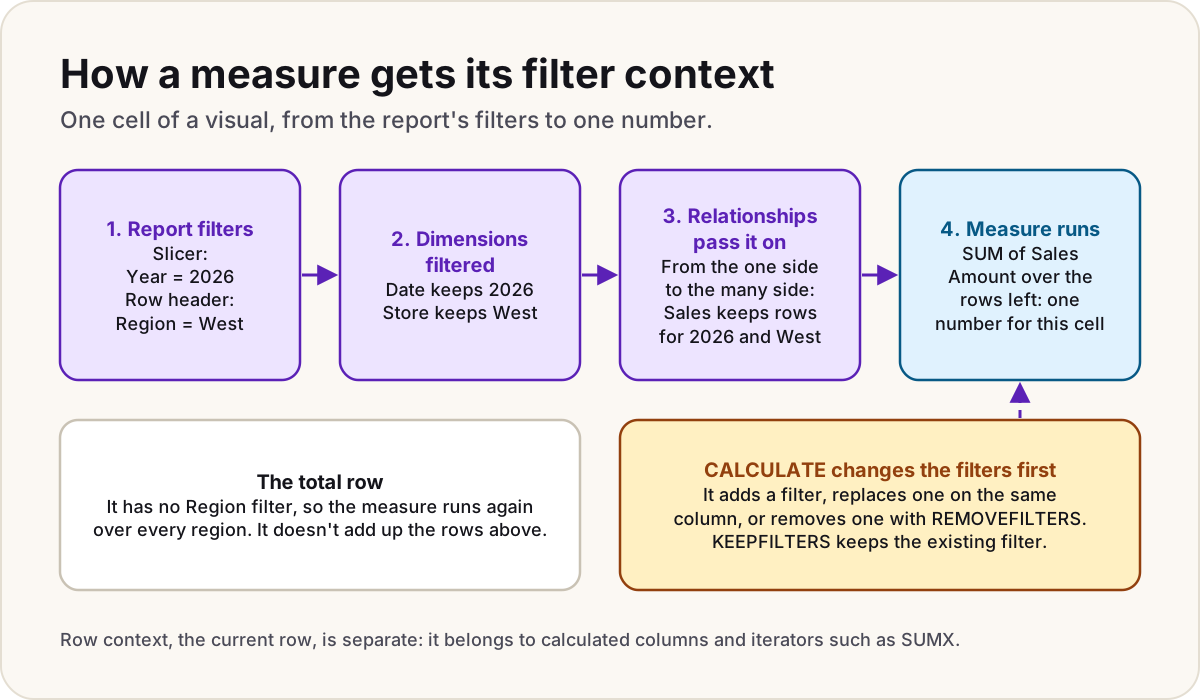
Short answer: Row context is "the current row": it exists in a calculated column and inside iterator functions such as SUMX. Filter context is the set of filters that decides which rows a measure sees: slicers, report filters, the row and column headers of a visual, and any filters a formula adds with CALCULATE.
In more detail:
- Row context doesn't filter anything by itself. Learn's own example:
SUM ( Sales[Profit] )used as a calculated column returns the same grand total on every row. - Filters on a dimension reach the fact table through relationships, as the diagram at the top of this page shows.
- Context transition turns a row context into a filter context. It happens automatically when you call a measure in a row context, and
CALCULATEwith no filter arguments does it explicitly. - The total row of a table is a cell like any other. It has fewer filters, so the measure is worked out again over all the rows, not by adding up the rows above.
Follow-up they may ask: "Every row looks right, but the total doesn't equal their sum. Is that a bug?" No. The total is a fresh calculation in a wider filter context. If the business wants the sum of the row values, write the measure to iterate the rows, for example with SUMX over the values shown.
Read more: Why are my totals wrong? Filter context explained
5. What is Power Query, and what is M?
Short answer: Power Query is where you connect to data and shape it before it loads into the model. Every query is written in M: a let expression made of named steps, each building on the one before, with the result named after in. The Applied steps list is a friendly view of those steps.
In more detail:
- M is case-sensitive:
Table.SelectRowsworks,table.selectrowsdoesn't. each [Amount] > 100is shorthand for a function with one parameter called_, so it means(_) => _[Amount] > 100.- Step names with spaces are written as quoted identifiers, such as
#"Filtered rows". - Home > Advanced Editor shows the whole script.
- Shaping belongs in Power Query: Microsoft's guidance prefers a custom column there to a DAX calculated column for an Import model.
let
    Source = Sql.Database("sales-server", "SalesDb"),
    Orders = Source{[Schema = "dbo", Item = "Orders"]}[Data],
    #"Filtered rows" = Table.SelectRows(Orders, each [OrderDate] >= #date(2025, 1, 1)),
    #"Kept columns" = Table.SelectColumns(#"Filtered rows", {"OrderID", "OrderDate", "CustomerID", "Amount"})
in
    #"Kept columns"
Follow-up they may ask: "A refresh fails because a source table was renamed. What does the error say?" Usually that the key didn't match any rows in the table: the navigation step looked for a name that's gone. Repoint the step in Power BI Desktop and republish.
Read more: Fix "the key didn't match any rows in the table" in Power BI
6. Why build a date table instead of using the date column?
Short answer: A date table gives you one row per day and the columns people slice by (year, quarter, month), relates to every fact table's date, and is what time intelligence needs. Power BI's auto date/time creates a hidden table for every date column instead, which adds size and can't filter several fact tables at once.
In more detail:
- Learn's requirements: a column of type date (or date/time), unique values, no blanks, no missing dates, and full years. A fiscal year counts as a year.
- With the classic time intelligence functions, such as
TOTALYTD ( [Sales], 'Date'[Date] ), you must mark it with Mark as date table. - Microsoft now recommends calendar-based time intelligence, still in preview, where you define calendars instead. You then don't need to mark the table, except in specific cases such as a relationship on a whole-number key like
20261231. - Once your own table is in place, turn auto date/time off.
Follow-up they may ask: "Your fact date includes a time. Why don't the numbers match?" The model stores dates as date/time, so a relationship to a date-only table matches midnight only. Remove the time in Power Query.
Read more: Create a date table in Power BI, and when to mark it
7. What are workspace roles, and who needs which licence?
Short answer: A workspace has four roles, each including the ones below it: Admin, Member, Contributor and Viewer. Admins, Members and Contributors create and edit content; Viewers read it. Anyone who publishes or shares needs Power BI Pro or Premium Per User (PPU). Viewers need Pro or PPU too, unless the content is on a Fabric capacity of F64 or larger (or a Premium P capacity), where a free licence with the Viewer role is enough.
In more detail:
- Content in a PPU workspace can only be opened by people with PPU.
- Publishing an app, or changing who sees it, needs Member or Admin. An Admin can allow Contributors to update an existing app.
- A Viewer can use Analyze in Excel only with Build permission on the semantic model.
- Workspaces are for the people who build; apps are the usual way to reach the people who read.
- Row-level security applies only to people who read. Admins, Members and Contributors see all the data (question 16).
Follow-up they may ask: "Someone should edit one report but only view the rest. Which role?" Roles cover the whole workspace, so put that report and its model in a separate workspace and make them a Contributor there.
Read more: Power BI permissions cheat sheet and Power BI licensing: Free vs Pro vs Premium Per User
8. What's drillthrough, and what are field parameters?
Short answer: Drillthrough takes a reader from a summary to a detail page filtered to the item they picked, by right-clicking a data point or with a button, and a Back button returns them. Field parameters let readers choose, from a slicer, which measure or which field a visual uses.
In more detail:
- For drillthrough, drag the field into the detail page's Drillthrough filters well, and Power BI adds the Back button. The source visual must use the same field, not summarised.
- Create a field parameter with Modeling > New parameter > Fields. Power BI writes it as a small DAX table that you can edit later.
- A field parameter can't use implicit measures, so write an explicit measure for anything it should total.
- A field parameter can't be the linked field of a drillthrough or tooltip page. Link the individual fields it contains instead.
Follow-up they may ask: "The drillthrough option doesn't appear when you right-click. Why?" Learn's troubleshooting list starts with the same checks: the field must be in the Drillthrough filters well, the source visual must use that same field, and it mustn't be summed or counted there.
Read more: Drillthrough in Power BI and Field parameters in Power BI
Mid level: DAX, Power Query and refresh
9. What does CALCULATE do?
Short answer: CALCULATE evaluates an expression in a modified filter context. Each filter argument either adds a filter, or replaces the existing filter on the same column. Filter modifiers such as REMOVEFILTERS, ALL, KEEPFILTERS and USERELATIONSHIP give finer control. With no filter arguments, it performs context transition.
In more detail:
- A simple filter argument, such as
'Product'[Colour] = "Blue", can reference columns from one table only, and can't reference a measure. REMOVEFILTERSclears filters from a column or table, which is how you write a share of the total.KEEPFILTERSadds a filter without removing the existing one on the same column.USERELATIONSHIPuses an inactive relationship for the calculation, andCROSSFILTERchanges a relationship's direction.
Blue Sales =
CALCULATE ( [Sales Amount], 'Product'[Colour] = "Blue" )

Share of all regions =
DIVIDE (
    [Sales Amount],
    CALCULATE ( [Sales Amount], REMOVEFILTERS ( Store[Region] ) )
)
Follow-up they may ask: "A slicer is set to Red. What does Blue Sales show?" Blue sales, because the filter argument replaces the slicer's filter on the same column. Wrap it in KEEPFILTERS ( 'Product'[Colour] = "Blue" ) and it shows blank, because no product is both red and blue.
Read more: Why are my totals wrong? Filter context explained
10. What's the difference between SUM and SUMX?
Short answer: SUM adds up one column. SUMX is an iterator: it works out an expression for each row of a table you give it, then adds up the results. Use SUMX when the thing to add doesn't exist as a column, such as quantity times price.
In more detail:
- Inside
SUMX, the expression has a row context for each row in turn. SUMXcounts only numbers: blanks, logical values and text are ignored.- Other aggregations have X versions too, such as
AVERAGEXandMAXX. - The table argument can be a filtered table, such as
FILTER ( Sales, ... ), or the values of a column, which is how you average per customer.
Sales Amount (from lines) =
SUMX ( Sales, Sales[Quantity] * Sales[Unit Price] )

Average sales per customer =
AVERAGEX ( VALUES ( Customer[CustomerKey] ), [Sales Amount] )
Follow-up they may ask: "Why does the second measure work per customer when [Sales Amount] has no customer filter?" Context transition: calling a measure inside the iterator turns each customer row into a filter, so the measure is worked out for that customer.
Read more: Why are my totals wrong? Filter context explained
11. How do you write year-to-date and last-year measures?
Short answer: With a date table and the time intelligence functions. In the classic approach, the date table is marked as a date table and the functions take its date column. In the newer calendar-based approach, still in preview, the functions take a calendar you define on the table.
In more detail:
- Classic functions throw an error if dates are missing between the first and last date, and they don't do week-based calculations.
- Calendar-based time intelligence handles non-Gregorian and week-based calendars, and Microsoft says some calculations run faster. Turn it on in File > Options and settings > Options > Preview features > Enhanced DAX Time Intelligence.
- For a fiscal year,
TOTALYTDtakes an optional year-end date, such as"6/30". You can't pass that argument when you use a calendar.
Sales YTD = TOTALYTD ( [Sales Amount], 'Date'[Date] )

Sales last year =
CALCULATE ( [Sales Amount], SAMEPERIODLASTYEAR ( 'Date'[Date] ) )

Sales YTD (fiscal, June year end) =
TOTALYTD ( [Sales Amount], 'Date'[Date], "6/30" )
Follow-up they may ask: "Can you use the fact table's order date column in these functions?" Use the date table's column. It has every date with no gaps, and it filters every fact table.
Read more: Create a date table in Power BI
12. What is query folding, and why does it matter?
Short answer: Query folding is Power Query turning your steps into one query in the source's own language, such as SQL, so the source does the filtering and shaping. Steps that can't fold run in the Power Query engine after the data has been fetched. Folding makes refresh faster, and some features depend on it.
In more detail:
- Folding can be full, partial or none. Sources with a query engine, such as SQL Server, usually fold. Files such as CSV and Excel don't.
- In Power BI Desktop, right-click a step: if View Native Query is available, that step folds. The step folding indicators and query plan are available only in Power Query Online.
- DirectQuery and Dual tables need their queries to fold.
- Incremental refresh relies on the
RangeStartandRangeEndfilter folding. If it doesn't, an Import refresh can fetch every row and filter it locally, which defeats the point. - Put filters and column removal early, so they fold before a step that can't.
Follow-up they may ask: "Can incremental refresh use a native SQL query?" Microsoft's pages disagree. The incremental refresh overview shows a native query with RangeStart and RangeEnd written into the SQL, while the query folding guidance for Power BI Desktop says incremental refresh can't use a native SQL query. Say so, and test it on your source.
Read more: Incremental refresh: set it up, and prove it's working
13. Import, DirectQuery, Direct Lake or composite: how do you choose?
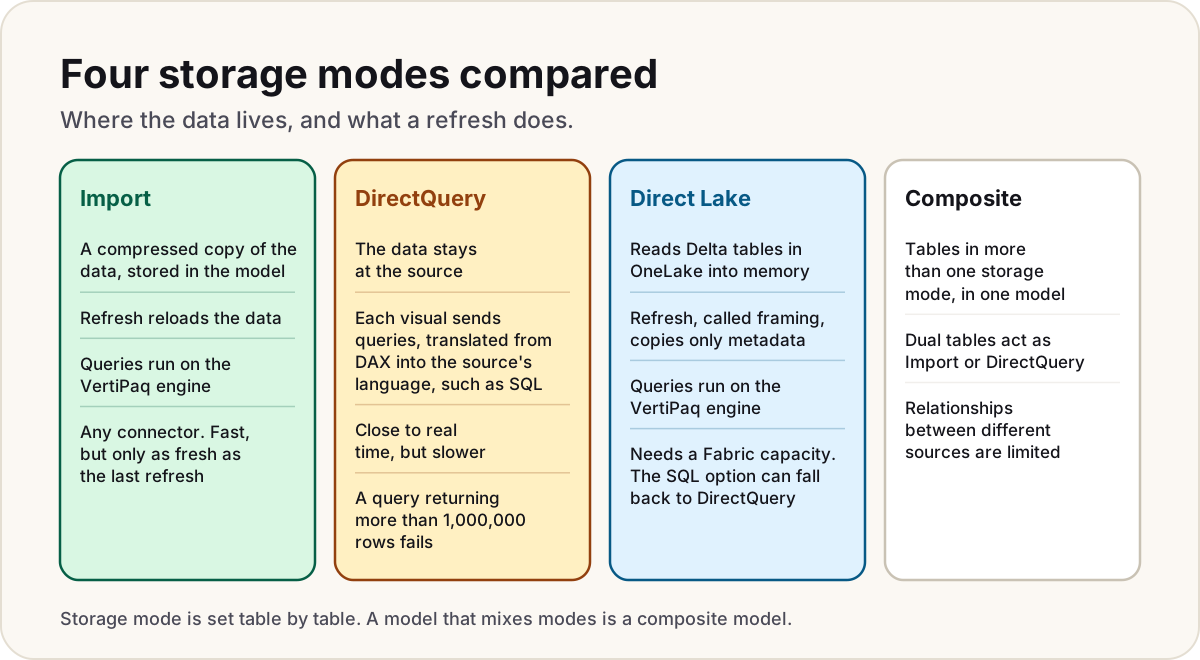
Short answer: Import copies the data into the model, which makes queries fast, but it's only as fresh as the last refresh. DirectQuery leaves the data at the source and queries it each time a visual loads. Direct Lake, in Microsoft Fabric, loads Delta tables from OneLake into memory without copying them in a refresh. A composite model mixes storage modes, table by table.
In more detail:
- Import works with any connector; DirectQuery only with sources that support it.
- Import and Direct Lake queries are answered by the VertiPaq engine, and Microsoft says they normally outperform DirectQuery, which translates DAX into the source's language, such as SQL.
- DirectQuery has hard limits: a query that returns more than 1,000,000 rows fails, and the service times out a query after four minutes. It also limits Power Query steps and DAX in calculated columns.
- A Direct Lake refresh, called framing, copies only metadata. Direct Lake needs a Fabric capacity. Direct Lake on SQL can fall back to DirectQuery, for example on a SQL view; Direct Lake on OneLake doesn't.
- In a composite model, Dual tables act as Import or DirectQuery as needed, which keeps their relationships regular. Relationships between different sources are limited.
Follow-up they may ask: "The business wants near real-time numbers on a large fact table. What do you suggest?" A composite or hybrid design: Import for history and dimensions, with recent data in DirectQuery. Incremental refresh can add a real-time DirectQuery partition, but only for models on Premium, PPU or Embedded.
14. How does incremental refresh work?
Short answer: You filter a large table with two Power Query date/time parameters, RangeStart and RangeEnd, then set a policy: how much history to keep and how much to refresh. After you publish, the service splits the table into date partitions and refreshes only the recent ones, leaving history alone.
In more detail:
- The parameter names are reserved and case-sensitive, and they must be the date/time type.
- Incremental refresh works on Pro, PPU, Premium and Embedded. The optional real-time DirectQuery partition doesn't work on Pro.
- The filter must fold (question 12); otherwise every row is still fetched.
- Use
>=on one parameter and<on the other, so a row on the boundary lands in one partition only. - After the first publish, republishing the model from Power BI Desktop removes the partitions and data, and you can't download the .pbix back.
- Detect data changes can skip periods whose last-updated column hasn't moved.
#"Filtered rows" = Table.SelectRows(Orders, each [OrderDate] >= RangeStart and [OrderDate] < RangeEnd)
Follow-up they may ask: "Weeks after you added incremental refresh, refreshes start failing with key conflicts. What's a likely cause?" Learn's troubleshooting page names one: the date used for partitioning was updated at the source. Incremental refresh reads that as a new row plus a deleted one, and a deletion in the historical range isn't picked up, which can cause partition-key conflicts.
Read more: Incremental refresh: set it up, and prove it's working
15. When do you need a gateway, and which kind?
Short answer: When the Power BI service has to reach data it can't get to over the internet, such as an on-premises SQL Server or a file share. The standard on-premises data gateway is shared and centrally managed. Personal mode is for one person refreshing their own Import models. The virtual network (VNet) data gateway is a Microsoft-managed option for data inside an Azure virtual network.
In more detail:
- Personal mode works with Power BI only, can't be shared, and doesn't support DirectQuery, live connections to Analysis Services, composite models or clustering.
- Standard mode supports DirectQuery and live connections, can serve other services such as Power Apps and Power Automate, and can run as a cluster for high availability.
- Gateway permissions are separate from workspace roles: someone with a workspace role still needs access to the gateway connection.
- Direct Lake doesn't work through any gateway; it supports only cloud connections.
Follow-up they may ask: "An author left, and their models stopped refreshing. What do you check?" Whether the models used a personal gateway on that person's machine, which nobody else can share, and whose credentials the data sources used. Move them to a standard gateway with shared connections, then take over the models and set the credentials again.
Read more: Refresh failed: a Power BI checklist
16. How do you set up row-level security, including dynamic RLS?
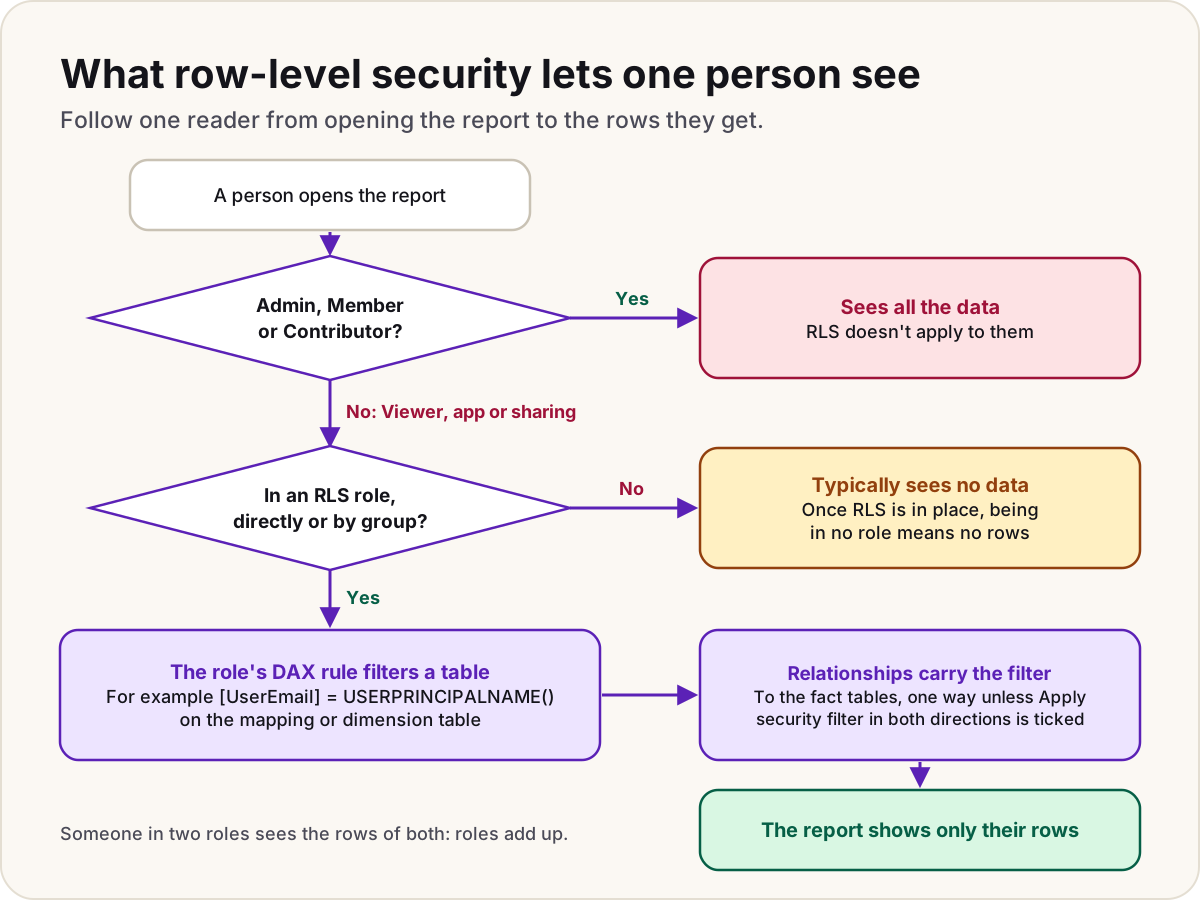
Short answer: In Power BI Desktop, create roles under Modeling > Manage roles, each with a DAX rule that returns true or false for every row of a table. Publish, then add people or groups to the roles on the semantic model's Security page. For dynamic RLS, one role compares a column in a user-mapping table with USERPRINCIPALNAME(), so each person sees only their rows.
In more detail:
- RLS applies only to people with Viewer access, or who reach the content through an app or sharing. Workspace Admins, Members and Contributors see all the data.
- A person in two roles sees the rows of both: roles add up.
- Filter a dimension, not the fact table, and let the relationship carry the filter. RLS filters flow in a single direction by default, even across a bi-directional relationship, unless you tick Apply security filter in both directions.
- Microsoft 365 groups can't be added to roles; Microsoft Entra security groups, mail-enabled groups and distribution groups can. Service principals can't be added either.
- Test as role in the service uses your own identity for
USERPRINCIPALNAME(), so for dynamic RLS and for guests, test with the real account too. - RLS secures rows, not columns. For columns or tables, Microsoft points to object-level security.
// Rule on the UserAccess table, which relates to Store
[UserEmail] = USERPRINCIPALNAME ()
Follow-up they may ask: "With DirectQuery, do the database's own security rules apply?" Microsoft's pages disagree. The RLS FAQ says DirectQuery uses the source's security roles with the user's credentials, while the DirectQuery page says that by default everyone connects with the credentials entered after publishing, so the source's rules don't apply per user unless you set up single sign-on or Kerberos. Check how the connection is configured.
Read more: Dynamic row-level security with USERPRINCIPALNAME
Senior: performance, scale and delivery
17. A report page is slow. How do you find out why?
Short answer: Measure before changing anything. Open Performance Analyzer (on the Optimize ribbon in Power BI Desktop), start recording, and refresh the visuals. Each visual's time is split into DAX query, Direct query, Visual display and Other, which tells you whether the model, the source or the page design is slow.
In more detail:
- A long DAX query time points at the model or the measure. Use Copy query or Run in DAX query view to test the query on its own.
- A long Direct query time is the source database; look at its indexes, or at aggregations and Import for the busy tables.
- Long Visual display or Other times usually mean too many visuals: they wait for each other on one thread.
- Performance Analyzer is also available when editing a report in the service, under View.
- Fix the biggest cost first, then measure again. Typical fixes are fewer visuals per page, a star schema instead of chains of bi-directional relationships, and explicit, simpler measures.
Follow-up they may ask: "Performance Analyzer shows the DAX query takes six seconds. What next?" Copy the query into DAX query view, simplify it until it's fast, and find the part that isn't. Check whether the measure iterates a large table or relies on a bi-directional relationship. Copilot in DAX query view can help simplify the verbose query a visual generates, but check what it gives you.
Read more: Calculated column vs measure in Power BI
18. What is VertiPaq, and how do you make a model smaller?
Short answer: VertiPaq is the engine that stores Import data, compressed column by column, and answers queries for Import and Direct Lake tables. Microsoft gives about 10 times compression as a reasonable expectation. Smaller models refresh faster, query faster and fit within capacity limits, so remove what you don't need before you tune anything else.
In more detail:
- Remove columns nothing uses, and rows nobody reports on, such as years of history.
- Numbers compress best: VertiPaq stores them with value encoding, while text needs hash encoding with a dictionary of unique values. An order number like
SO123456can become a whole number. - Text columns with many unique values cost the most, because each unique value needs its own entry in the dictionary.
- Prefer Power Query custom columns to DAX calculated columns, and turn off auto date/time.
- Summarise to a higher grain if nobody needs the detail.
- Pro models are limited to 1 GB in the service; PPU allows up to 100 GB.
- With a Fabric capacity, the semantic model's Memory analyzer notebook shows memory and storage statistics for its tables, columns and relationships, and Best practice analyzer checks the model against more than 60 rules.
Follow-up they may ask: "Why not just load everything in case someone needs it?" Microsoft's advice is the opposite: it's easier to add a column later than to remove one that reports already use.
Read more: Build a star schema from messy exports
19. Why use one shared semantic model for many reports?
Short answer: So every report uses the same measures and the same data, refreshed once. Publish the model on its own, connect reports to it with a live connection, and give report authors Build permission rather than editing rights in the model's workspace. Endorse the model as promoted or certified so people know which one to trust.
In more detail:
- A report with a live connection has no model of its own. Measures created in it are stored in the report.
- To add a table or tweak a column for one report, use DirectQuery for Power BI semantic models: select Make changes to this model, and Power BI builds a composite model on top of the shared one.
- Build permission comes with the Contributor role or above, through an app audience setting, or by sharing the model directly.
- Fewer models means fewer refreshes hitting the source.
Follow-up they may ask: "Three teams need slightly different revenue measures. Do you build three models?" No. Keep one model with clearly named measures, and let teams extend it in their own reports. Split only when the data or the security genuinely differs.
Read more: One semantic model, many reports
20. How do you move Power BI content from development to production?
Short answer: With a deployment pipeline: each stage is its own workspace, by default development, test and production, and you deploy content from one stage to the next. Deployment rules switch data sources or parameter values per stage, so production points at the production database.
In more detail:
- A pipeline has between 2 and 10 stages; three is the default.
- Deployment copies metadata, not data. Role assignments, refresh schedules, data source credentials and permissions aren't copied, so set them in each stage.
- Rules for a semantic model can be data source rules or parameter rules. You must own the item to create one, and the rule applies from the next deployment.
- Items are paired between stages, and a deployment overwrites only the paired item. Check pairing before the first deployment into a stage that already has content.
- Microsoft lists deployment pipelines as a Premium feature, available with PPU and on capacity workspaces, not with Pro alone.
- For source control, Fabric's Git integration connects a workspace to Azure DevOps or GitHub. PL-300 doesn't test it, but DP-600 does.
Follow-up they may ask: "What changed for semantic models in pipelines this year?" From 12 February 2026, deployment pipelines dropped support for semantic models not upgraded to enhanced metadata. Learn's supported-items list also currently labels Power BI reports and semantic models as preview, while Microsoft's licensing tables list deployment pipelines as a standard Premium and PPU feature; mention both if asked about production use.
21. What does Microsoft Fabric change for a Power BI developer?
Short answer: Fabric is Microsoft's software-as-a-service analytics platform, and Power BI is one of its workloads, next to Data Factory, databases, Real-Time Intelligence and others. All of them store data in OneLake. Existing Power BI content stays where it is; what changes is that semantic models can read lakehouse and warehouse tables through Direct Lake, and capacity is bought as Fabric F SKUs.
In more detail:
- Creating lakehouses, warehouses or notebooks needs an F capacity, a Premium P capacity with Fabric turned on, or a Fabric trial. Learn is explicit that PPU doesn't provide a Fabric capacity.
- On F64 or larger, readers with a free licence and the Viewer role can view Power BI content. Below F64, every reader needs Pro or PPU.
- Microsoft is retiring the Power BI Premium per-capacity (P) SKUs and points new deployments to F SKUs.
- OneLake integration can write an Import model's tables to Delta tables in OneLake, which Learn suggests as a quick way to use Fabric without redesigning anything.
- Direct Lake suits large, IT-managed data in the lake. Import still suits self-service work, where the analyst shapes data in Power Query.
Follow-up they may ask: "Would you convert a working Import model to Direct Lake?" Not by default. Direct Lake needs the data prepared in the lake first, and Microsoft recommends a proof of concept before choosing it.
Read more: Fabric capacity pricing explained and Power BI licensing explained
22. How would you use Copilot in Power BI, and what does it need?
Short answer: Copilot can summarise a report, answer questions about its data, draft report pages and narrative visuals, write and explain DAX queries, and add descriptions to measures. It needs the workspace on a paid Fabric capacity of F2 or larger, or Premium P1 or larger, in a supported region, with the admin setting turned on. Pro or PPU on its own isn't enough, and trial capacities aren't supported.
In more detail:
- The Copilot pane on reports is generally available. The standalone, full-screen Copilot and Copilot in apps are in preview, and so is Copilot in web modeling for model authors.
- Answers are only as good as the model. Microsoft asks model owners to prepare their data for AI, for example with clear names and descriptions.
- Copilot usage is charged to capacity as background operations. A Fabric Copilot capacity can collect an organisation's Power BI Copilot usage in one place.
- Treat what it produces as a draft: Microsoft warns that AI-generated content can contain mistakes.
Follow-up they may ask: "A manager asks Copilot a question and gets a wrong number. What do you check?" Whether the question maps clearly to a measure in the model, whether names and descriptions make sense to someone outside the team, and whether a verified answer or a report page should answer it instead.
Read more: Power BI licensing explained
Scenario questions
Scenarios test how you think. Say what you'd look at first, what each finding would tell you, and what you'd change.
23. A scheduled refresh failed overnight. Walk through what you do.
Short answer: Read the actual error in Refresh history, then work through the likely causes in order: credentials, the gateway, a changed source, data that breaks the model, and time or size limits. Fix the cause, refresh by hand, and switch the schedule back on if Power BI turned it off.
Step by step:
- Read the error. In the workspace, open the semantic model, then Refresh > Refresh history. The first failure after a run of successes shows when something changed.
- Credentials. An expired password or a changed account is the most common cause. Re-enter them under Data source credentials.
- The gateway. For on-premises data, check the gateway is online and its machine is running.
- A changed source. "The key didn't match any rows in the table" usually means a table or sheet was renamed or moved.
- Data that breaks the model. A duplicate value on the "one" side of a relationship fails the whole refresh.
- Limits. Scheduled refreshes time out after two hours on Pro and five hours on Premium. A Pro model can't exceed 1 GB.
- The schedule. After four failures in a row, Power BI turns the schedule off; after two months with no report views, it pauses it.
Follow-up they may ask: "How would you hear about it before users do?" Leave the failure emails on for the model owner, add a team address as an extra recipient, and check refresh history across models regularly.
Read more: Refresh failed: a Power BI checklist, Fix "the key didn't match any rows" and Fix "column contains a duplicate value"
24. A sales rep can see another region's numbers. How do you investigate?
Short answer: Start with how they reach the report, because RLS doesn't apply to everyone. Then check their role memberships, the rule and the mapping table, and test as that person rather than as yourself.
Step by step:
- Their workspace role. If they're an Admin, Member or Contributor, RLS doesn't apply and they see everything. Give them the Viewer role or an app instead.
- Their RLS roles. Roles add up, so membership of a broad role, directly or through a group, overrides a narrow one.
- The rule and the mapping table. Is there a mapping row for their UPN that grants the other region? Does
USERPRINCIPALNAME()return the value the table holds? - The model. Is the rule on the dimension, and does the filter reach every fact table the report uses?
- Test properly. Test as role uses your identity for dynamic rules, so sign in as a real reader, or use View as with another user in Power BI Desktop.
Follow-up they may ask: "And if they see nothing at all?" Learn notes that someone not in any role typically sees no data once RLS is in place. Check their role membership, and for guests, the exact UPN format returned.
Read more: Dynamic row-level security with USERPRINCIPALNAME and Power BI permissions cheat sheet
The PL-300 certification in 2026
25. Which certification matters for a Power BI role now?
Short answer: PL-300, Microsoft Power BI Data Analyst, which earns the Power BI Data Analyst Associate certification. It's still current: unlike several Power Platform exams retired in 2026, it isn't on Microsoft's list of exams scheduled to retire, and its skills were last updated on 20 April 2026. For Fabric-heavy roles, DP-600, the Fabric Analytics Engineer exam, is the next step.
In more detail:
- PL-300's four areas: prepare the data (25 to 30%), model the data (25 to 30%), visualise and analyse the data (25 to 30%), and manage and secure Power BI (15 to 20%).
- What's in the current skills list: choosing between Direct Lake, DirectQuery and Import; calculation groups and visual calculations; Performance Analyzer and DAX query view; and Copilot, for a narrative visual, a new report page and a summary of the semantic model.
- The 20 April 2026 update made minor changes to three skill groups: getting data, report usability, and workspaces and assets.
- Passing and renewing: you need 700 to pass, and the certification renews every 12 months through a free online assessment.
- Preview features: most questions cover generally available features, but preview features can appear if they're commonly used.
- DP-600: its skills were updated on 19 October 2026 and cover Direct Lake, composite models, incremental refresh, deployment pipelines, workspace version control and the XMLA endpoint.
Follow-up they may ask: "Will PL-300 be replaced like PL-200 and PL-400?" Microsoft hasn't announced it. The Power Platform maker and developer exams moved to AB-410 and AB-400 this year, as our Power Apps interview guide explains, but PL-300 wasn't on the retirement list when we checked.
Before the interview
- Build a small star schema from one flat export: a fact table, three dimensions and a date table, with single-direction relationships.
- Write
Sales Amount,Margin %, a year-to-date measure and a share of total withREMOVEFILTERS, and explain each total row. - Add dynamic RLS with a mapping table, publish it, and test it as a reader.
- Set up incremental refresh on a source that folds, and check View Native Query shows the date filter.
- Run Performance Analyzer on your slowest page and fix one thing it shows.
- Prepare two stories, a report people relied on and a problem you solved, each as situation, action and result with your real numbers.
- Read the PL-300 study guide's skills list, and bring questions of your own: who owns the shared models, how content reaches production, and which licences and capacity the readers have.
These answers follow Microsoft Learn as it stood on 21 October 2026. For a broader view of the platform, our Power Platform admin interview questions cover governance and capacity.
Sources
- Understand star schema and the importance for Power BI — Microsoft Learn
- Model relationships in Power BI Desktop — Microsoft Learn
- Bi-directional relationship guidance — Microsoft Learn
- DAX overview: context — Microsoft Learn
- CALCULATE function (DAX) — Microsoft Learn
- SUMX function (DAX) — Microsoft Learn
- TOTALYTD function (DAX) — Microsoft Learn
- Set and use date tables in Power BI Desktop — Microsoft Learn
- Design guidance for date tables in Power BI Desktop — Microsoft Learn
- Implement time-based calculations in Power BI — Microsoft Learn
- Data reduction techniques for Import modeling — Microsoft Learn
- Quick tour of the Power Query M formula language — Microsoft Learn
- Understanding Power Query M functions — Microsoft Learn
- Overview of query evaluation and query folding in Power Query — Microsoft Learn
- Query folding examples — Microsoft Learn
- Query folding guidance in Power BI Desktop — Microsoft Learn
- Table storage mode in Power BI semantic models — Microsoft Learn
- DirectQuery in Power BI — Microsoft Learn
- Use DirectQuery in Power BI Desktop — Microsoft Learn
- Direct Lake overview — Microsoft Learn
- Configure incremental refresh and real-time data — Microsoft Learn
- Troubleshoot incremental refresh and real-time data — Microsoft Learn
- On-premises data gateways in Power BI — Microsoft Learn
- Use a personal gateway in Power BI — Microsoft Learn
- Row-level security (RLS) with Power BI — Microsoft Learn
- Roles in workspaces in Power BI — Microsoft Learn
- Power BI service features by license type — Microsoft Learn
- Power BI Premium Per User — Microsoft Learn
- Power BI implementation planning: subscriptions, licenses and trials — Microsoft Learn
- Use field parameters to let report readers change visuals — Microsoft Learn
- Use Performance Analyzer to examine report performance — Microsoft Learn
- Use notebooks with a semantic model — Microsoft Learn
- Introduction to deployment pipelines — Microsoft Learn
- The deployment pipelines process — Microsoft Learn
- Create deployment rules — Microsoft Learn
- What is Microsoft Fabric? — Microsoft Learn
- Copilot for Power BI overview — Microsoft Learn
- Configure scheduled refresh — Microsoft Learn
- Troubleshoot refresh scenarios — Microsoft Learn
- Study guide for Exam PL-300: Microsoft Power BI Data Analyst — Microsoft Learn
- Microsoft Certified: Power BI Data Analyst Associate — Microsoft Learn
- Exam and assessment lab retirement — Microsoft Learn
- Study guide for Exam DP-600: Implementing Analytics Solutions Using Microsoft Fabric — Microsoft Learn
Was this helpful?
Comments
No comments yet. Share what worked for you.
Sign in to comment. Comments show under a display name you choose, never your email.