Microsoft Fabric vs Databricks: SaaS or PaaS, billing, and using both
Fabric and Azure Databricks compared fairly: one SaaS capacity against DBUs plus compute, Delta tables on both, Unity Catalog, and how teams run the two together.
Data & storageChoose a tool10 min read
Microsoft Fabric and Azure Databricks overlap a lot: both offer Spark, notebooks, SQL warehousing, machine learning and a lakehouse on open Delta tables. The real difference is how they're run and billed. Fabric is a software-as-a-service (SaaS) platform paid for by one shared capacity, while Microsoft's own architecture guidance puts Azure Databricks on the platform-as-a-service (PaaS) side, with more control and more to manage. Because both store Delta tables, Microsoft also documents ways to run them side by side, which is what many organisations end up doing.
Note
Checked against Microsoft Learn on 22 October 2026, and against Databricks' Azure pricing page.
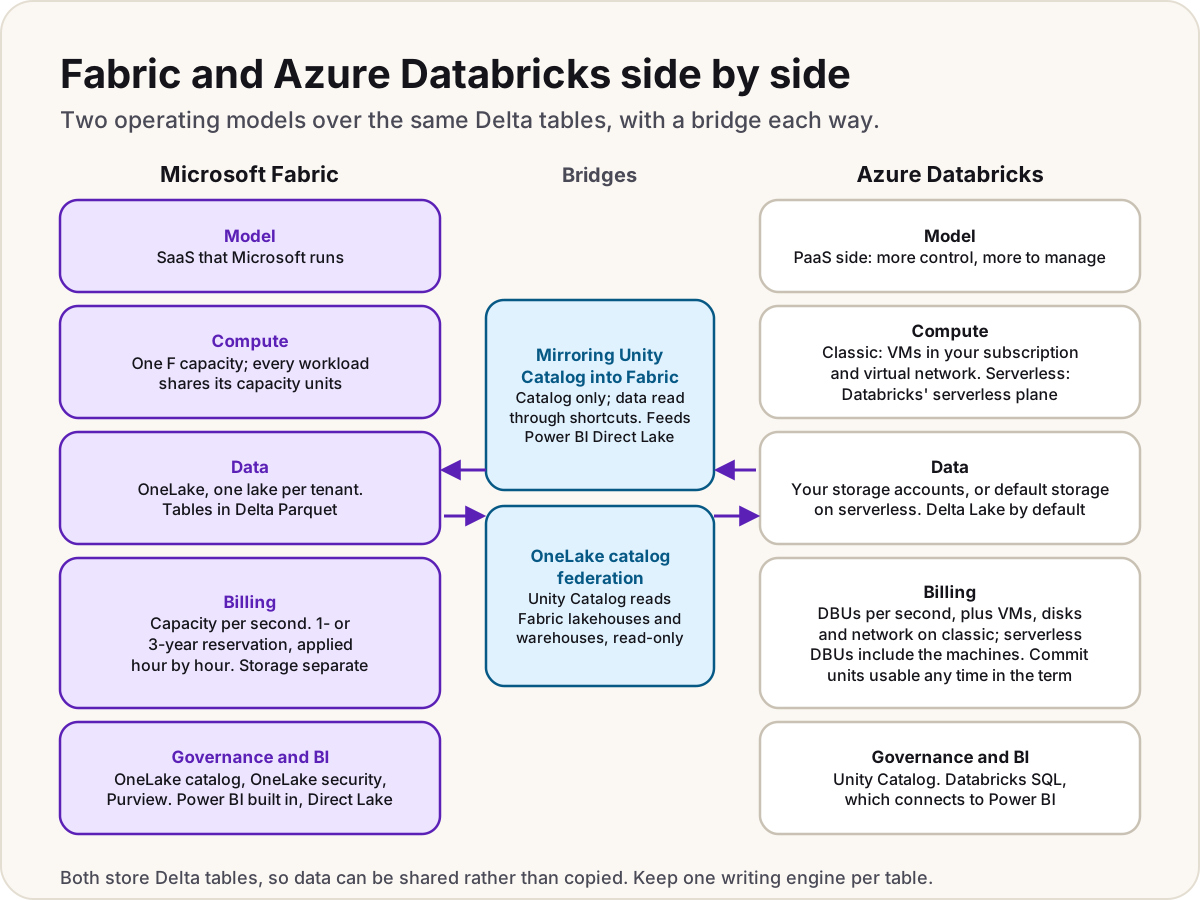
This guide compares the two. For what Fabric is and what it includes, start with what Microsoft Fabric is.
Side by side
| Microsoft Fabric | Azure Databricks | |
|---|---|---|
| Delivered as | SaaS: Microsoft runs the platform | Microsoft places it on the PaaS side: you manage more of it |
| Where compute runs | Inside Fabric, on your capacity | Classic: VMs in your Azure subscription and virtual network. Serverless: in Databricks' serverless compute plane |
| Where data lives | OneLake, one lake per tenant | Your Azure storage accounts; serverless workspaces can use default storage |
| Table format | Delta Parquet; Iceberg tables readable too | Delta Lake by default; Iceberg supported |
| Billing unit | Capacity units (CUs) on an F SKU | Databricks Units (DBUs), plus VMs on classic compute |
| Governance | OneLake catalog, OneLake security, Microsoft Purview | Unity Catalog |
| BI | Power BI built in, with Direct Lake | Databricks SQL and AI/BI dashboards; connects to Power BI |
| Clouds | A Microsoft service; shortcuts can read Amazon S3 and Google Cloud Storage | Azure Databricks on Azure; Databricks also runs on AWS and Google Cloud |
SaaS or PaaS: who runs what
Fabric hides the infrastructure. You don't create storage accounts, clusters or networks; you assign workspaces to a capacity and build. Spark runs on Fabric's own pools, a ready-to-use starter pool or custom pools with predefined node sizes, and every workload shares the same compute and the same lake. The trade-off is less low-level control: you pick a capacity size, not virtual machines.
Azure Databricks splits into a control plane, run by Databricks in its own account (the web app and backend services), and a compute plane where your data is processed:
- On classic compute, clusters are created in a virtual network in your own Azure subscription, so you choose machine types, network rules and storage access, and you look after them.
- On serverless compute, Databricks runs the machines in a serverless plane in the same region, so there's less to manage.
Microsoft's own Fabric deployment guidance describes Azure Data Lake Storage, Azure Databricks and Power BI together as the PaaS route: the most control and flexibility, with more integration, operations and governance work. Its analytics comparison adds that an integrated platform isn't automatically the right choice, and lists what to compare: engines, network isolation, regions, governance boundaries, existing skills and pricing.
How each one bills
Fabric: one capacity for everything
You buy an F capacity in Azure, billed per second with a one-minute minimum, or reserve capacity units for one or three years. Every workload draws on the same capacity units, so one bill covers Spark, SQL, pipelines, real-time data and Power BI. A reservation is applied hour by hour: units you don't use in an hour are lost. OneLake storage is billed separately, and Power BI authors still need Pro or Premium Per User. Our Fabric capacity pricing guide has the prices.
Azure Databricks: DBUs plus the compute underneath
Azure Databricks bills in Databricks Units (DBUs), a normalised unit of processing, metered per second. How many DBUs a workload uses depends on the compute type, the workload (all-purpose, jobs, SQL and so on), the pricing tier and options such as Photon, which increases the DBU count.
- On classic compute, the total is DBUs plus the virtual machines, disks and network the clusters use, billed as ordinary Azure resources.
- On serverless compute, the DBU price already includes the machines.
- You can pre-purchase Databricks commit units (DBCUs) for one or three years. Unlike a Fabric reservation, the pool doesn't expire hour by hour: you draw it down at any time during the term. The discount covers DBUs only, not VMs, storage or networking.
DBU rates differ by workload, tier and region, so price your own case on the Azure Databricks pricing page rather than from a single number. Databricks' own Azure pricing page describes the same model: per-second billing, pay-as-you-go or committed-use discounts.
Warning
Don't compare an F SKU's monthly price with a DBU rate alone. On classic compute the VMs are a separate charge, and Fabric's capacity also covers Power BI, pipelines and SQL. Compare the whole workload: the same jobs, the same hours, the same storage.
Delta Lake on both sides
This is where the two meet. Delta Lake, an open format that adds a transaction log to Parquet files, is the default for every table on Azure Databricks; Databricks created it and still contributes to it. Fabric stores its tables in Delta Parquet in OneLake too. OneLake also exposes the same APIs as Azure Data Lake Storage, so Azure Databricks notebooks can read and write OneLake directly.
The practical result: neither platform locks your tables into a private format, and you can share data between them instead of copying it. Microsoft's guidance warns against writing to the same table path from several engines at once, because the writers can conflict. Pick one writer per table.
Governance: Unity Catalog and OneLake catalog
Unity Catalog is Databricks' governance layer: access control, lineage, auditing and discovery across workspaces, with names in a three-level catalog.schema.table pattern. It's switched on automatically for Azure Databricks workspaces created after 9 November 2023, and needs the Premium plan.
Fabric governs through the OneLake catalog (discovery and governance across the tenant), OneLake security roles down to rows and columns, and Microsoft Purview for sensitivity labels, data loss prevention and audit. Purview can also scan Unity Catalog's metadata, which helps when you run both.
Using both together
Microsoft publishes a reference architecture that does exactly this: Azure Databricks cleans and shapes the data in bronze, silver and gold layers, and Fabric adds Power BI with Direct Lake, real-time dashboards and Copilot on top. Two features join them.
Mirror Unity Catalog into Fabric
Mirroring Azure Databricks copies only Unity Catalog's structure into Fabric. The data stays in your storage and Fabric reads it through shortcuts, so nothing is replicated. You get a mirrored Azure Databricks item and a SQL analytics endpoint, and Power BI can report on it in Direct Lake mode. New and dropped schemas and tables sync automatically by default.
Know the limits before you plan on it:
- Changes can take from a few seconds to several minutes to show in Fabric.
- The storage account behind your Databricks workspace must be reachable from Fabric.
- Not supported: tables with row-level security or column masks, streaming tables, views and materialized views, Delta Sharing tables and federated tables.
- It's available in a listed set of regions; check yours first.
Read OneLake from Databricks
Going the other way, OneLake catalog federation registers a Fabric lakehouse or warehouse in Unity Catalog, so Databricks can query it without copying. It's read-only, needs Databricks Runtime 18.0 or later (or SQL warehouses 2025.40 or later), and a Fabric admin has to switch on three tenant settings first, including Allow apps running outside of Fabric to access data via OneLake. For writing, Databricks can also reach OneLake directly through its ABFS path with a service principal.
Which suits whom
| Your situation | Leans towards |
|---|---|
| Reporting is mostly Power BI, the team is low-code or SQL-first, and you want one bill and no infrastructure | Fabric |
| You already analyse Dataverse or Dynamics 365 data and want it next to your reports | Fabric, with Link to Fabric |
| A code-first data engineering or machine learning team that wants to choose machines, networks and storage | Azure Databricks |
| You run on more than one cloud | Databricks, which also runs on AWS and Google Cloud |
| You already have Databricks pipelines and want Power BI and Copilot on top | Both: mirror Unity Catalog into Fabric |
Do
- Run the same real workload on each before deciding, and compare the whole bill.
- Keep each table to one writing engine when both platforms share data.
- Check the mirroring limits against your tables, especially row-level security and views.
Don't
- Don't move a working Databricks estate just to reach Power BI: mirroring gets you Direct Lake without a migration.
- Don't assume either platform is cheaper from list prices alone.
Still choosing the store itself, rather than the analytics platform? See which Azure data store.
Sources
- What is Azure Databricks? — Microsoft Learn
- High-level architecture (Azure Databricks) — Microsoft Learn
- Azure Databricks components: billing — Microsoft Learn
- Best practices for cost optimization (Azure Databricks) — Microsoft Learn
- Optimize Azure Databricks costs with a prepurchase — Microsoft Learn
- What is Delta Lake in Azure Databricks? — Microsoft Learn
- What is Unity Catalog? — Microsoft Learn
- Unity Catalog setup guide — Microsoft Learn
- Mirroring Azure Databricks Unity Catalog — Microsoft Learn
- Limitations in Microsoft Fabric mirrored databases from Azure Databricks — Microsoft Learn
- Integrate OneLake with Azure Databricks — Microsoft Learn
- Enable OneLake catalog federation — Microsoft Learn
- What is OneLake? — Microsoft Learn
- Understand Microsoft Fabric licenses and capacity — Microsoft Learn
- Save costs with Microsoft Fabric capacity reservations — Microsoft Learn
- Choose a Microsoft Fabric deployment pattern — Microsoft Learn
- Analytics services on Azure and AWS — Microsoft Learn
- Build a modern data platform for SMBs with Microsoft Fabric and Azure Databricks — Microsoft Learn
- Azure Databricks pricing — Databricks
- Azure Databricks pricing — Azure
Was this helpful?
Comments
No comments yet. Share what worked for you.
Sign in to comment. Comments show under a display name you choose, never your email.