What is Power Automate on Windows 11, and do you need it?
Found Power Automate on your PC? Why Windows 11 includes it, what it does, whether you need it, whether it's safe, and how to remove or reinstall it.
Power AutomateQuick reference9 min read
What is Power Automate, and why is it on a Windows 11 PC you never set up for it? It's Power Automate for desktop, Microsoft's app for building desktop flows: automations that click, type and copy data through your apps and websites the way you would. Windows 11 includes it, it's free for personal automation on your own PC, and you can uninstall it if you don't want it.
Why it's on your PC
Microsoft's Windows 11 getting-started page calls Power Automate for desktop a preinstalled app. Microsoft's licensing FAQ describes it slightly differently: you search for Power Automate in the Windows search bar, and the app downloads automatically and opens the first time you select its icon. Either way, it's part of Windows 11, not something another program slipped in.
On Windows 10, you have the same right to use it, but you download it yourself.
To see which version you have, open Settings > Apps and look at the name in the list:
| You see | It's the | What that means |
|---|---|---|
| Power Automate | Microsoft Store version | Updates itself. No admin rights needed to install it |
| Power Automate for desktop | MSI installer version | Needs admin rights. Microsoft's typical case is a managed work device, sometimes with the machine runtime app that connects the PC to Power Automate in the cloud |
You can't have both on one PC. To switch, uninstall the one you have first.
What it does
A desktop flow is a list of steps that Power Automate carries out on the PC, one after another. You build it in a drag-and-drop designer from more than 400 prebuilt actions, or you switch on the recorder and let it turn your own mouse and keyboard activity into steps.
Microsoft's own examples are everyday ones:
- back up a folder you pick into a backup folder on the desktop;
- copy prices from shopping websites into an Excel spreadsheet;
- fill in the same web form or desktop app screen again and again;
- convert files from one format to another.
This is robotic process automation (RPA). Businesses use the same app to automate old systems that have no API, from terminal screens to desktop apps. Our cloud flow, agent flow or desktop flow guide explains where desktop flows fit next to Power Automate's other kinds of flow.
It runs on Windows 10 and Windows 11 (Home, Pro and Enterprise). PCs with Arm processors aren't supported.
Do you need it?
Only if you want to use it. Nothing in Microsoft's documentation says Windows needs it to work.
Do
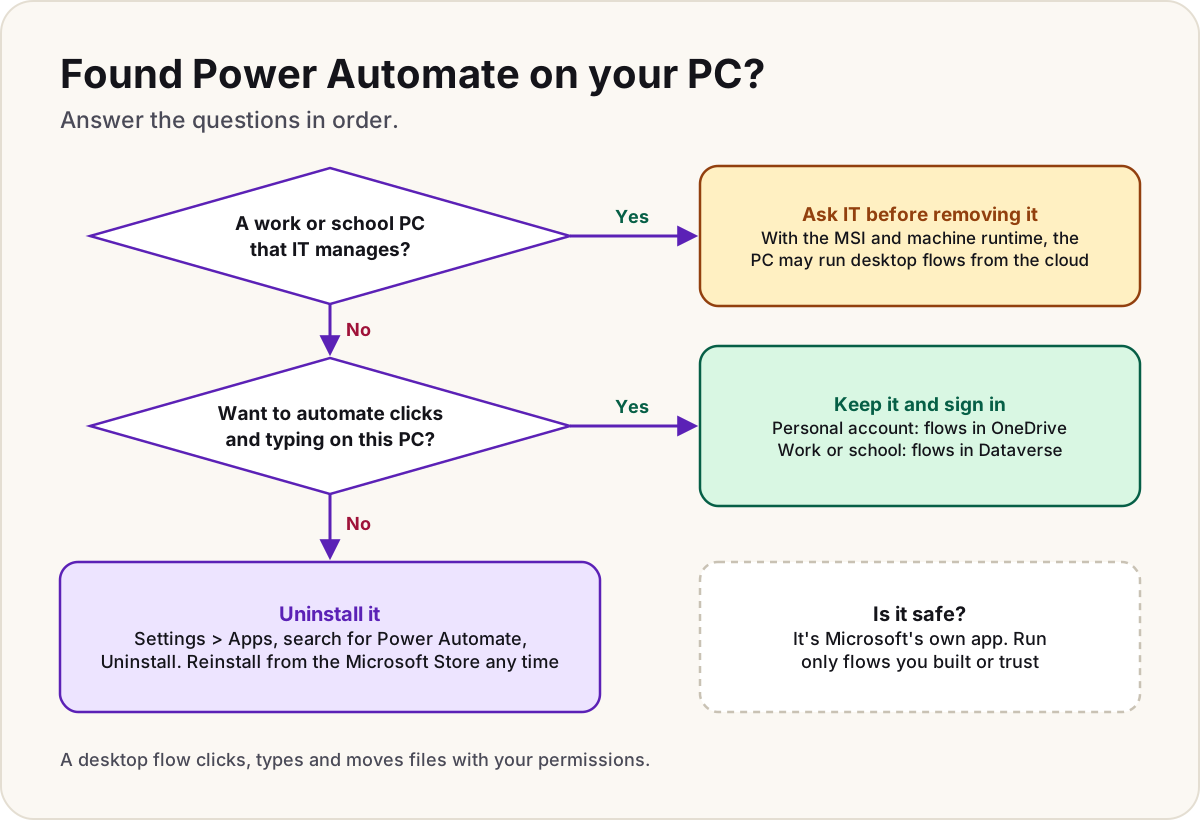
- Keep it if you repeat the same clicks or copy-and-paste jobs every week: that's exactly what it's for.
- On a work or school PC, ask IT before removing it. If they installed the MSI version with the machine runtime, the PC may be registered to run desktop flows from the cloud.
Don't
- Don't expect it to connect your email, Teams or SharePoint. It automates what's on this PC; cloud flows are built on the Power Automate website, and a Windows licence doesn't include them.
- Don't remove it just because you didn't install it. It's part of Windows 11, not malware.
Is it safe?
The app itself is Microsoft's. The Store version comes from the Microsoft Store and updates itself; new MSI installers are served from download.microsoft.com. Things worth knowing:
- It installs a Windows service. Microsoft's architecture page describes UIFlowService, which starts automatically and runs as its own account. It connects out to Microsoft's cloud over HTTPS, and no inbound ports need to be open on the PC.
- It sends diagnostic data. Required data covers things like device configuration, performance and errors. Microsoft says it doesn't include your name, email address or the content of your files. Optional data is off unless you agreed to it at installation or turned it on later on the Data collection tab of the console's Settings (only admins can change it).
- A flow can do anything you can do. That's the real risk. A desktop flow clicks, types and moves files with your permissions, so run only flows you built or trust. Power Automate asks you to confirm before a flow starts from a link or desktop shortcut; leave Display confirmation dialog when invoking flows externally switched on. Microsoft warns that turning it off could let a questionable flow shared by a malicious actor run without notice.
- On work PCs, IT is in control. Admins can block sign-in with personal Microsoft accounts, or with work accounts that have no RPA licence, using documented registry settings.
Personal account or work account
The first time you open it, Power Automate asks you to sign in. What you get depends on the account:
| Personal Microsoft account | Work or school account | Organisation premium account | |
|---|---|---|---|
| Cost | No extra cost | No extra cost | A paid licence or a trial |
| Where flows are stored | Your OneDrive | Dataverse in your organisation's default environment | Dataverse, in any environment |
| Designer, recorder, 400+ actions, error handling | Yes | Yes | Yes |
| Start or schedule flows from cloud flows | No | No | Yes |
| Share flows with colleagues | No | No | Yes |
| Premium and custom connectors, AI Builder, unattended runs | No | No | Yes |
Three details catch people out:
- Personal accounts still work in the desktop app. Microsoft stopped personal accounts signing in to the Power Automate website and mobile app in July 2025, and deleted cloud flows tied to them. Microsoft says Power Automate for desktop wasn't affected and still works with personal accounts.
- A work or school account needs a Dataverse database in the organisation's default environment before it can create desktop flows. If there isn't one, you're prompted to create it.
- Copilot in Power Automate for desktop doesn't work with a personal Microsoft account.
On Windows 11 Home you can build flows and run them on the PC, but you can't start them from the cloud.
What's free and what costs money is a longer story, told in is Power Automate Desktop free?.
Remove it
Microsoft's documented steps:
- Open the Start menu and select Settings > Apps.
- Search for Power Automate, and select it.
- Select Uninstall.
(Microsoft's troubleshooting pages give the same list as Settings > Apps > Installed apps.) An IT department can remove the MSI version silently from a command prompt:
Setup.Microsoft.PowerAutomate.exe -Silent -Uninstall
Microsoft's uninstall steps don't mention your flows. What it does document is where they're kept: in your OneDrive for a personal account, and in Dataverse for a work or school account, so they belong to your account rather than living only in the app.
Reinstall it
From the Microsoft Store, which needs no admin rights and keeps itself up to date:
- Go to the Power Automate for desktop page in the Microsoft Store.
- Select Download, or View in Store to open the Store app.
Or with the MSI installer, which needs admin rights: download Setup.Microsoft.PowerAutomate.exe from Microsoft's install page, run it, choose the parts you want (the app, the machine runtime app, and Java automation support), agree to the terms and select Install. The machine runtime, which connects the PC to cloud flows, comes only with the MSI (it can sit alongside the Store app), and registering a machine needs an organisation premium account. Desktop flow won't run from the cloud covers what that set-up involves.
Warning
If Power Automate says it needs an update but can't apply it right now the first time you open it, the usual cause is that the Windows Update service isn't running. Start that service, or run the Windows Update troubleshooter, then open Power Automate again. Microsoft's third fix is to uninstall it and reinstall it from the Microsoft Store.
Once you're building flows, UI elements that survive changes shows how to stop them breaking when an app updates, and Power Automate licensing explained covers the paid plans if you outgrow the free app.
Sources
- Get started with Power Automate in Windows 11 — Microsoft Learn
- Power Automate licensing FAQ: capabilities included in Windows licences — Microsoft Learn
- Install Power Automate — Microsoft Learn
- Install Power Automate silently — Microsoft Learn
- Prerequisites and limitations, and the sign-in account comparison — Microsoft Learn
- Get started with a Microsoft account — Microsoft Learn
- Get started with a work or school account — Microsoft Learn
- Introduction to desktop flows — Microsoft Learn
- Power Automate for desktop architecture — Microsoft Learn
- Diagnostic data collection in Power Automate — Microsoft Learn
- Power Automate console: settings — Microsoft Learn
- Run desktop flows via URL or desktop shortcuts — Microsoft Learn
- Governance in Power Automate for desktop — Microsoft Learn
- Deprecation of support for personal Microsoft service accounts in Power Automate — Microsoft Learn
- Get started with Copilot in Power Automate for desktop — Microsoft Learn
- "Power Automate needs an update" message — Microsoft Learn
- Troubleshoot installation issues in Power Automate for desktop — Microsoft Learn
Was this helpful?
Comments
No comments yet. Share what worked for you.
Sign in to comment. Comments show under a display name you choose, never your email.