Is Power Automate Desktop free? What's free and what needs a licence
Yes, for flows you build and run yourself on your own Windows PC. What's free, what needs Premium or Process, and whether you can schedule a desktop flow for free.
Power AutomateQuick reference9 min read
Is Power Automate Desktop free? Yes, for the core job: Power Automate for desktop (Microsoft's name for the app) comes with Windows 11, is a free download for Windows 10, and lets anyone build desktop flows and run them on their own PC while they watch. You pay once a flow has to run without you starting it: from a cloud flow, on a schedule, unattended, or shared with colleagues.
Note
Checked against Microsoft Learn on 22 October 2026, and against Microsoft's Power Automate pricing page.
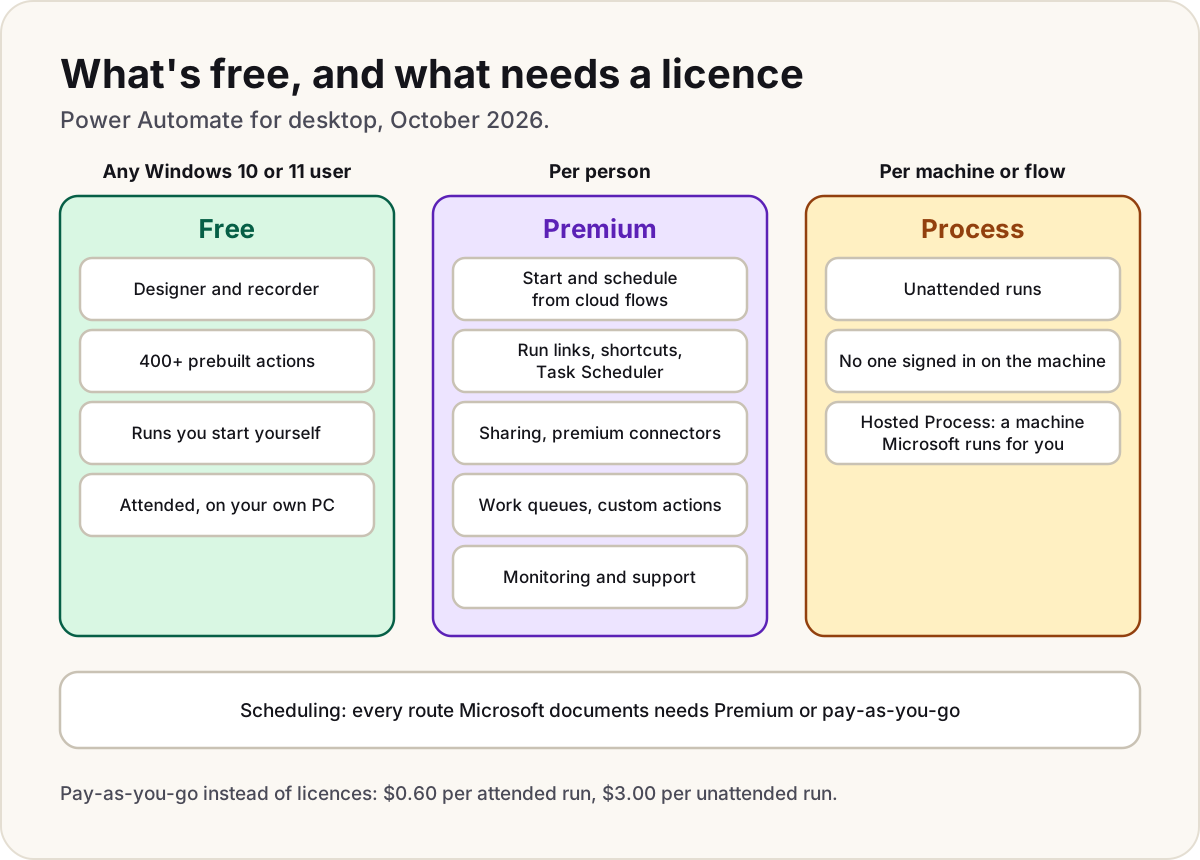
What's free
Microsoft's licensing FAQ says Windows 11 users can use attended desktop flows for personal productivity, and Windows 10 users have the same rights once they download the app. Signing in with a personal Microsoft account or a work or school account costs nothing extra. Either way you get the full authoring tools:
- the drag-and-drop designer and the recorder;
- more than 400 prebuilt actions, including web automation in Edge, Chrome and Firefox, Excel, files and folders, and older systems such as SAP, terminal emulators, Java apps and Citrix;
- error handling, so a flow can recover instead of stopping;
- running a flow from the console or the designer, on your own PC, while you're signed in.
The free version has firm edges:
| Limit | Personal Microsoft account | Work or school account |
|---|---|---|
| Where flows are saved | Your OneDrive | Dataverse, in the organisation's default environment only |
| Share a flow with someone | No | No |
| Start it from a cloud flow or a schedule | No | No |
| Premium and custom connectors | No | No |
| Microsoft support | No | No |
A work or school account also needs a Dataverse database in the default environment before it can save desktop flows. And on Windows 10 or 11 Home, even a paid account can't start desktop flows from the cloud.
Note
A Microsoft 365 licence doesn't add desktop flow rights. Microsoft's comparison of the licences that include Power Automate lists attended RPA as No for Office 365, Dynamics 365 and Power Apps, and default environment only for Windows.
New to the app itself? What is Power Automate on Windows 11 covers why it's on your PC, whether it's safe, and how to remove it.
What needs Premium
Power Automate Premium licenses a person. Microsoft's list of premium RPA features is long; these are the ones people run into first:
| You want to | Free | With Premium |
|---|---|---|
| Start a desktop flow from a cloud flow, on a schedule or when an email arrives | No | Yes, attended (you signed in on the PC) |
| Start a flow from a run link, a desktop shortcut or Windows Task Scheduler | No | Yes |
| Share flows as co-owner or user | No | Yes |
| Work in more than one environment | No | Yes |
| Use premium and custom connectors in the cloud flow | No | Yes |
| Work queues, custom actions, UI element collections, credentials from Azure Key Vault | No | Yes |
| Central monitoring, run queues, analytics | No | Yes |
| Register a machine or machine group | No | Yes |
| Help from Microsoft support | No | Yes |
Premium also covers process mining, and is the licence Microsoft says every RPA developer needs to build and manage desktop flows in the Power Automate portal. Premium includes one attended bot: the flow runs on your machine, in your signed-in session.
What needs a Process licence
Unattended runs, where Power Automate signs in to a machine on its own and runs the flow with nobody there, need a Power Automate Process licence. You buy one per machine, or more if you want several flows running on that machine at the same time. Hosted Process adds a machine that Microsoft runs for you.
Process licenses the machine or flow, not a person, so the people who build the flows still need Premium. Our Power Automate licensing explained guide has the prices, what each licence covers and the fine print; on Microsoft's pricing page in October 2026, Premium was $15 per user per month and Process $150 per bot per month, billed yearly.
Pay-as-you-go instead
An environment linked to an Azure subscription can pay per run instead of buying licences. In October 2026 that was $0.60 per attended run (free for users whose own licence already includes attended RPA) and $3.00 per unattended run. In such an environment, desktop flow users get most premium features within that environment. Process licences don't work in a pay-as-you-go environment.
Can you schedule a desktop flow without Premium?
Not in any way Microsoft documents. These are the documented routes, and what each needs:
| Route | What Learn says it needs |
|---|---|
| A scheduled cloud flow that calls Run a flow built with Power Automate for desktop | A work or school account, a registered machine, and Premium for attended runs; for unattended runs, Process (this page still calls it the unattended add-on) |
Windows Task Scheduler running a run link (ms-powerautomate:/console/flow/run?...) | A Power Automate Premium plan or access to a pay-as-you-go environment |
| A desktop shortcut or run link you open yourself | The same: Premium or pay-as-you-go |
| Schedules for desktop flows, set without a cloud flow | Announced in Microsoft's 2026 release wave 1 plan with a public preview in August 2026. Learn doesn't yet document how to use it or what it needs, so don't plan on it being free |
The Task Scheduler route surprises people, because it runs entirely on the PC. Microsoft still lists Premium or pay-as-you-go as a prerequisite for run links and shortcuts.
Do
- Run your free flows from the console: select the flow and Run. That's the fully free route.
- If you only need a flow on a timer now and then, start a trial to see whether scheduling is worth paying for (below).
Don't
- Don't turn off Display confirmation dialog when invoking flows externally to make run links start silently. Microsoft warns it lets a questionable flow shared by a malicious actor run without notice.
Trying the paid features
People with a work or school account can start a Power Automate trial from Go premium in the Power Automate for desktop console, or from the desktop flows section of the Power Automate portal. Learn says the self-service trial lasts 90 days and includes premium connectors and one attended and one unattended bot. Admins can switch self-service trials off for the whole tenant.
Warning
Microsoft's pages disagree on the trial length. Learn's licensing pages say the self-service trial lasts 90 days; Microsoft's pricing page (October 2026) advertises a 30-day free trial. Admin-managed trials, which a global admin starts in the Microsoft 365 admin center, last 30 days and can be extended once.
Desktop or cloud?
The other half of Power Automate is cloud flows, built on the Power Automate website, which connect services such as Outlook, Teams and SharePoint through connectors. The licensing is different:
| Power Automate for desktop | Cloud flows | |
|---|---|---|
| What it automates | Apps and websites on a Windows PC, by clicking and typing | Online services, through connectors and APIs |
| Included with a Windows licence | Yes, attended, on your own PC | No |
| Included with Microsoft 365 (work or school) | Only the free app, as above | Yes, with standard connectors |
| Personal Microsoft account | Works | No longer supported since July 2025 |
The two meet when a cloud flow starts a desktop flow, and that's exactly the point where Premium starts. Our guide to cloud, agent and desktop flows compares all three, and if a cloud flow can't reach your machine, desktop flow won't run from the cloud has the fixes.
Sources
- Power Automate licensing FAQ — Microsoft Learn
- Premium RPA features — Microsoft Learn
- Prerequisites and limitations, and the sign-in account comparison — Microsoft Learn
- Get started with a work or school account — Microsoft Learn
- Get started with a Microsoft account — Microsoft Learn
- Trigger desktop flows from cloud flows — Microsoft Learn
- Run desktop flows via URL or desktop shortcuts — Microsoft Learn
- Run unattended desktop flows — Microsoft Learn
- Manage machine groups — Microsoft Learn
- Types of Power Automate licenses — Microsoft Learn
- Deep dive on specific licenses: trials — Microsoft Learn
- Pay-as-you-go meters — Microsoft Learn
- Schedule desktop flows directly (2026 release wave 1 plan) — Microsoft Learn
- Deprecation of support for personal Microsoft service accounts in Power Automate — Microsoft Learn
- Power Automate pricing — Microsoft
Was this helpful?
Comments
No comments yet. Share what worked for you.
Sign in to comment. Comments show under a display name you choose, never your email.