Power Automate expressions cheat sheet: functions with examples
Power Automate expressions list by job: text, arrays, logic, conversion, dates and step references, each with syntax and an example, plus null-safe ? and the traps.
Power AutomateQuick reference13 min read
This cheat sheet lists the Power Automate expressions makers use most, grouped by job: text, arrays, logic, conversion, dates and reading earlier steps. Each entry has the syntax, one line on what it does, and an example with its result. The same functions run in Azure Logic Apps, because both use Microsoft's Workflow Definition Language.
Where expressions go
- New designer: select the field, then select fx (Insert expression) next to the lightning bolt (Insert dynamic content). Type the function, use the Dynamic content tab inside the editor to drop in values from earlier steps, then select Add. The editor suggests functions and their parameters as you type.
- Classic designer: select Add dynamic content, then the Expression tab, type the function, and select OK.
- Type the function without
@. Microsoft's own steps typeformatDateTime(...)straight into the editor; the designer handles the rest. - Text in single quotes:
'Approved'. Numbers and arrays need none:length('Hello'), notlength("Hello").
Behind the designer, the flow's definition marks an expression with @. That changes what the result is:
| In the definition | What you get | Example |
|---|---|---|
@<expression> as the whole value | The function's own type: a number, array, object or Boolean | @length(body('Get_items')?['value']) returns 12 |
@{<expression>} inside text | Always text, joined into the surrounding words | Order @{triggerBody()?['Id']} received |
No @ at all | The characters exactly as typed | utcNow() comes back as the text utcNow() |
@@ at the start | A literal @ | @@ gives @ |
You also write the @ yourself in a few places, such as a trigger condition: @equals(triggerBody()?['Status'], 'Approved').
Text functions
Positions start at 0.
| Function | Syntax | What it does | Example → result |
|---|---|---|---|
concat | concat('<text1>', '<text2>', …) | Joins two or more strings | concat('INV-', '0042') → INV-0042 |
substring | substring('<text>', <start>, <length>?) | Characters from a start position, for a length (not an end position) | substring('Invoice-2026-0042', 8, 4) → 2026 |
slice | slice('<text>', <start>, <end>?) | Characters from a start position up to, not including, an end; negative counts from the end | slice('Hello World', -2) → ld |
replace | replace('<text>', '<old>', '<new>') | Swaps a substring for new text; case-sensitive; returns the original if there's no match | replace('2026/03/18', '/', '-') → 2026-03-18 |
split | split('<text>', '<delimiter>') | Breaks text into an array | split('a_b_c', '_') → ["a","b","c"] |
toLower / toUpper | toLower('<text>') | Changes case | toLower('Hello World') → hello world |
trim | trim('<text>') | Removes spaces at the start and end | trim(' Hello ') → Hello |
indexOf | indexOf('<text>', '<search>') | Position of the first match, not case-sensitive; -1 if none | indexOf('hello world', 'world') → 6 |
startsWith / endsWith | startsWith('<text>', '<search>') | true or false; not case-sensitive | endsWith('report.PDF', '.pdf') → true |
Last 4 characters:     substring(variables('Code'), sub(length(variables('Code')), 4), 4)
Second part of a name: split(triggerBody()?['FullName'], ' ')[1]
Domain of an email:    last(split(triggerBody()?['Email'], '@'))
New line in text:      concat('Line 1', decodeUriComponent('%0A'), 'Line 2')
substringfails if it runs past the end of the text, unlike similar functions in other languages. Check the length first, or useslice, which stops quietly at the end.splitkeeps spaces:split('a, b, c', ',')gives"a"," b"and" c". Trim each item afterwards.\nisn't a line break in an expression. UsedecodeUriComponent('%0A'), or<br>in HTML.
Collection functions
| Function | Syntax | What it does | Example → result |
|---|---|---|---|
length | length(<array or text>) | Number of items, or characters | length(body('Get_items')?['value']) → the number of items |
first / last | first(<array or text>) | First or last item (or character) | first(createArray(0, 1, 2)) → 0 |
union | union(<array1>, <array2>, …) | Every item from all the arrays, without duplicates | union(createArray(1, 2, 3), createArray(1, 2, 10)) → [1,2,3,10] |
contains | contains(<collection>, '<value>') | Text contains a substring, array contains a value, or object has a key; case-sensitive | contains(createArray('North', 'East'), 'East') → true |
empty | empty(<collection>) | true if the text, array or object is empty | empty('') → true |
join | join(<array>, '<delimiter>') | One string from every item of an array | join(createArray('a', 'b', 'c'), '; ') → a; b; c |
firstof an empty array returnsnull, not an error. Check withempty()before you use the result.containson an array of objects compares whole objects, not one field. Filter the array with Filter array and check thelengthof the result instead.joinneeds plain values. For an array of records, pull out one field with a Select action first.
Logical functions
| Function | Syntax | What it does | Example → result |
|---|---|---|---|
if | if(<test>, <if true>, <if false>) | One of two values | if(equals(1, 1), 'yes', 'no') → yes |
equals | equals(<value1>, <value2>) | true if they're equivalent | equals(triggerBody()?['Status'], 'Approved') |
and / or | and(<test1>, <test2>, …) | All true / at least one true | and(greater(1, 10), equals(0, 0)) → false |
not | not(<test>) | The opposite | not(contains('200 Success', 'Fail')) → true |
greater | greater(<value>, <compareTo>) | true if the first is bigger; equal gives false | greater(10, 10) → false |
less, greaterOrEquals, lessOrEquals | Same shape as greater | The other comparisons, for numbers and text | lessOrEquals(10, 10) → true |
There are no operators such as >, = or && in these expressions: every comparison is a function, and conditions nest, as in or(and(A, B), C). When a comparison meets a null, it treats it as empty text (''). The function reference lets and and or take more than two tests; Microsoft's conditions tutorial says they take two. Nesting pairs, as in and(A, and(B, C)), fits both descriptions.
Conversion functions
| Function | Syntax | What it does | Example → result |
|---|---|---|---|
int | int('<text>') | Text to a whole number | int('10') → 10 |
float | float('<text>', '<locale>'?) | Text to a decimal number, optionally read in a locale | float('10.000,333', 'de-DE') → 10000.333 |
string | string(<value>) | Any value to text; null becomes '' | string(10) → "10" |
json | json('<text>') | JSON text (or XML) to an object or array | json('{"name":"Alice"}')?['name'] → Alice |
base64 | base64('<text>') | Encodes text as base64 | base64('hello') → aGVsbG8= |
base64ToString | base64ToString('<base64>') | Decodes base64 back to text | base64ToString('aGVsbG8=') → hello |
formatNumber | formatNumber(<number>, '<format>', '<locale>'?) | A number as formatted text | formatNumber(1234567890, '#,##0.00', 'en-US') → 1,234,567,890.00 |
int('3.5')fails; it doesn't round. Useint(float(...))when the text might have decimals.- Don't wrap an action's output in
json()when it's already an object; most connector outputs are. That causes an error. Usejson()on text only. Dynamic content missing covers when to parse and when to read values directly. - You rarely need the base64 functions. The platform does most base64 encoding and decoding for you, and Microsoft warns that adding these functions by hand can make them vanish from the designer, leaving just their inputs.
Dates and times
| Function | Syntax | What it does | Example → result |
|---|---|---|---|
utcNow | utcNow('<format>'?) | The current date and time, in UTC | utcNow('yyyy-MM-dd') → 2026-10-22 |
addDays | addDays('<timestamp>', <days>, '<format>'?) | Adds (or, with a negative number, subtracts) days | addDays('2018-03-15T00:00:00Z', -5) → 2018-03-10T00:00:00.0000000Z |
formatDateTime | formatDateTime('<timestamp>', '<format>'?, '<locale>'?) | A timestamp as text in your format | formatDateTime('2026-03-18T14:30:00Z', 'dd MMM yyyy') → 18 Mar 2026 |
convertFromUtc | convertFromUtc('<timestamp>', '<zone>', '<format>'?) | UTC to a named time zone | convertFromUtc(utcNow(), 'GMT Standard Time', 'HH:mm') |
convertTimeZone | convertTimeZone('<timestamp>', '<from zone>', '<to zone>', '<format>'?) | Any zone to any zone | convertTimeZone('2018-01-01T08:00:00.0000000Z', 'UTC', 'Pacific Standard Time') → 2018-01-01T00:00:00.0000000 |
ticks | ticks('<timestamp>') | The timestamp as a count of 100-nanosecond ticks since 1 January 0001 | ticks('2026-03-18') |
Days between two dates: div(sub(ticks(variables('End')), ticks(variables('Start'))), 864000000000)
Is A after B?           greater(ticks(variables('A')), ticks(variables('B')))
Today in London:        convertFromUtc(utcNow(), 'GMT Standard Time', 'dd/MM/yyyy')
- Format codes are case-sensitive:
MMis the month andmmis minutes;ddis the day. - Time zone names come from Microsoft's list of Windows default time zones, such as
GMT Standard TimeorAUS Eastern Standard Time. Microsoft notes you may have to drop punctuation from a name. - Compare dates with
ticks, not as text: text only sorts correctly in theyyyy-MM-ddshape. - One day is 864,000,000,000 ticks. Microsoft's expression cookbook says there's no built-in date difference function and uses this pattern, but the function reference does list
dateDifference(), which returns a timespan as text, such as1268.00:00:00. Usetickswhen you need a number.
For the time zone fixes in detail, see Power Automate dates and time zones.
Referencing earlier steps
| Function | Syntax | What it returns | Example |
|---|---|---|---|
triggerBody | triggerBody() | The trigger's body | triggerBody()?['Title'] |
triggerOutputs | triggerOutputs() | The trigger's whole output: headers and body | triggerOutputs()?['headers'] |
body | body('<action name>') | An action's body | body('Get_user')?['mail'] |
outputs | outputs('<action name>') | An action's whole output: status code, headers and body | outputs('Compose') |
items | items('<loop name>') | The current item of a named Apply to each loop | items('Apply_to_each')?['Email'] |
item | item() | The current item in a repeating action, such as Apply to each or Filter array | item()?['Status'] |
variables | variables('<name>') | A variable's value | variables('Total') |
parameters | parameters('<name>') | A parameter defined in the flow's definition | parameters('customerName') |
result | result('<scope name>') | The inputs, outputs and status of each top-level action in a scope or loop | result('Try') |
workflow | workflow() | Details of the flow and the current run | workflow()?['tags']?['flowDisplayName'] |
- Action names use underscores for spaces: the action Get user is
body('Get_user'). - Path-style keys work too. The designer sometimes writes
outputs('Get_secret')?['body/value']for a field inside the body. - Environment variables in a solution appear in the Dynamic content list; pick them from there rather than typing a reference.
result('Try')is how a Catch scope finds the failed action; child flows that fail well uses it to send the parent a proper error report, andworkflow()to link to the failed run.
Null-safe access and coalesce
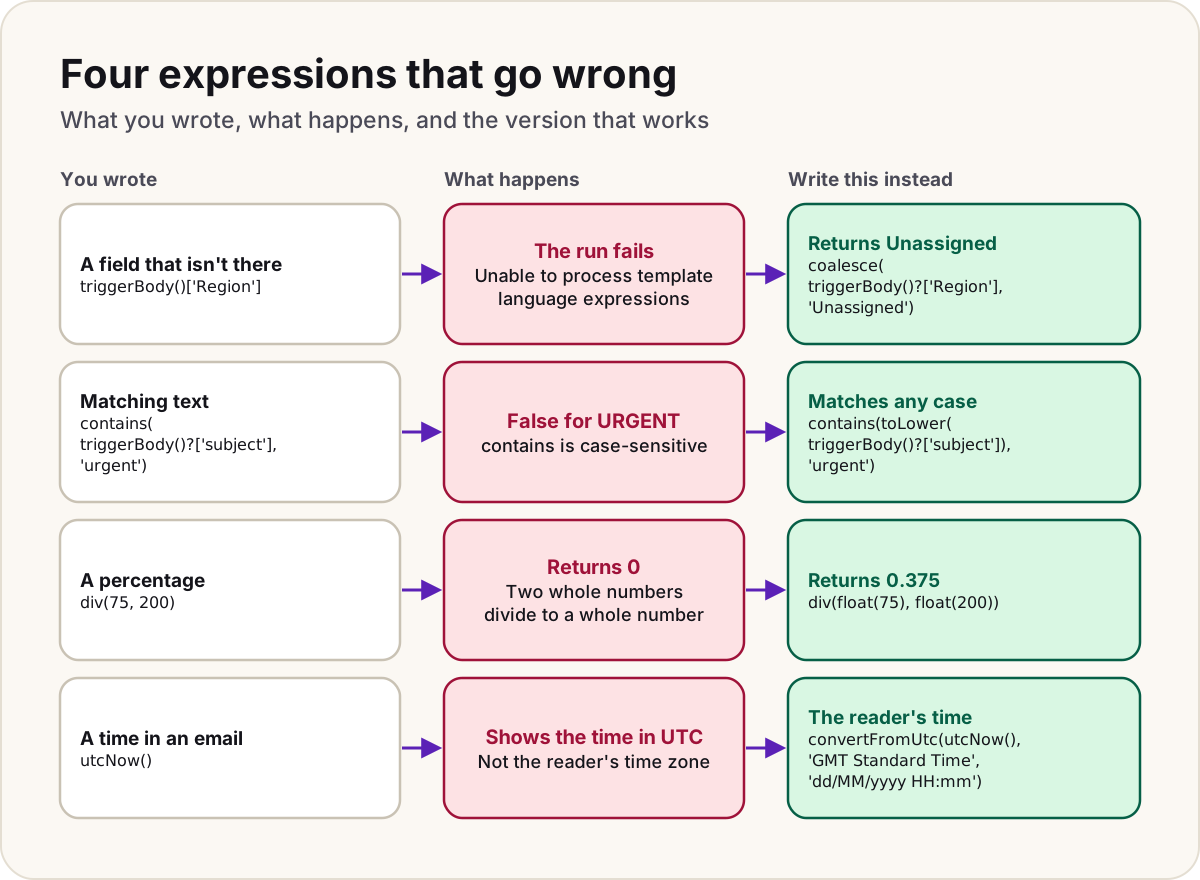
A field that's missing or null stops the run with Unable to process template language expressions. The question mark operator prevents that.
| You write | When the field is missing | Use it for |
|---|---|---|
triggerBody()['Region'] | The run fails | Never, for optional fields |
triggerBody()?['Region'] | Returns null | Any field that might be absent |
body('HTTP')?['data']?['items']?[0]?['name'] | Returns null at the first missing level | Deep paths |
coalesce(triggerBody()?['Region'], 'Unassigned') | Returns Unassigned | A default value |
- Put
?before every level of a path, not only the first. coalescereturns the first value that isn'tnull, and an empty string isn'tnull. For a field that can arrive as'', test it:if(empty(triggerBody()?['Region']), 'Unassigned', triggerBody()?['Region']).empty()is true for''andnull, but errors on a number, such asempty(0).
Traps
Warning
Typed straight into the box, a function doesn't run. Microsoft's steps add every expression through fx (or the Expression tab), and in the definition only a value marked with @ is evaluated. Anything else comes back as the characters you typed, so an email reads utcNow() instead of a date. Delete the text and add it through fx.
Don't
- Don't write
Order @triggerBody()?['Id'] receivedin the definition. Inside text, an expression needs braces,Order @{triggerBody()?['Id']} received, or it may not be read as an expression at all. - Don't trust
containsorreplaceto ignore case. Both are case-sensitive;indexOfisn't. Wrap both sides intoLower. - Don't divide two whole numbers and expect a fraction:
div(75, 200)is0anddiv(11, 5)is2. Usediv(float(75), float(200)). - Don't format
utcNow()and send it to people. It's UTC; convert it first. - Don't use
toUpperon one side of a comparison only. Normalise both sides.
Do
- Use
?['field']for every optional field, andcoalescefor a default. - Give actions meaningful names, so
body('Get_manager')says what it reads. - Test an awkward expression in a Compose action first, and read its output in the run history.
Sources
- Reference guide to functions in expressions for workflows in Azure Logic Apps and Power Automate — Microsoft Learn
- Schema reference guide for the Workflow Definition Language in Azure Logic Apps — Microsoft Learn
- Expression cookbook for cloud flows — Microsoft Learn
- Use expressions in conditions to check multiple values — Microsoft Learn
- Explore the cloud flows designer — Microsoft Learn
- Classic designer vs. new designer for cloud flows — Microsoft Learn
- Customize or format date and time values in a flow — Microsoft Learn
- Getting errors with null fields — Microsoft Learn
- Create environment variables — Microsoft Learn
- Use environment variables for Azure Key Vault secrets — Microsoft Learn
- Default time zones — Microsoft Learn
Was this helpful?
Comments
No comments yet. Share what worked for you.
Sign in to comment. Comments show under a display name you choose, never your email.