Power Automate vs n8n vs Zapier: which automation tool fits
Power Automate, n8n and Zapier compared from each vendor's own pages: hosting, connectors, pricing, Microsoft 365 governance, desktop RPA and AI agents.
Power AutomateChoose a tool13 min read
Power Automate vs n8n vs Zapier comes down to three things: where the automation runs, what it needs to reach, and who has to govern it. Power Automate lives inside Microsoft 365 and Power Platform, is governed by the same admins and data policies, and is the only one of the three with desktop automation (RPA) of its own. n8n is the one you can run on your own servers. Zapier is fully hosted and lists the most app integrations. All three now have AI agent features.
Note
Checked against Microsoft Learn on 22 October 2026, and against n8n's and Zapier's own documentation and pricing pages, and UiPath's product page, the same day.
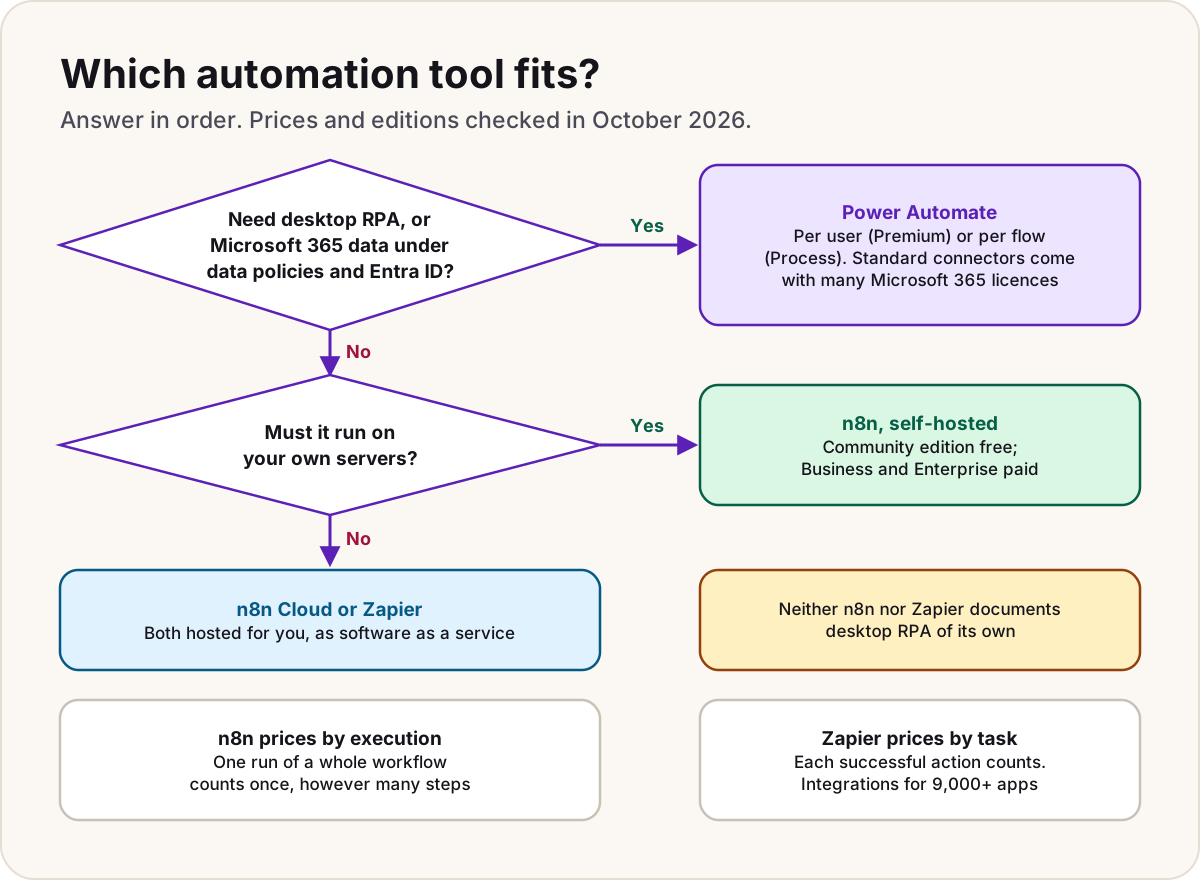
Who each one is for
| Power Automate | n8n | Zapier | |
|---|---|---|---|
| Made by | Microsoft, as part of Power Platform | n8n | Zapier |
| Aimed at | Business users, makers and IT in Microsoft 365 organisations | Technical teams who want control, code steps and the option to self-host | Business users connecting many SaaS apps without code |
| Hosting | Microsoft's cloud; desktop flows run on your own Windows machines | n8n Cloud, or self-hosted on your own infrastructure | Zapier's cloud only |
| Integrations | 1,000+ connectors, standard or premium | 2,000+ integrations listed, all included in every plan | 9,000+ apps; some "premium apps" need a paid plan |
| You pay for | People (Premium) or flows and machines (Process) | Workflow executions | Tasks (successful actions) |
| Sign-in | Microsoft Entra ID work accounts | Own accounts; SAML or OIDC single sign-on on paid editions | Own accounts; SAML single sign-on from the Team plan |
| Desktop RPA | Yes: desktop flows | Not documented | Not documented |
| AI and agents | Copilot in the designer, generative actions (preview), agent flows in Copilot Studio | AI Agent node, agents (preview), MCP | Zapier Agents, Copilot, MCP, AI steps |
Hosting: SaaS or your own servers
Power Automate is a Microsoft cloud service. Cloud flows run in Microsoft's cloud, and Microsoft documents no self-hosted version. Two parts reach into your own network: desktop flows run on Windows machines you register, and the on-premises data gateway lets cloud flows read and write data held on your own servers.
n8n offers both. n8n Cloud is fully managed. Self-hosting runs n8n on your own infrastructure, on-premises or in a private cloud, with Docker or Docker Compose (n8n has deprecated the npm install from version 3.0). n8n's own guidance is plain about the trade: self-hosting needs technical expertise for installation, configuration and maintenance, and is its recommended route when you need full control. Of the paid plans, Business is self-hosted only; Enterprise is either.
Warning
n8n's free Community edition isn't open source in the usual sense. Its Sustainable Use License lets you use and modify it for your own internal business purposes, or for non-commercial or personal use, and only lets you give it to others free of charge for non-commercial purposes. Some enterprise source files are excluded altogether. Read the licence before building a product on it.
Zapier is cloud-only. Its own n8n comparison describes it as fully managed cloud infrastructure, and says it can't replace n8n where an automation must run self-hosted, air-gapped or on-premises.
Connectors and integrations
| Power Automate | n8n | Zapier | |
|---|---|---|---|
| Count the vendor gives | More than 1,000 connectors (one Microsoft page says 1,400+) | More than 2,000 integrations | More than 9,000 apps |
| Tiers | Standard and premium; premium needs a premium licence | None: every plan includes every integration | "Premium apps" only on paid plans |
| Anything without a connector | Custom connectors and the HTTP connector (both premium) | HTTP Request node, GraphQL and code steps in JavaScript or Python | Webhooks (paid plans) and Code by Zapier |
| Microsoft 365 apps | Native connectors for SharePoint, Outlook, Teams, Dataverse, Approvals and more | Nodes for Outlook, Teams, SharePoint, Excel, OneDrive, Entra ID and Dataverse | Integrations for Microsoft Teams, SharePoint and Outlook, among others |
The raw count matters less than whether the services you use have the triggers and actions you need. For a Microsoft 365 organisation, Power Automate's depth on SharePoint, Teams, Outlook and Dataverse is the deciding factor more often than the long tail of SaaS apps. For a team living in non-Microsoft SaaS tools, Zapier's catalogue is the widest.
Pricing models (October 2026)
The three count usage in completely different ways, so compare a real workload, not the headline price.
Power Automate
From Microsoft's pricing page, in US dollars, paid yearly:
| Plan | Price |
|---|---|
| Power Automate Premium | $15 per user/month |
| Power Automate Process | $150 per bot/month |
| Power Automate Hosted Process | $215 per bot/month |
Many Microsoft 365 licences already include cloud flows with standard connectors, so a lot of automation costs nothing extra. Usage is counted in Power Platform requests: the trigger and every action count, retries and loop iterations included, against a daily limit (6,000 on Microsoft 365 licences, 40,000 on Premium, 250,000 per Process licence). What each licence covers, and whose licence a run uses, is in Power Automate licensing explained.
n8n
From n8n's pricing page, which showed prices in euros, billed annually (n8n says annual billing saves 17%):
| Plan | Price | Executions a month | Hosting |
|---|---|---|---|
| Starter | €20/month | 2,500 | n8n Cloud |
| Pro | €50/month | 10,000 | n8n Cloud |
| Business | €667/month | 40,000 | Self-hosted only |
| Enterprise | Contact sales | Custom | Cloud or self-hosted |
| Community edition | Free | Not metered | Self-hosted |
Every plan includes unlimited users, unlimited workflows and every integration. An execution is one run of a whole workflow, whatever its number of steps. SSO, environments and Git version control start at Business.
Zapier
From Zapier's pricing page, in US dollars:
| Plan | Price | What you get |
|---|---|---|
| Free | $0 | 100 tasks a month, two-step Zaps |
| Professional | From $19.99/month billed yearly | Multi-step Zaps, premium apps, webhooks |
| Team | From $69/month billed yearly | 25 users, shared Zaps and connections, SAML SSO |
| Enterprise | Contact sales | Unlimited users, advanced admin permissions and app controls |
Zapier says paying yearly saves 33%, and the price rises with the task tier you pick. A task is each successful action; triggers don't count, and neither do built-in tools such as Filter, Formatter and Paths. Each Zapier MCP tool call uses two tasks. When you reach your limit, pay-per-task billing (if turned on) keeps Zaps running at a higher per-task rate. Zapier Agents is a separate add-on, with 400 activities a month free and a Pro tier at $33.33 a month billed annually.
The same workload, three ways
Take a workflow with one trigger and five actions that runs 1,000 times a month:
| Tool | What's counted | Usage |
|---|---|---|
| Power Automate | Trigger plus every action, per run | 6,000 requests, spread over the month against a daily limit |
| n8n | One execution per run | 1,000 executions |
| Zapier | Each successful action (not the trigger) | 5,000 tasks |
Add a loop over ten items and the gap widens: Microsoft counts each action inside a loop once per item, while n8n still counts one execution per run. Check Zapier's rates page for how its looping steps count.
Governance and security in a Microsoft 365 organisation
This is where the three differ most for a company already on Microsoft 365.
Power Automate runs inside your tenant. People sign in with their Microsoft Entra ID work accounts, flows sit in Power Platform environments, and admins govern them from the Power Platform admin center. Data policies decide which connectors can be used, and which can be combined in one flow: a connector in the Business group can't be mixed with one in Non-Business, and Blocked connectors can't be used at all. Policies apply to a tenant or an environment, never to a single user, and cover desktop flow actions too. Our data policy checklist walks through designing them.
n8n and Zapier sit outside those controls. Power Platform data policies don't reach them, so governance moves to two other places:
- Microsoft Entra ID consent. When someone connects n8n or Zapier to their Microsoft 365 account, the app asks for permission to their data. Admins decide whether users may grant that themselves in the Microsoft Entra admin center under Identity > Applications > Enterprise apps > Consent and permissions > User consent settings; Microsoft recommends allowing user consent only for apps from verified publishers.
- The tool's own admin features. Zapier offers SAML single sign-on from Team, and on Enterprise adds user provisioning (SCIM; Microsoft Learn has a tutorial for provisioning Zapier users from Entra ID), app access controls, action restrictions and domain restrictions. Its pricing page notes that Zapier Agents doesn't yet support Enterprise app and action restrictions. n8n supports SAML or OIDC single sign-on on self-hosted Business and Enterprise and on n8n Cloud Enterprise, plus external secret stores and log streaming on Enterprise.
Do
- In a Microsoft 365 organisation, decide which tool is sanctioned, and set Entra ID consent so other automation tools need an admin's approval.
- If you allow n8n or Zapier, connect them through accounts and permissions you've reviewed, not each maker's personal consent.
Don't
- Don't assume your Power Platform data policies protect data that flows through n8n or Zapier. They don't apply there.
Desktop automation (RPA)
Power Automate has it built in. Desktop flows click, type and read the screen in Windows applications, web pages and terminal emulators, with more than 400 prebuilt actions and a recorder. Attended runs come with Premium; unattended runs need a Process licence. Our guide to cloud, agent and desktop flows explains when to use one.
n8n documents no desktop or UI automation of its own. The nearest thing is the Execute Command node, which runs shell commands on the machine hosting n8n; it's self-hosted only and disabled by default from n8n 2.0.
Zapier documents no desktop automation either. Its agents can browse the web and work through a Chrome extension, which isn't the same as driving desktop applications.
Where UiPath fits
If RPA is the main job rather than a side need, the usual comparison is with UiPath, which lists RPA and agentic AI among its platform's capabilities and describes the platform as governed agentic automation. Compare it with Power Automate's desktop flows on the applications you need to drive, not on feature lists.
AI and agents
| What the vendor documents | |
|---|---|
| Power Automate | Copilot builds cloud flows from a description (on by default; admins can turn it off). Generative actions (preview) let AI pick the steps from an intent, for nine Microsoft 365 connectors. Agent flows are built in Copilot Studio, can be an agent's tools, and are paid in Copilot Credits per action. AI Builder adds document and text processing |
| n8n | An AI Agent node and AI steps inside workflows, standalone agents (preview) on all plans, MCP server and client support, and human approval for tool calls |
| Zapier | Zapier Agents (add-on, priced by activities), Copilot for building Zaps, AI steps in Zaps, Chatbots, and Zapier MCP, which lets AI tools use Zapier's integrations |
If your agents live in Microsoft 365 and Copilot Studio, Power Automate and agent flows keep everything in one governed place. If you're building agents around other models and tools, n8n and Zapier both connect to MCP clients.
How to choose
- You're a Microsoft 365 organisation and the automation touches SharePoint, Teams, Outlook or Dataverse: Power Automate. It's often already licensed, and it's governed by the admins and policies you have. For heavy, IT-owned integration, compare cloud flows with Azure Logic Apps too.
- You need to drive desktop applications: Power Automate desktop flows, or a dedicated RPA platform such as UiPath.
- Data must stay on your servers, or you want to self-host for control: n8n, checking its licence terms.
- Your work lives in many non-Microsoft SaaS apps and you want nothing to run yourself: Zapier, or n8n Cloud if your workflows have many steps per run.
Mixed estates are common: Power Automate for anything touching Microsoft 365 data, with another tool sanctioned for a team's own SaaS stack. Whatever you choose, write down which tool owns which kind of automation.
Sources
- What is Power Automate? — Microsoft Learn
- Power Automate pricing — Microsoft
- Types of Power Automate licenses — Microsoft Learn
- Power Automate licensing FAQ: what counts as an action — Microsoft Learn
- Custom connectors overview: connector count — Microsoft Learn
- Power Automate migration to Azure Logic Apps (Standard): connector count — Microsoft Learn
- Implement a data policy strategy — Microsoft Learn
- Connector classification — Microsoft Learn
- Configure how users consent to applications — Microsoft Learn
- Configure Zapier for automatic user provisioning with Microsoft Entra ID — Microsoft Learn
- Introduction to desktop flows — Microsoft Learn
- Use generative actions in cloud flows (preview) — Microsoft Learn
- Agent flows overview — Microsoft Learn
- n8n pricing — n8n
- Choose how to use n8n — n8n Docs
- Configure SSO — n8n Docs
- Execute Command node — n8n Docs
- Build and manage agents — n8n Docs
- n8n integrations — n8n
- Sustainable Use License (LICENSE.md) — n8n on GitHub
- Zapier plans and pricing — Zapier
- n8n vs Zapier (16 September 2026) — Zapier
- UiPath platform — UiPath
Was this helpful?
Comments
No comments yet. Share what worked for you.
Sign in to comment. Comments show under a display name you choose, never your email.