Power BI vs Tableau: prices, tools, AI and who each one suits
Power BI vs Tableau, compared from each vendor's own pages: list prices, authoring, data modelling, sharing, AI features, on-premises servers and who each suits.
Power BIChoose a tool12 min read
Power BI and Tableau both turn data into interactive reports, and both can do the job for most teams. The real differences are in how they charge, where they run, which ecosystem they sit in and what their AI features need. This comparison sets the facts side by side from each vendor's own pages, so you can price your own situation instead of relying on anyone's verdict, ours included.
Note
Checked against Microsoft Learn on 22 October 2026, and against Microsoft's Power BI pricing page and Tableau's pricing and help pages.
Pricing from each vendor's own page
Power BI, from Microsoft's Power BI pricing page (US dollars, October 2026):
| Plan | Price | What it gives |
|---|---|---|
| Free | $0 | Build in Power BI Desktop and your own workspace; no sharing |
| Pro | $14 per user/month, paid yearly | Publish and share reports. Included in Microsoft 365 E5 and Office 365 E5 |
| Premium Per User (PPU) | $24 per user/month, paid yearly | Everything in Pro, plus larger models and more frequent refreshes |
| Fabric capacity | Varies by size, pay-as-you-go or reserved | Shared compute; on F64 or larger, people who only view reports need no paid licence |
Tableau, from Tableau's Cloud and Server pricing pages (US dollars, October 2026). Every price is per user per month, on an annual contract billed annually; Tableau says monthly plans aren't available.
| Edition | Creator | Explorer | Viewer |
|---|---|---|---|
| Tableau Standard | $75 | $42 | $15 |
| Tableau Enterprise | $115 | $70 | $35 |
| Tableau Cloud+, Tableau Server+, Tableau+ Bundle | Contact sales | Contact sales | Contact sales |
The same role prices apply to Tableau Cloud and Tableau Server. Every deployment needs at least one Creator. Creators build new workbooks and data sources and get Tableau Desktop and Tableau Prep Builder; Explorers edit existing workbooks; Viewers view, interact and subscribe. Tableau also sells capacity-based pricing on Tableau Cloud (blocks of viewer capacity instead of named Viewers) and compute-based pricing on Tableau Server (licensed in 8-core units), both through sales.
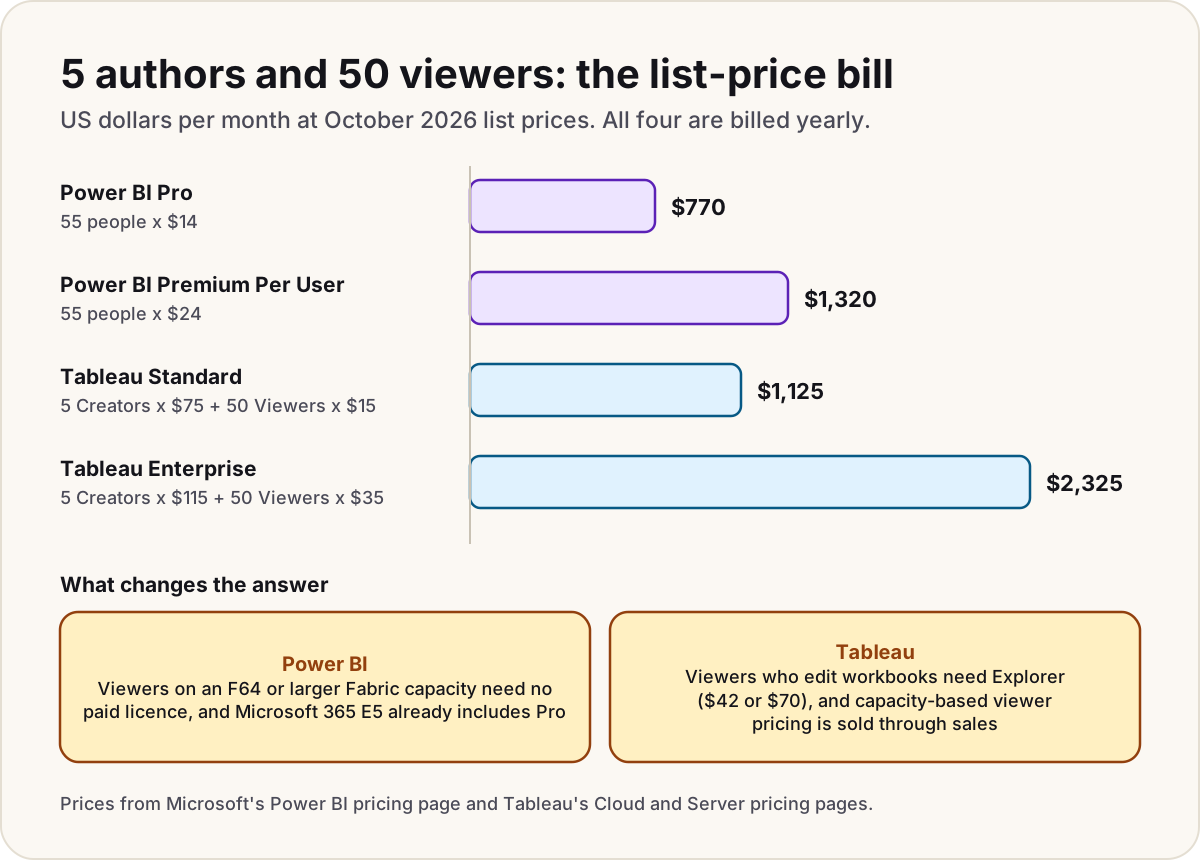
A worked example: a team with 5 report authors and 50 people who only view reports, per month at these list prices.
| Option | Sum | Per month |
|---|---|---|
| Power BI Pro for everyone | 55 x $14 | $770 |
| Power BI PPU for everyone | 55 x $24 | $1,320 |
| Tableau Standard | 5 Creators x $75 + 50 Viewers x $15 | $1,125 |
| Tableau Enterprise | 5 Creators x $115 + 50 Viewers x $35 | $2,325 |
Two things change these numbers most. On Power BI, viewers on an F64 or larger capacity need no paid licence, and Microsoft 365 E5 already includes Pro. On Tableau, any viewer who needs to edit workbooks needs Explorer ($42 or $70) instead of Viewer. Negotiated discounts and capacity options move a real bill further. For the full Power BI licence rules, see our Power BI licensing guide, and for what an F64 costs, our Fabric capacity pricing guide.
Warning
A Premium Per User workspace locks out everyone without PPU, viewers included. Price PPU for every person who opens that content, not just for the authors.
Authoring tools
| Power BI | Tableau | |
|---|---|---|
| Desktop tool | Power BI Desktop, a free download, Windows 10 or later | Tableau Desktop, included with a Creator licence, on Windows and macOS |
| Data preparation | Power Query, built into Power BI Desktop | Tableau Prep Builder, included with a Creator licence |
| In the browser | Create and edit reports in the Power BI service | Web authoring in Tableau Cloud and Tableau Server |
| Free option | Power BI Desktop plus a Free licence: build, but not share | Tableau Desktop Free Edition: full desktop analysis, but no publishing or connecting to Tableau Cloud or Server |
The practical difference: if your report authors use Macs, Tableau Desktop runs natively and Power BI Desktop doesn't.
Data modelling
Power BI builds a semantic model: tables joined by relationships, ideally as a star schema, with business logic written once as DAX measures. Each table has a storage mode. Import copies data into memory, DirectQuery sends queries to the source, and Direct Lake reads Delta tables in Fabric OneLake without a full copy. Import and Direct Lake both use the VertiPaq engine, which Microsoft says normally outperforms DirectQuery. One model can feed many reports, which our one semantic model, many reports guide explains.
Tableau builds a data source in two layers. In the logical layer, tables are linked by relationships that keep each table at its own level of detail, and Tableau picks the join type when a view is built, which avoids double-counting. In the physical layer, inside one logical table, you use joins and unions. A data source can stay live against the database or become an extract in Tableau's .hyper format, which Tableau says generally performs better. Calculations are calculated fields, and level of detail expressions (FIXED, INCLUDE, EXCLUDE) control the grain a number is worked out at.
The two approaches reach the same goal differently: Power BI puts the shared logic in a central model that many reports reuse, while Tableau's relationships let you combine tables of different grain without designing a star schema first.
Sharing and governance
Power BI shares through workspaces, with four roles (Admin, Member, Contributor and Viewer), and through apps that package content for a wider audience. Everything except viewing and interacting needs Pro or PPU. Row-level security filters what each viewer sees, and the Power BI service supports sensitivity labels. Our Power BI permissions cheat sheet maps who can do what.
Tableau decides capability by licence role first: Viewers can view, comment and subscribe themselves, Explorers can edit and create subscriptions for others, and Creators can publish new data sources and flows. Within that, site and content permissions apply. The editions add governance tiers: Tableau Cloud Standard supports up to 3 sites, Enterprise up to 10 and Cloud+ up to 50, and Enterprise adds Tableau's Data Management and Advanced Management capabilities.
Ecosystem: Microsoft 365 and Fabric, or Salesforce
Power BI is part of Microsoft Fabric and works inside Microsoft 365: reports embed in Teams tabs and SharePoint pages, the PowerPoint add-in shows live report data on slides, and Excel can connect straight to semantic models. Microsoft 365 E5 and Office 365 E5 include a Pro licence for each user. The same Fabric capacity that serves reports can also run lakehouses, warehouses and notebooks.
Tableau is owned by Salesforce. Its newest product, Tableau Next, is built on Salesforce's Agentforce 360 Platform and works in Slack, and the Tableau+ Bundle adds Data 360. Tableau still connects widely beyond Salesforce, including SQL Server, Azure SQL Database, Excel, SharePoint lists and OneDrive.
Neither ecosystem locks the data in: Power BI connects to Salesforce, and Tableau connects to Microsoft sources. The ecosystem matters most for licences you already own, sign-in, and where people already spend their day.
AI features: Copilot and Tableau Agent
| Copilot in Power BI | Tableau's AI features | |
|---|---|---|
| What it does | Summarises reports and answers questions in a report pane, creates report pages, writes DAX queries, and suggests measure descriptions | Tableau Agent helps with authoring, data prep and catalog descriptions; Tableau Pulse sends metric digests by email or Slack |
| What it needs | A paid Fabric capacity (F2 or larger) or Power BI Premium (P1 or larger). Pro or PPU alone isn't enough, and trial capacities don't qualify | On Tableau Cloud: Pulse comes with every edition, while Tableau Agent needs Cloud+ or the Tableau+ Bundle. On Tableau Server: Tableau Agent comes with every edition, but you supply your own large language model |
| Status | The report Copilot pane is generally available; the standalone, full-screen Copilot is in preview | Tableau's Server pricing FAQ describes Tableau Agent as generally available on every Server edition |
| How it's paid for | Copilot use consumes capacity units on the Fabric capacity | Included in the edition price; some Cloud+ and Tableau+ AI features can consume Data 360 credits with Audit Trail |
Both vendors' AI features depend on the data underneath. Microsoft says Copilot gives generic or inaccurate answers when the semantic model isn't prepared for AI, so model quality matters more, not less.
Deployment: Power BI Report Server vs Tableau Server
If the reports must run on your own servers, both vendors offer a self-hosted option, but they aren't equivalent.
Power BI Report Server hosts Power BI reports, paginated reports and Excel files on premises or on Azure virtual machines. It comes with Fabric F64 or larger reserved capacity, or with SQL Server licences: Enterprise Edition with active Software Assurance for versions before 2025, and Standard or Enterprise core licences from SQL Server 2025. It uses its own version of Power BI Desktop, releases three times a year, and lacks many service features, including dashboards, apps, Q&A, bookmarks and email subscriptions for Power BI reports. Microsoft's comparison page still gives the licence as Power BI Premium or SQL Server Enterprise Edition with Software Assurance, without the Fabric or SQL Server 2025 routes its getting-started page describes, so confirm with your licensing contact.
Tableau Server is Tableau's self-managed platform, sold in the same Standard and Enterprise editions at the same role prices as Tableau Cloud, or by compute. It runs on Windows Server 2016, 2019 or 2022, or on Linux (including Red Hat Enterprise Linux, Ubuntu LTS and several others), on premises or in a public cloud. On Windows, Tableau's minimum for a single production node is 8 physical cores and, from version 2022.3, 128 GB of memory. Tableau Pulse is documented for Tableau Cloud.
Who each one suits
| Your situation | Leans towards | Why |
|---|---|---|
| You're on Microsoft 365 E5 already | Power BI | Pro is already included for every user |
| Hundreds of people only view reports | Power BI on F64 or larger, or Tableau capacity pricing | Both remove the per-viewer charge; compare the quotes |
| Report authors work on Macs | Tableau | Tableau Desktop runs on macOS; Power BI Desktop needs Windows |
| Your CRM and data platform are Salesforce | Tableau | Tableau Next is built on Salesforce's Agentforce 360 Platform, and the Tableau+ Bundle includes Data 360 |
| You're building on Microsoft Fabric | Power BI | Direct Lake reads OneLake data without a full copy, and one capacity runs both |
| Reports must be self-hosted | Compare both closely | Power BI Report Server lacks many Power BI service features; Tableau Server is sold in the same editions as Tableau Cloud, though Pulse is documented for the cloud |
| A small team of authors, few viewers, tight budget | Power BI Pro | At list prices, $14 per person is the lowest paid per-seat price in either list |
Do
- Price both tools with your real mix of authors, editors and viewers, and ask both vendors for a quote.
- Run a two-week pilot on your own data, with the people who'll build the reports.
- Check which AI features your edition or capacity actually includes before you plan around them.
Don't
- Don't compare Power BI Pro with a Tableau Viewer licence: they don't do the same job.
- Don't assume an on-premises server gives you the cloud product's features.
- Don't choose from a market-share chart: it won't tell you what fits your team.
Sources
- Power BI pricing — Microsoft
- Tableau pricing — Tableau
- Tableau Cloud pricing — Tableau
- Tableau Server pricing — Tableau
- Tableau technical specifications — Tableau
- The Tableau data model — Tableau Help
- Level of detail expressions — Tableau Help
- Extract your data — Tableau Help
- Create metrics with Tableau Pulse — Tableau Help
- Tableau Server on Windows: before you install — Tableau Help
- Tableau Server on Linux: before you install — Tableau Help
- Download Power BI Desktop — Microsoft Learn
- Compare Power BI Report Server and the Power BI service — Microsoft Learn
- What is Power BI Report Server? — Microsoft Learn
- Copilot for Power BI overview — Microsoft Learn
- Direct Lake overview — Microsoft Learn
- Power BI Premium Per User — Microsoft Learn
- Roles in workspaces in Power BI — Microsoft Learn
- Collaborate and share Power BI content — Microsoft Learn
Was this helpful?
Comments
No comments yet. Share what worked for you.
Sign in to comment. Comments show under a display name you choose, never your email.