Code app vs canvas app in Power Apps: which should you build?
Compare Power Apps code apps vs canvas app, model-driven, PCF and generative pages. Get a decision rule, a side-by-side table, licence costs and when each wins.
Power AppsChoose a tool23 min read
You have an app to build in Power Apps and two very different ways to build it. A canvas app is low-code: screens, controls and Power Fx formulas in Power Apps Studio. A code app is a React, Vue or other single-page web app that a developer writes in their own editor, then publishes to Power Platform, where it gets sign-in, connectors and governance. Which one you pick decides who can maintain the app, what each user's licence costs, and whether it works offline.
The short answer: choose by the job and by who will own the app after go-live, then check licences. A code app makes sense when a developer team will look after a codebase for years, the screen needs more than standard controls can give, and every user already has premium Power Apps rights. Otherwise a canvas app, or a model-driven app for record-centric work, is usually the better fit. This guide explains why, compares all the options side by side, and shows the licence arithmetic.
The decision rule
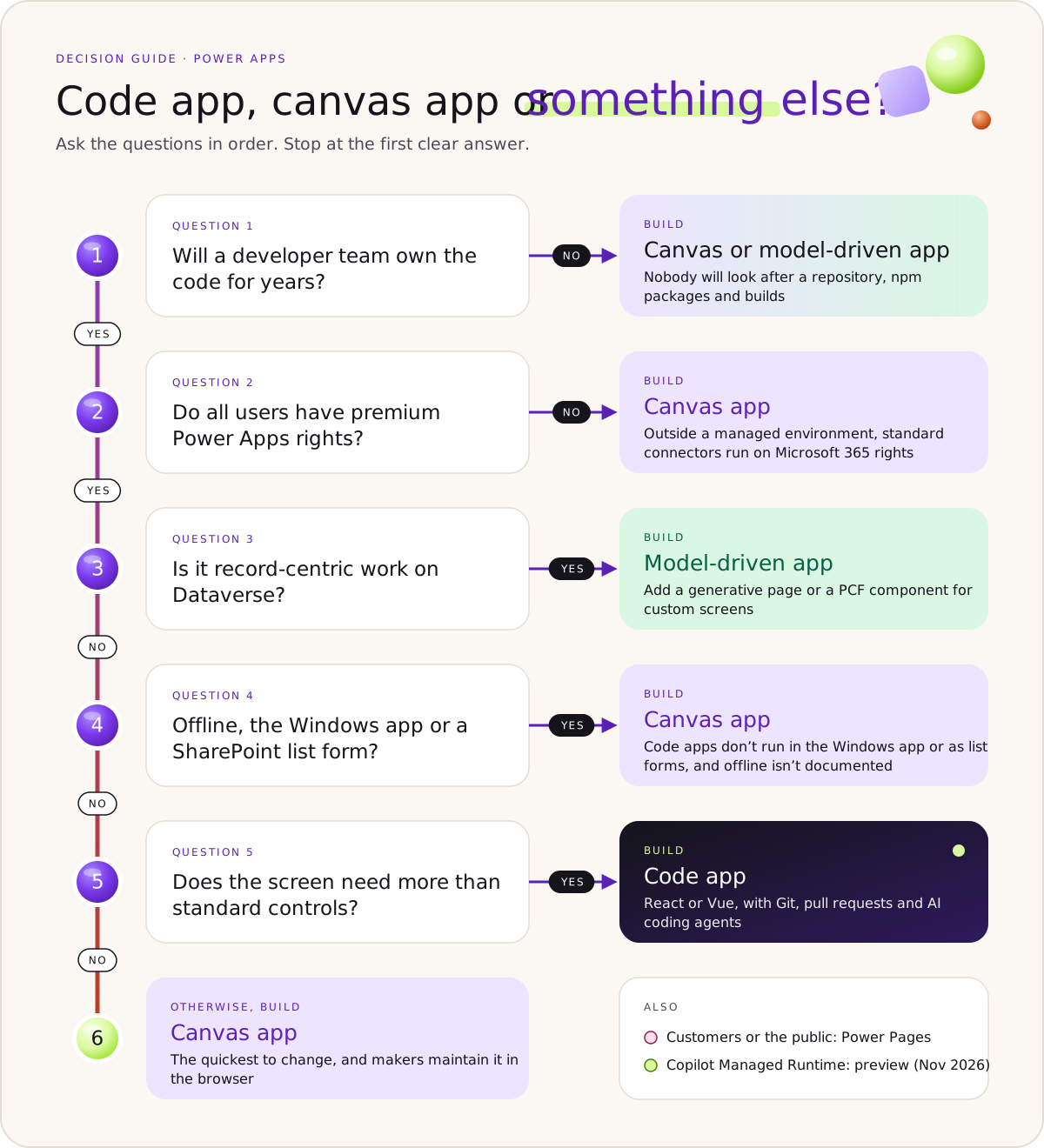
Ask these questions in order. Stop at the first one that gives a clear answer.
- Who will own and maintain the app after go-live? A code app is a software project: a repository, npm packages, TypeScript, dependency updates and builds. If no developer will own that for the life of the app, rule out code apps and PCF components. Choose a canvas or model-driven app.
- Do all the users already have premium Power Apps rights? Every person who runs a code app needs Power Apps Premium, pay-as-you-go, an App Pass or auto-claim, whatever the app connects to. If most users only have Microsoft 365 and the app can stay on standard connectors such as SharePoint and Outlook, a canvas app is the one that runs without an extra licence.
- Is the job record-centric work on Dataverse? If people find a record, edit it, follow related records and move it through a process, build a model-driven app. Add a generative page for a custom page inside it, or a PCF code component for a custom field or grid.
- Must it work offline, in Power Apps for Windows, or as a SharePoint list form? Microsoft documents all three for canvas apps. For code apps it says Power Apps for Windows and SharePoint forms aren't supported, and it doesn't document offline. Choose canvas (or model-driven for offline work on Dataverse records).
- Does the screen need behaviour standard controls can't give, and does a developer team want Git, pull requests and AI coding agents? Think of drag-and-drop planning boards, complex interactive views or npm libraries. That's the case for a code app.
- None of the above? Build a canvas app. It's the quickest to change, and makers can maintain it in the browser.
Two side rules:
- Customers or the public need a website, which is Power Pages, not Power Apps. See Power Pages or SharePoint. Partner staff invited as Microsoft Entra B2B guests are different: Microsoft documents guest access for code apps, as for canvas apps.
- Copilot Managed Runtime apps (the new prompt-built apps) are in preview as of November 2026. Don't choose them for production work yet; see Copilot Managed Runtime is not a code app.
- Step 1Who maintains it after go-live
- Step 2Do all users have premium rights
- Microsoft DataverseRecord-centric work on Dataverse
- Step 4Offline, Windows app or SharePoint form
- Step 5Custom screen and a developer team
- Step 6Otherwise a canvas app

Code app vs canvas app at a glance
Every cell comes from Microsoft's documentation as of 10 November 2026. "Not documented" means we found no Microsoft page that says either way.
| Canvas app | Model-driven app | Code app | PCF code component | Generative page | |
|---|---|---|---|---|---|
| What it is | A standalone app built from screens and controls | A standalone app built from Dataverse tables, forms and views | A standalone single-page web app hosted by Power Platform | A control that runs inside another app | A React page that runs inside a model-driven app |
| Who builds it | Makers | Makers who model data and processes | Developers | Professional developers and app makers | Makers, through an AI agent; the code can be edited |
| Language | Power Fx | Mostly configuration | TypeScript or JavaScript (React, Vue and others) | TypeScript | Generated React and TypeScript |
| Data | Dataverse and connectors | Dataverse only | Dataverse and connectors, except the two Excel Online connectors | Its host app's data; Dataverse Web API isn't available in canvas apps | Up to six Dataverse tables; connectors and custom APIs are preview |
| Where it runs | Browser, Power Apps mobile, Power Apps for Windows, Teams, SharePoint list forms, inside model-driven apps (custom pages), Power BI | Browser, Power Apps mobile, Power Apps for Windows, Teams | Browser, and Power BI reports through the Power Apps visual. Not Power Apps for Windows. Mobile app: see the note below. Teams: not documented, and not supported in Dataverse for Teams environments. Into a model-driven app only through an iframe | Inside canvas apps, model-driven apps and Power Pages | Inside model-driven apps only, including on a form |
| Licence for each user | Microsoft 365 rights if it uses standard connectors only and isn't in a managed environment; otherwise premium | Premium | Premium, pay-as-you-go, App Pass or auto-claim, whatever the connectors | Premium if it calls outside services directly; otherwise it follows the host app | Premium, because it runs in a model-driven app |
| Governance | DLP, sharing limits, Conditional Access per app (managed environments) | Dataverse security roles; Conditional Access per app isn't supported | DLP at launch, canvas sharing limits, Conditional Access per app (managed environments), quarantine | Follows the host app | Follows the model-driven app |
| ALM | Solutions, pipelines, Power Platform Git integration | Solutions, pipelines, Git integration | Solutions and pipelines; no Power Platform Git integration, so your own repository holds the source | Solutions; supported in Git integration | Solution-aware, through its app |
| Offline | Yes, on Dataverse, in the mobile app | Yes, with mobile offline | Not documented; a Microsoft maintainer said in October 2026 it isn't planned for the immediate future | Microsoft recommends PCF over HTML web resources in offline model-driven apps | Not documented |
| AI-assisted building | Plans; AI coding tools through the canvas apps plugin | Plans, generative pages and AI coding tools through the model-driven apps plugin | GitHub Copilot or Claude Code with Microsoft's code apps plugin (preview) | Not documented on Learn | AI is how it's built: in the browser (four regions) or with AI coding tools on public clouds worldwide |
| Time to first version | Depends on the design | Fast once the data model exists | Not documented | Not documented | Not documented |
Note
Code apps and the Power Apps mobile app. Learn removed the Power Apps mobile app from its code apps limitations on 29 May 2026 (Power Apps for Windows stayed on the list), but no Learn page says code apps run in the mobile app. In GitHub discussion #474 (13 October 2026), a Microsoft maintainer wrote that code apps are supported to run online in the mobile app. On 21 October another maintainer said the team had found a bug that stopped code apps launching in the mobile app, had made a fix, and expected it to be available soon. Offline isn't planned for the immediate future. Test on your users' own devices before you promise mobile.
The options outside Power Apps
Two newer or outside options come up whenever developers discuss code apps. Here's what Microsoft documents about each.
| Copilot Managed Runtime (preview) | SharePoint Framework (SPFx) | Web app on Azure Static Web Apps | |
|---|---|---|---|
| What it is | Microsoft-hosted, governed apps built from a prompt or with an SDK | Client-side web parts and extensions for SharePoint, Teams and Viva | Your own web app on Azure hosting |
| Who builds it | Business users and makers (Cowork, Copilot Studio, Copilot Code) and professional developers (Copilot Code, SDK and CLI) | Developers using TypeScript and any JavaScript framework | Developers |
| Sign-in | Microsoft Entra, built in | Runs as the signed-in user, with clients for SharePoint and Microsoft 365 | Entra and GitHub sign-in built in; limiting sign-in to your tenant needs a custom registration on the Standard plan |
| Data | 1,500+ connectors | SharePoint and Microsoft Graph; outside APIs have their own hosting and costs | Whatever you build |
| Governance | DLP, Conditional Access, sharing limits and connector policies apply by default; inventory in the Microsoft 365 admin center | Tenant admins approve solutions before users can use them | You build it |
| Source control | A built-in Git repository; GitHub Enterprise Cloud repositories are also supported | Your own repository | Your own repository, with GitHub and Azure DevOps deployment |
| Running cost | Power Apps Premium, or Copilot Credits per use | Not a Power Apps product, so Power Apps licences don't apply | Free plan, or Standard at $9 per app per month (US Azure regions, November 2026) |
| Status | Preview | Generally available | Generally available |
SPFx and Azure aren't wrong answers. They move work to you. With Azure you build sign-in rules, data access, governance and monitoring yourself. With SPFx you're tied to SharePoint and Teams as the place the app appears. A code app's selling point is that Power Platform does the hosting, sign-in, connectors and policies for you, and that's what the Premium licence pays for.
When a code app is the right choice
A code app is the best choice when all of these hold:
- The screen needs more than standard controls. Drag-and-drop planning boards, Gantt-style timelines, image annotation, rich interactive dashboards: work that's awkward or slow in Power Fx. You can use any npm library, and you control every element on the page.
- A developer team will own it. They want Git, pull requests, code review, unit tests and AI coding agents. In its pattern for adding custom React code to a model-driven app, Microsoft's Architecture Center lists complex API responses, logic you want to unit test and having developers who write TypeScript and C# among the reasons to use custom code. It lists having no professional developers for ongoing maintenance as a reason not to.
- Hosting and sign-in should be someone else's job. The app is hosted on Power Platform, and the Power Apps host handles Microsoft Entra sign-in. It calls more than 1,500 connectors from JavaScript, with no web server of your own to run. DLP policies, sharing limits and Conditional Access apply the same way they do to canvas apps.
- Every user already has premium rights. If your organisation has bought Power Apps Premium for these users, the code app adds no licence cost.
Things to know before you start:
- Power Platform Git integration doesn't support code apps, so your own repository is where the source lives. You publish the built app with the Power Apps CLI.
- The built files are served from a public endpoint that can't be restricted by IP address. Use Conditional Access to restrict by location, and never put secrets in the app.
- Calls to outside APIs straight from the browser are blocked by the Content Security Policy until an admin adds the API's address to its
connect-srcdirective. Use connectors for data where you can.
The code apps limitations guide has the full list. To build one, follow the code apps tutorial.
When a canvas app wins
Choose a canvas app when any of these is true:
- Users have Microsoft 365 but not Premium. A canvas app that uses only standard connectors runs on the Power Apps rights in Microsoft 365. A code app never does.
- Makers will maintain it. A maker with edit access can open a canvas app in Power Apps Studio and change a formula. A code app is changed in its code, then rebuilt and published again with the CLI.
- It must work offline. Canvas apps can work offline in the Power Apps mobile app, on Dataverse data. Microsoft doesn't document offline for code apps, and a Microsoft maintainer said in October 2026 that it isn't planned for the immediate future. Our guide to Power Apps offline mode covers the set-up and the hard limits.
- It runs in Power Apps for Windows, as a SharePoint list form, or as a Teams tab. Microsoft documents all of these for canvas apps. Code apps aren't supported in Power Apps for Windows or as SharePoint forms. Microsoft's Teams pages don't list them, and Dataverse for Teams environments don't support them.
- It's a quick task app. A request form, an inspection checklist, a stock count with a barcode scanner. Canvas gets you there with less set-up, and the data can stay in a SharePoint list.
One trap: a canvas app that uses Dataverse, a premium connector, a custom connector or a gateway is premium too. Then the licence argument for canvas disappears, and the choice comes down to skills and maintenance.
When model-driven, generative pages or PCF fit better
If the work is about records in Dataverse (cases, assets, approvals with several stages), start with a model-driven app. Forms, views, security roles, responsiveness and accessibility come built in. Our canvas vs model-driven guide has five questions for that choice.
When one part needs a custom screen, you have three ways to add it, and they behave differently:
- A generative page runs inside the model-driven app. When you put one on a form, it receives the current record's ID. It works with up to six Dataverse tables. Connectors and custom APIs are in preview, as of November 2026. You build it by describing the page to an AI agent, then refine the generated React code.
- A PCF code component replaces a field, a grid or a control inside the app. It's the right tool for field-level behaviour, not a whole multi-screen app.
- A code app can't be hosted natively inside a model-driven app. It runs as its own app, so to show it inside one you embed it in an iframe, with the record context passed in the URL. Embedding needs a Content Security Policy change so the model-driven app's address can frame it, and only users in the same tenant can open an embedded app. Microsoft's Architecture Center names this, and the lack of Power Platform Git integration, as the drawbacks of code apps for that scenario.
Choose a code app over these only when the custom part is really a separate app, with its own screens and its own users.
Copilot Managed Runtime is not a code app
People mix these up, partly because both are web apps that use the same connectors and both run under tenant governance. They're separate products:
- What it is. Copilot Managed Runtime hosts line-of-business apps built in Copilot Cowork, Copilot Studio, Copilot Code, or with its own SDK and CLI (
@microsoft/managed-apps-cli). Users open the apps from a portal at managedapps.cloud.microsoft, and admins manage them in the Microsoft 365 admin center (Apps > All apps). Apps are built in personal developer environments. - Status. Preview as of 10 November 2026. Microsoft's Architecture Center describes app building in Copilot Cowork and Copilot Studio as not a production option for its scenario, and Microsoft's Vibe migration page says preview features aren't meant for production use.
- Licensing. Running an app needs Power Apps Premium or Copilot Credits. Microsoft's licensing FAQ says each API call uses 0.1 Copilot Credits, and that Power Apps rights included with Microsoft 365 or Dynamics 365 don't cover these apps.
- The Vibe link. Power Apps Vibe (vibe.powerapps.com) is retiring. You can edit Vibe apps until 30 November 2026. From 1 December 2026 you can only migrate them to Apps in Copilot Studio or Copilot Cowork, or download their source. One-click migration started rolling out on 4 November 2026. Microsoft also documents turning a Vibe app into a code app instead.
If you want a governed, production app with solutions and pipelines today, the code app is the generally available option.
What it costs per user
These are Microsoft's US list prices, checked on 10 November 2026. The Premium prices are from the Power Apps pricing page; the pay-as-you-go rate is from Microsoft Learn's pay-as-you-go meters page, because the pricing page doesn't show it:
| Option | Price (USD) | Notes |
|---|---|---|
| Power Apps Premium | $20 per user per month, paid yearly | Unlimited apps. Rises to $22 for terms that start on or after 1 January 2027 |
| Power Apps Premium, 2,000-seat minimum | $12 per user per month, paid yearly | Rises to $14 from 1 January 2027 |
| Per app pay-as-you-go meter | $10 per active user per app per month | Billed to Azure; counts only people who open the app that month; Premium users aren't counted |
| App Pass (Power Apps per app) | Not shown on the pricing page | No longer sold to new customers through some channels since 2 January 2026 |
A worked example. You have 200 users with Microsoft 365 E3, which includes Power Apps for Microsoft 365. The environment isn't a managed environment.
- A canvas app on a SharePoint list that sends Outlook email uses standard connectors only. Extra licence cost: $0.
- The same canvas app moved to Dataverse becomes premium. It now costs the same as a code app.
- A code app, whatever it connects to, needs premium rights for all 200 people. With Premium: 200 × $20 = $4,000 a month, or $48,000 a year. On a term that starts on or after 1 January 2027: 200 × $22 = $4,400 a month, or $52,800 a year.
- The code app on pay-as-you-go instead: if all 200 open it in a month, 200 × $10 = $2,000 that month; if only 50 do, $500. But the meter counts each app separately. If the same 200 people each open three pay-as-you-go apps in a month, that's 600 × $10 = $6,000, more than Premium. Once an environment uses pay-as-you-go, any App Passes allocated to it are ignored and not consumed.
Warning
In a managed environment, every active user needs premium rights, even for a canvas app on standard connectors. Microsoft starts blocking users without one in February 2027. If your environment is managed, the $0 line in the example doesn't apply. Power Apps licensing explained covers the rules.
The outside options price differently. Azure Static Web Apps charges per app, not per user: a Free plan, or $9 per app per month on Standard (US Azure regions, from Microsoft's Azure Retail Prices API on 10 November 2026), plus bandwidth over 100 GB and whatever back-end services you add. SPFx isn't a Power Apps product, so Power Apps licences don't apply, but any outside APIs it calls carry their own costs. Neither gives you Power Platform's connectors, DLP or admin tools.
What developers say
These are two practitioners' views, read in November 2026. They aren't Microsoft guidance, but they put the decision in a few words.
- Three questions before a code app (Tomy Bien, June 2026). Does the screen need behaviour no standard control gives? Will a developer still own it in two years? Can the users be licensed for Premium? If any answer is no, he looks at canvas or model-driven first.
- Start with the job, not the tool (Reza Dorrani, YouTube). In his comparison of the four app types, he matches a task job to canvas, a process job to model-driven, an experience job to code apps and a speed job to Copilot Managed Runtime. His closing advice is to choose what your team can maintain after go-live.
Can you convert a canvas app to a code app?
Not as of November 2026. We found no Microsoft tool or Learn page that converts a canvas app into a code app, or a code app back into a canvas app. Canvas apps are stored as Power Fx in .pa.yaml files; code apps are compiled web apps. Moving between them is a rebuild.
Two conversions are documented:
- A Vibe app to a code app. Download the Vibe app's source, prepare the project as Microsoft's page describes, run
pa app initin it, thenpa app run,npm run buildandpa app push. The result is a new, separate code app. You must allow the Vibe image hosts in the code apps Content Security Policy, or images won't show. - A Vibe app to Copilot Studio or Copilot Cowork. One-click or manual migration, as covered above.
If you rebuild a canvas app as a code app, plan for the licence change, the move from Studio to a repository, and a connection consent prompt for every user the first time they open the new app. Run both side by side until the new app has been tested with real users.
Do
- Write down who will maintain the app in two years before you choose.
- Check every user's licence, and whether the environment is managed.
- Prototype the hardest screen first, in the type you're leaning towards.
- Before go-live, open the app with an account that has no Premium licence and no trial. A Power Apps trial gives the account premium rights, so it hides the licence check.
Don't
- Don't choose a code app because a canvas app is slow to build. Choose it because the screen or the team needs it.
- Don't plan a code app inside a model-driven form; use a generative page or PCF.
- Don't put preview options such as Copilot Managed Runtime into production yet.
Related: Code apps tutorial, Code apps limitations, Canvas app or model-driven app?, What is Power Apps?
Sources
- Power Apps code apps overview (Microsoft Learn)
- Application lifecycle management for code apps (Microsoft Learn)
- Embed a code app in an iframe (Microsoft Learn)
- Connect a code app to data (Microsoft Learn)
- Configure Content Security Policy for code apps (Microsoft Learn)
- Code apps system configuration (Microsoft Learn)
- Quickstart: create a code app with GitHub Copilot (Microsoft Learn)
- Code apps architecture (Microsoft Learn)
- Develop offline-capable canvas apps (Microsoft Learn)
- Copilot Managed Runtime FAQ (preview) (Microsoft Learn)
- Modernize legacy applications with React web resources and Dataverse custom APIs (Microsoft Architecture Center)
- Generate a page using natural language (Microsoft Learn)
- Power Apps component framework overview, including licensing (Microsoft Learn)
- Power Apps component framework limitations (Microsoft Learn)
- What are model-driven apps? (Microsoft Learn)
- Manage Power Apps: Conditional Access on individual apps (Microsoft Learn)
- Source control for canvas apps with Git integration (Microsoft Learn)
- FAQs about source code integration (Microsoft Learn)
- Use Power Apps on mobile devices (Microsoft Learn)
- Install the Power Apps mobile app: other mobile apps (Microsoft Learn)
- Mobile offline for model-driven apps (Microsoft Learn)
- Mobile offline limitations for model-driven apps (Microsoft Learn)
- Power Apps and Microsoft Teams integration (Microsoft Learn)
- Known issues and limitations of Dataverse for Teams (Microsoft Learn)
- Create and edit canvas apps with AI code generation tools (Microsoft Learn)
- Edit your app with Copilot in Power Apps Studio, removed 6 January 2026 (Microsoft Learn)
- Build and edit model-driven apps with AI code generation tools (Microsoft Learn)
- Create and edit generative pages with AI code generation tools (Microsoft Learn)
- Convert a vibe app to a code app (Microsoft Learn)
- Migrate apps from Power Apps Vibe (Microsoft Learn)
- What is Copilot Managed Runtime (preview) (Microsoft Learn)
- Copilot Managed Runtime overview for admins (preview) (Microsoft Learn)
- Copilot Managed Runtime licensing FAQ (preview) (Microsoft Learn)
- Power Apps licensing FAQs (Microsoft Learn)
- Licensing overview for Microsoft Power Platform (Microsoft Learn)
- Pay-as-you-go meters (Microsoft Learn)
- Pay-as-you-go known issues and FAQ (Microsoft Learn)
- How to check license designation for an app (Microsoft Learn)
- List of all Standard tier connectors (Microsoft Learn)
- Power Apps Developer Plan: trial and developer plan FAQ (Microsoft Learn)
- Microsoft 365 and Office 365 platform service description (Microsoft Learn)
- Overview of the SharePoint Framework (Microsoft Learn)
- Azure Static Web Apps hosting plans (Microsoft Learn)
- Authenticate and authorize Static Web Apps (Microsoft Learn)
- Power Apps licensing and pricing (Microsoft)
- New pricing for Power Apps Premium, 9 September 2026 (Microsoft Licensing News)
- Power Apps per app license sales end, 14 January 2026 (Microsoft Licensing News)
- Static Web Apps pricing (Microsoft Azure)
- Azure Retail Prices REST API (Microsoft Learn)
- Generally available: host and run code apps in Power Apps, 5 February 2026 (Microsoft Power Platform Blog)
- Power Apps code apps repository (GitHub, Microsoft)
- Discussion #474: run code apps in the Power Apps mobile app (GitHub, Microsoft)
- What months of code apps in production taught me (Tomy Bien)
- Which Power App should you build? Canvas vs model-driven vs code apps vs Copilot (Reza Dorrani, YouTube)
Add LowCodeStacks as a preferred source on Google
Was this helpful?
Comments
No comments yet. Share what worked for you.
Sign in to comment. Comments show under a display name you choose, never your email.