Fix "you cannot schedule refresh" on a Power BI dynamic data source
Your Power BI dynamic data source won't refresh in the service because the query builds its own address. Find it, then use RelativePath, Query or a parameter.
Power BIFix a problem8 min read
The report refreshes happily in Power BI Desktop. You publish it, open its settings in the service, and the service won't schedule a refresh. When the query is fine in Desktop, the cause is almost always a dynamic data source: the query works out its own web address, file path or server name while it runs, so Power BI can't tell before the refresh what it will connect to. This guide finds that query and rewrites it so the service can refresh it.
- In the semantic model's settings in the service, refresh can't be scheduled, with the message
You cannot schedule refresh for this semantic model because it gets data from sources that currently don't support refresh. - The same file refreshes without complaint in Power BI Desktop.
- A query joins a URL, file path or server name together with
&, or takes it from another query or a table.
What makes a data source dynamic
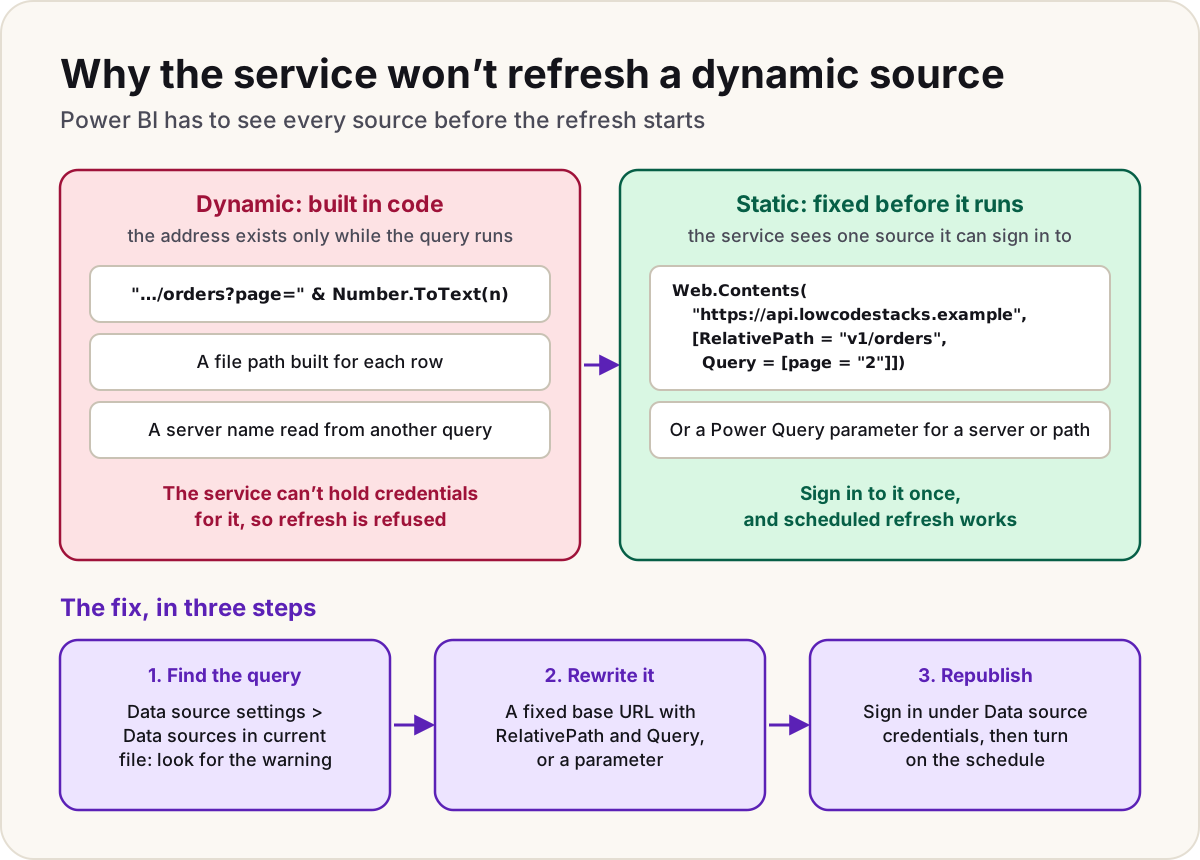
Before a refresh starts, the service has to know every source a semantic model reads from, so it can attach your credentials to each one and route on-premises sources through a gateway. Microsoft defines a dynamic data source as one where some or all of the connection details can't be known until Power Query runs the query, because they're generated in code or returned from another source. Its examples are the instance name and database of a SQL Server database, the path of a CSV file, and the URL of a web service.
In most cases, Microsoft says, a semantic model with a dynamic data source can't be refreshed in the Power BI service. It names the exceptions that matter for a fix:
Web.Contentscalls that use the RelativePath and Query options;- queries that reference Power Query parameters.
And one that doesn't work: switching between data sources with dynamic M query parameters isn't supported in the service.
| In the query | Why the service can't see it | A version that refreshes |
|---|---|---|
Web.Contents("https://api.lowcodestacks.example/v1/orders?page=" & Number.ToText(n)) | The full URL only exists once the query runs | A fixed base URL, with the path and page number in RelativePath and Query |
Sql.Database(Settings{0}[Server], "Sales"), with the server name read from another query | The server comes from data | A Power Query parameter that holds the server name |
A list of file paths built row by row, each passed to File.Contents | Every path is computed | The Folder or SharePoint folder connector pointed at a fixed root, then filtered to the files you want |
Find the query that builds its address
- In Power BI Desktop, select Transform data on the ribbon to open Power Query Editor.
- Open Data source settings and select Data sources in current file.
- Look for a warning in that window. Microsoft's documentation shows it as a note that some data sources may not be listed because of hand-authored queries. If it's there, the file contains a dynamic data source that the service can't refresh.
- Open each query's Advanced Editor and look at the first argument of every source function (
Web.Contents,Sql.Database,File.Contents,Csv.Documentover a computed path, and so on). A text value written out in full is static. Anything joined with&, built withText.Combine, or taken from a column or another query is dynamic.
If nothing is dynamic and the service still refuses, the source itself may not support refresh in the service. Microsoft's fix for that case: note the provider named at the top of the query in the Advanced Editor and compare it with its list of Power BI data sources.
Fix a web API with RelativePath and Query
This is the most common case: an API that's called once per page, per date or per ID. The broken version builds the whole URL as text:
// Won't refresh in the service: the URL exists only while the query runs
let
    GetPage = (page as number) =>
        Json.Document(
            Web.Contents("https://api.lowcodestacks.example/v1/orders?page=" & Number.ToText(page))
        ),
    Pages = List.Transform({1..5}, GetPage)
in
    Pages
The version that refreshes keeps the first argument of Web.Contents a fixed base URL. Everything that changes goes into the options record: RelativePath is added to the end of the base URL, and Query adds the query string for you, escaping the values. Pass the values as text, as Microsoft's own example does.
// Refreshes: the base URL is fixed, only the path and the query string change
let
    GetPage = (page as number) =>
        Json.Document(
            Web.Contents(
                "https://api.lowcodestacks.example",
                [
                    RelativePath = "v1/orders",
                    Query = [page = Number.ToText(page)]
                ]
            )
        ),
    Pages = List.Transform({1..5}, GetPage)
in
    Pages
The service now sees one source, https://api.lowcodestacks.example, and you sign in to it once. If the API takes a key in the query string, don't paste the key into the URL: name it with the ApiKeyName option and enter the value as a Web API credential, so it's stored with the credential and not in your M code.
Warning
Keep the base URL plain. Microsoft documents that queries referencing Power Query parameters can be refreshed, but people on the Fabric community forums report that a base URL assembled from a parameter and other text can still be flagged as dynamic. If the warning stays after your rewrite, put the full base URL in as text.
Fix a server, database or path with a parameter
When the part that changes is a server, database, folder or site, which usually differs only between test and production, turn it into a Power Query parameter instead of reading it from a table or working it out in code.
- In Power Query Editor, select Manage Parameters > New Parameter.
- Give it a name such as
SqlServer, the type Text, and the current server name as its Current Value, then select OK. - In the query, replace the computed value with the parameter:
Sql.Database(SqlServer, "Sales").
After you publish, change the value in the service without editing the file: in the service's Settings, on the Semantic models tab, select the model and expand Parameters. Microsoft's refresh documentation uses the same pattern, with schema and table names held in parameters.
For files, point the Folder or SharePoint folder connector at a fixed root folder or site, and filter the list of files in Power Query. The source is then that one fixed location, however many files you pick from it.
Republish and set up the refresh
- Step 1Find the dynamic query
- Step 2Fix the base URL or use a parameter
- Step 3Republish from Desktop
- Step 4Sign in to the source
- Step 5Schedule the refresh
- Refresh in Desktop and check the numbers haven't changed, then publish.
- In the service, open the semantic model's settings. Under Data source credentials, select Edit credentials for each source and sign in. An on-premises source needs a gateway connection instead.
- Turn the refresh schedule on, then run Refresh now once and check Refresh history to confirm it succeeded.
Don't
- Don't hard-code an API key in the URL to make it "fixed": use
ApiKeyNameand a Web API credential. - Don't build a report that switches between data sources with dynamic M query parameters bound to slicers; Microsoft says the service doesn't support it.
If the refresh now starts but fails, that's a different problem: our refresh failures checklist covers credentials, gateways and timeouts, and the key didn't match any rows covers a table that moved at the source.
Sources
- Data refresh in Power BI: refresh and dynamic data sources — Microsoft Learn
- Troubleshooting unsupported data source for refresh — Microsoft Learn
- Web.Contents: the RelativePath, Query and ApiKeyName options — Microsoft Learn
- Using parameters in Power Query — Microsoft Learn
- Edit parameter settings in the Power BI service — Microsoft Learn
- Dynamic datasource error with RelativePath — Fabric community forum thread (a lead, confirmed against the Learn pages above)
Add LowCodeStacks as a preferred source on Google
Did this fix it?
Comments
No comments yet. Share what worked for you.
Sign in to comment. Comments show under a display name you choose, never your email.