Fix "Formula.Firewall: references other queries or steps" in Power BI
Power Query stops a step that reads another query and calls a data source at once. What Power BI Desktop changed in July 2026, and the fixes that keep privacy on.
Power BIFix a problem9 min read
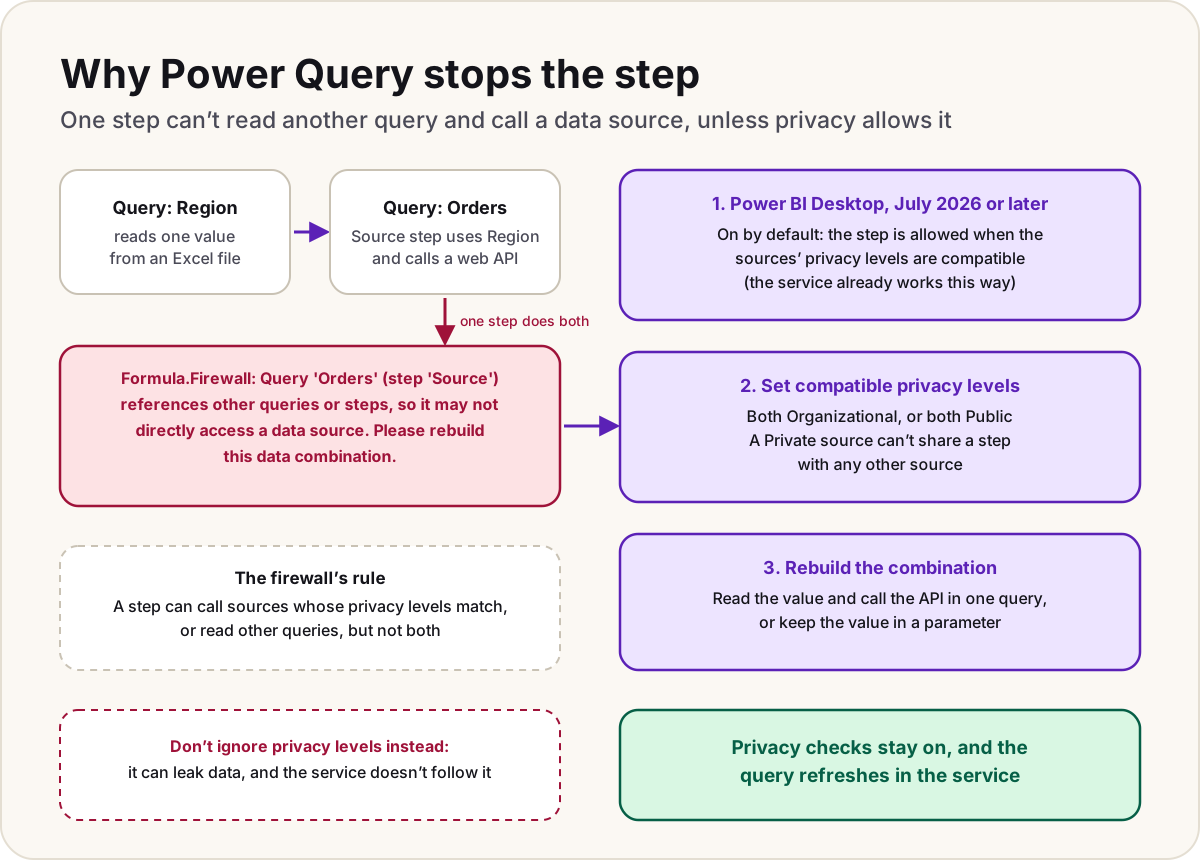
You're building a query in Power Query that takes a value from another query, such as a region code, a date or an ID, and uses it to call a web API or a database. The preview stops with a yellow bar: "Formula.Firewall: Query 'Orders' (step 'Source') references other queries or steps, so it may not directly access a data source. Please rebuild this data combination." Nothing is wrong with your connection. Power Query's Data Privacy Firewall refused to run that one step, because it does two things the firewall keeps apart. This guide explains the rule and gives the fixes, newest first.
- Power Query Editor shows
Formula.Firewall: Query '…' (step '…') references other queries or steps, so it may not directly access a data source. Please rebuild this data combination. - The named step uses a value from another query inside a call such as
Web.Contents,Sql.DatabaseorFile.Contents. - The same query worked when the value was typed in by hand.
Why Power Query stops the step
Power Query can fold work into a source: it turns your filters and joins into a SQL statement or an API call so the source does the work. Folding is also how data from one source could end up inside a request to another, for example a customer list from your database sent as part of a call to an outside web service. The Data Privacy Firewall exists to stop that happening by accident.
It works by splitting your queries into partitions, groups of one or more steps, and enforcing one rule. Microsoft states it as: a partition can either access compatible data sources, or reference other partitions, but not both. When one step needs both, you get one of two messages:
| Message | What the step did |
|---|---|
references other queries or steps, so it may not directly access a data source | It took data from another query and called a data source |
is accessing data sources that have privacy levels which cannot be used together | It called two sources whose privacy levels don't allow sharing in both directions |
Here's a typical pair of queries that trips the first message. Region reads one value from an Excel file, and Orders puts it into a web address:
// Region
let
    Source = Excel.Workbook(File.Contents("C:\Data\settings.xlsx"), null, true),
    Settings = Source{[Item = "Settings", Kind = "Table"]}[Data],
    Region = Settings{0}[Region]
in
    Region

// Orders: this Source step references Region AND calls a web API
let
    Source = Json.Document(
        Web.Contents("https://api.example.com/orders?region=" & Region)
    )
in
    Source
A value typed into Manage Parameters behaves differently: Microsoft documents that the firewall treats a simple parameter as part of the step that uses it, so Web.Contents(myUrl) with a parameter is allowed. The firewall only objects when the value comes from a query that reads a source itself.
Since July 2026, Desktop allows it when privacy levels match
Microsoft relaxed the rule. From the July 2026 version of Power BI Desktop, a setting called Allow data privacy firewall partitions that reference other partitions to also access data sources lets a step reference other queries and call a data source, as long as the sources' privacy levels are compatible. It's on by default from that version, and Microsoft says the Power BI service, Power Query Online and gateways already behaved this way, so a published semantic model doesn't need the setting.
- Update Power BI Desktop to the July 2026 version or later. If the setting isn't there, the version is older.
- To check it, select File > Options and settings > Options.
- Under GLOBAL, select Preview features, and make sure Allow data privacy firewall partitions that reference other partitions to also access data sources is selected.
The firewall is still on: Power Query still compares the sources' privacy levels before it combines data. So if the message stays after updating, the privacy levels are the problem, which the next section fixes.
Two places where the old behaviour may remain. Microsoft's page names Power BI Desktop, not Power Query in Excel, so in Excel use the fixes below. And Microsoft notes that privacy levels are currently unavailable in Power Platform dataflows.
Set privacy levels that can be combined
Every data source has a privacy level: None, Private, Organizational or Public. Two sources can share a partition only if data may flow between them in both directions, which Microsoft says means both Public or both Organizational. Two Private sources, or one Public and one Organizational, can't.
| Level | Use it for | Can share a step with |
|---|---|---|
| Private | Sensitive or confidential data, such as salaries or reviews | Nothing, not even another Private source |
| Organizational | Company data that a trusted group can see | Another Organizational source |
| Public | Data anyone can see, such as a public web page | Another Public source |
To set them in Power BI Desktop:
- Select File > Options and settings > Data source settings. Choose Global permissions, or Data sources in current file for just this report.
- Select the first source, then Edit Permissions....
- Under Privacy Level, choose the level, then select OK.
- Repeat for the other source, then refresh the preview.
In the example, the Excel file and the web API are both company data, so setting both to Organizational is honest and lets the step run on a current version of Desktop. Don't mark a source Public just to make the message go away: the level is what stops its data being sent somewhere it shouldn't go.
Warning
The option to ignore privacy levels, which Microsoft also calls Fast Combine (on the Privacy page of Options, under GLOBAL or CURRENT FILE), hides the error in Desktop, but Microsoft warns it can expose sensitive data to the wrong source. It also doesn't carry over: semantic models published to the service don't follow it, so the refresh can fail there instead. Our refresh failures checklist covers that case.
Rebuild the data combination in one query
When the levels genuinely differ, or you're on Excel or an older Desktop, change the queries so no single step does both jobs. Microsoft lists these ways:
- Move the value into the same query, before the step that calls the source. Everything then runs in one partition. This is the fix Microsoft shows in its own example.
- Use a Power Query parameter for a value someone sets by hand, such as a region or an environment name, instead of reading it from a file.
- Use a staging query, or keep the steps that call a source apart from the steps that combine results from other queries.
The example, rebuilt as one query:
// Orders: the lookup and the call now live in one query
let
    Workbook = Excel.Workbook(File.Contents("C:\Data\settings.xlsx"), null, true),
    Settings = Workbook{[Item = "Settings", Kind = "Table"]}[Data],
    Region = Settings{0}[Region],
    Source = Json.Document(
        Web.Contents(
            "https://api.example.com",
            [RelativePath = "orders", Query = [region = Region]]
        )
    )
in
    Source
This still needs the two sources' privacy levels to be compatible, because they're now in one partition. Using RelativePath and Query with a fixed base address also keeps the source refreshable in the service, which our guide to refreshing a dynamic data source explains.
Do
- Update Power BI Desktop before rewriting anything: the error may simply stop.
- Set privacy levels that describe the data truthfully, usually Organizational for company sources.
- Keep hand-set values, such as a region or server name, in parameters.
Don't
- Don't switch on the option to ignore privacy levels to get past the message; the service doesn't follow it and it can leak data.
- Don't mark company data Public to make two sources compatible.
Sources
- Behind the scenes of the Data Privacy Firewall — Microsoft Learn
- Allow data privacy firewall partitions that reference other partitions to also access data sources — Microsoft Learn
- Privacy levels — Microsoft Learn
- Dealing with errors in Power Query: other common step-level errors — Microsoft Learn
- Formula.Firewall: please rebuild this data combination — Fabric community forum thread (a lead, confirmed against the Learn pages above)
Add LowCodeStacks as a preferred source on Google
Did this fix it?
Comments
No comments yet. Share what worked for you.
Sign in to comment. Comments show under a display name you choose, never your email.