Fix "MailboxNotEnabledForRESTAPI" in Power Automate and Dataverse
The mailbox your Outlook connection reaches isn't an Exchange Online mailbox the REST API serves. Find which mailbox it is, then fix its licence or location.
Power AutomateFix a problem8 min read
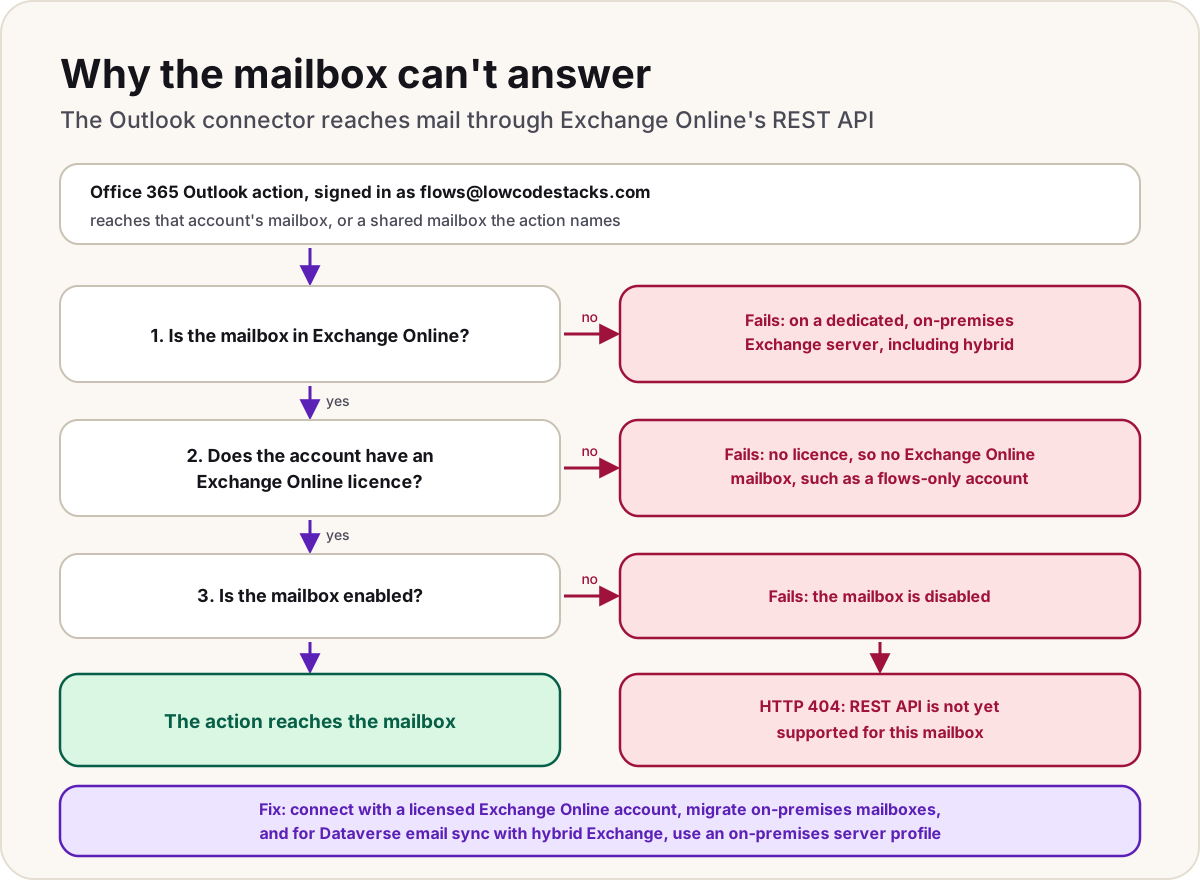
A flow step from the Office 365 Outlook connector fails with error code MailboxNotEnabledForRESTAPI and the message "REST API is not yet supported for this mailbox." Or a mailbox in Dataverse fails its test with error 8005E274. Your flow's logic is fine. The connector works with mail through Exchange Online's REST API (and Microsoft Graph), and the mailbox it reached isn't one that API serves, usually because it lives on an on-premises Exchange server or the account has no Exchange Online licence. The fix is on the mailbox or the account, which normally means an Exchange or Microsoft 365 admin.
- An Office 365 Outlook action, such as sending an email or getting emails, fails with the message
REST API is not yet supported for this mailbox.Microsoft documents it as an HTTP 404. - The run shows the code
MailboxNotEnabledForRESTAPIorMailboxNotSupportedForRESTAPI. - It fails for one connection or one mailbox, while the same flow works with another.
- In Dataverse, testing and enabling a mailbox fails with error code 8005E274.
What the error means
Microsoft documents the message for any request to a mailbox through the Outlook REST API: HTTP error 404, one of the two codes above, and "REST API is not yet supported for this mailbox." Its stated cause is a mailbox that's on a dedicated Microsoft Exchange Server and isn't a valid Microsoft 365 mailbox.
The Office 365 Outlook connector depends on that API. Microsoft's connector page says that to use it you need access to an Office 365 mailbox with the REST API enabled, and some of its operations go through Microsoft Graph. So the error isn't about the action's settings, the email's content or your permissions on a mailbox. It's about where the mailbox lives and whether Exchange Online can serve it.
Find the mailbox behind the connection
The action reaches a mailbox through its connection, so start there:
- Open the flow's run history, select the failed run, and select the failed Outlook action.
- Note the connection it uses, and the account that connection signs in with. That account's own mailbox is the one the action reaches, unless the action names another.
- If the action has a shared mailbox address filled in, that shared mailbox is checked too. Note it.
- Ask a Microsoft 365 admin to look up each account in the Microsoft 365 admin center: whether it has a licence that includes Exchange Online, and whether its mailbox is in Exchange Online or on an on-premises server.
A useful test: create a connection with your own licensed work account and run the same action. If it works, the flow is fine and the original account or mailbox is the problem.
Causes and fixes
Microsoft's pages give these causes. Each is fixed outside the flow:
| Cause | Who documents it | Fix |
|---|---|---|
| The mailbox is on a dedicated (on-premises) Exchange Server, or isn't a valid Microsoft 365 mailbox | The Exchange and Power Automate troubleshooting pages | An Exchange admin migrates the mailbox to Exchange Online. Until then, use a connection whose account has an Exchange Online mailbox |
| The mailbox is in an Exchange on-premises hybrid deployment | The Dataverse troubleshooting page | Same as above for flows; for Dataverse email sync, see below |
| The account has no Exchange Online licence, so it has no Exchange Online mailbox | The Dataverse troubleshooting page | Assign a licence that includes Exchange Online. Microsoft notes Exchange may need extra time to create the mailbox afterwards |
| The mailbox is disabled | The Dataverse troubleshooting page | Re-enable it, or use another account |
| The mailbox isn't part of a Microsoft 365 plan that includes Power Automate | The Power Automate troubleshooting page | Use an account with a Microsoft 365 plan that includes both Exchange Online and Power Automate |
| An Outlook.com account that isn't enabled | The Power Automate troubleshooting page | For work or school mail, use the Office 365 Outlook connector with a work account, not the Outlook.com connector |
One version to watch for is a service account created just for flows and licensed for Power Automate but not for Exchange Online. It can sign in, so the connection looks healthy, but it has no Exchange Online mailbox for the action to reach.
Shared mailboxes
A shared mailbox in Exchange Online doesn't need its own licence (up to 50 GB), but Microsoft says a person must have a licensed Exchange Online mailbox to access one, and that a shared mailbox's own account isn't meant for signing in. So:
- Don't sign the connection in as the shared mailbox's account. Sign in as a licensed user, or a licensed service account, that has permission on the shared mailbox.
- Put the shared mailbox's address in the action, for example Send an email from a shared mailbox (V2).
For the permissions themselves, and the "send on behalf" and "not found in the store" errors, see send email from a shared mailbox in Power Automate.
Related connector errors
Microsoft's Office 365 Outlook connector page lists two errors that look similar but have different fixes:
| Error | Fix |
|---|---|
Access to OData is disabled | Check the REST API is enabled for the mailbox. If your organisation uses an EWS application access policy, its allowed user agents must include the ones the connector page lists |
Specified object was not found in the store | Check the account's permissions on the shared mailbox and the address in the action; see the shared mailbox guide above |
In Dataverse server-side synchronization
The same code appears when Dataverse syncs email with Exchange. When you test and enable a mailbox, the test fails with error code 8005E274, and the alerts on the mailbox record can show Email Server Error Code: MailboxNotEnabledForRESTAPI. Microsoft gives the same causes (no Exchange Online licence, a disabled mailbox, or a mailbox in an Exchange on-premises hybrid deployment) and this fix:
- Check that the person has an Exchange Online licence. If you assign one, allow time for it to sync and for Exchange to create the mailbox.
- For a mailbox that stays on-premises in a hybrid deployment, create a server profile that points to the on-premises Exchange server. In the Power Platform admin center, open the environment's Settings, then under Email select Server profiles, and New server profile. Set the email server type to Exchange Server (on-premises), give the profile a name, and save it.
- Test and enable the mailbox again, and if it still fails, read its alerts.
Do
- Check the connection's account first: licence, mailbox location, and whether it's enabled.
- Give flows that send mail a licensed account with an Exchange Online mailbox.
- Keep the shared mailbox's address in the action, and the permission on the person or service account.
Don't
- Don't rebuild the flow; the same flow works once the mailbox is right.
- Don't sign in to a connection with a shared mailbox's own account.
For other failed runs, our cloud flow error codes guide covers the common status codes.
Sources
- REST API is not yet supported for this mailbox error for request to a mailbox — Microsoft Learn
- Troubleshoot common issues with email in flows — Microsoft Learn
- Office 365 Outlook connector: common errors and known issues — Microsoft Learn
- Error code 8005E274 when you test and enable mailbox — Microsoft Learn
- About shared mailboxes: licensing and sign-in — Microsoft Learn
Add LowCodeStacks as a preferred source on Google
Did this fix it?
Comments
No comments yet. Share what worked for you.
Sign in to comment. Comments show under a display name you choose, never your email.